Electronics / Speakers Soundbars
JBL BAR 1000MK2 Soundbar System User Guide
Comprehensive setup, installation, and usage guide for the JBL BAR 1000MK2 soundbar system, including wall mounting, sound calibration, and connectivity instructions.
Table of contents
Manual images
Jump to the sectionProduct Overview
The JBL BAR 1000MK2 is a high-performance 7.1.4 channel soundbar system designed to deliver an immersive audio experience. The system includes a main soundbar unit, a powerful subwoofer, and detachable surround speakers that provide flexible placement options. It supports advanced audio formats like Dolby Atmos and features seamless connectivity options including HDMI eARC, optical input, and wireless streaming capabilities.
Getting Started
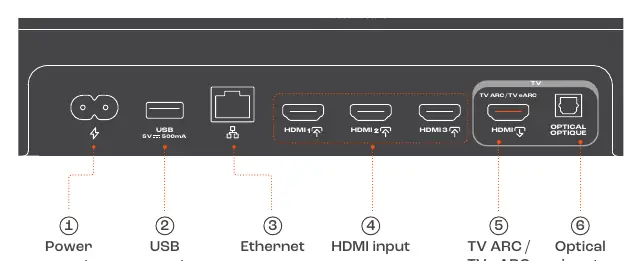
Unpack your system and ensure all components are present, including the soundbar, subwoofer, detachable speakers, power cords, remote control, and wall-mounting hardware. Connect the soundbar to your TV using the appropriate HDMI cable (eARC or ARC) for the best audio performance. Power on the system and charge the detachable surround speakers by attaching them to the main soundbar unit or using the provided charging ports.
Sound Calibration
To ensure optimal audio performance tailored to your room, perform the sound calibration process. This involves placing the detachable speakers in your desired listening positions. Use the remote control to initiate the calibration sequence. The system will emit test tones to measure the room acoustics and adjust the audio output accordingly. Follow the on-screen prompts or the LED indicators on the soundbar to confirm the calibration steps.
Connectivity and Control
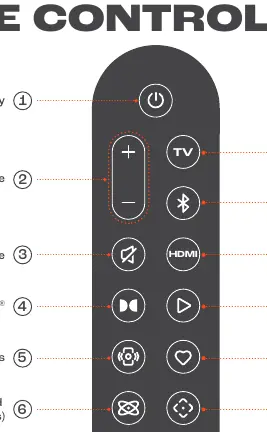
The JBL BAR 1000MK2 offers versatile connectivity. Use the HDMI inputs to connect external devices like gaming consoles or media players. The system supports Wi-Fi and Bluetooth for wireless music streaming. Download the JBL ONE app on your Android or iOS device to complete the network setup, manage speaker settings, and access additional features. The included remote control provides quick access to volume, source selection, sound modes, and calibration settings.
Wall Mounting
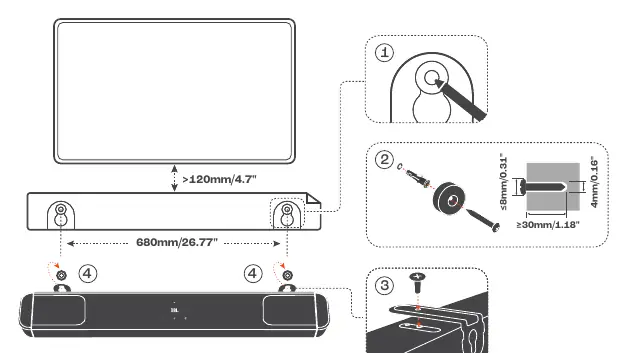
For a clean installation, the soundbar and detachable speakers can be mounted on the wall. Use the provided mounting brackets and hardware. Ensure the wall surface is suitable and follow the measurements provided in the guide for precise placement. Maintain a minimum distance of 120mm between the TV and the soundbar for optimal performance.
Maintenance and Safety
Keep the system in a well-ventilated area and avoid exposing it to extreme temperatures. Use a soft, dry cloth for cleaning. Refer to the bottom enclosure of the unit for specific electrical and safety information. The system is a Class II electrical appliance.
Manufacturer information
JBL
Practical help
Common problems
Detachable speakers not charging
Ensure they are correctly attached to the main soundbar unit or connected to a power source via the charging port.
No sound from TV
Check that the HDMI cable is connected to the eARC/ARC port on both the TV and the soundbar, and ensure the TV audio output is set to HDMI ARC/eARC.
Before use
- Verify all components are in the box
- Check regional power cord compatibility
- Install batteries in the remote control
- Connect HDMI cable to eARC/ARC port
- Charge detachable surround speakers
- Download the JBL ONE app
Specs in practice
- Sound System
- 7.1.4 channel configuration for immersive surround sound.
- Total Power Output
- 960W maximum power output for the entire system.
- Bluetooth Version
- v5.3 for stable wireless audio streaming.
- Operating Temperature
- Safe operating range is 0°C to 45°C.
Images and diagrams
- Connectors panel shows power, USB, Ethernet, HDMI inputs, and TV ARC/eARC port.
- Remote control layout identifies buttons for power, volume, source, and calibration.
- Wall mounting diagram illustrates bracket installation and spacing requirements.
- Sound calibration diagram shows speaker placement and confirmation steps.
Model compatibility
- USB playback is available in the US version only; other versions use USB for service only.
- 5.6-5.64 GHz Wi-Fi band is disabled in Australia and New Zealand.
- Works with Google Home, Google Cast, and Apple AirPlay.

Manual page author
Michael Turner
Technical manual editor
Reviews PDF manuals for structure, safety notes, and practical product details so readers can find the right information quickly.