Electronics / Speakers & Soundbars
User Manual for JBL Bar 1300XMK2 Soundbar
Quick start guide for the JBL Bar 1300XMK2 soundbar system. Includes setup instructions, wall mounting, sound calibration, Bluetooth pairing, and technical specifications.
Table of contents
Manual images
Click an image to enlargeQuick Start Guide
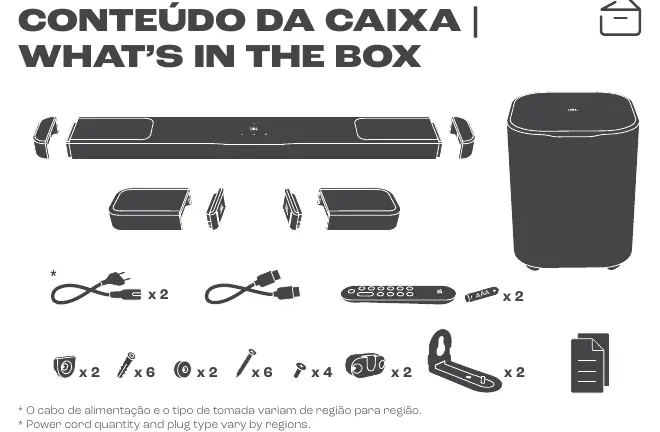
This guide provides essential setup and operation instructions for the JBL Bar 1300XMK2 soundbar system. Ensure you have all components from the box, including the soundbar, detachable speakers, subwoofer, and necessary cables.
Wall Mounting
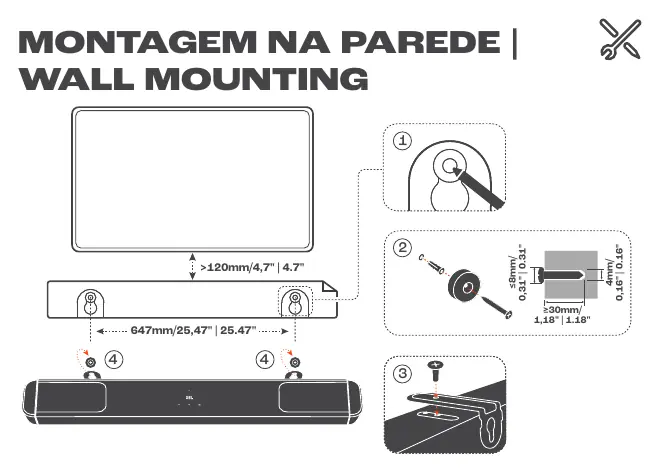
The soundbar and detachable speakers can be mounted on the wall. Ensure the wall can support the weight of the equipment. Use the provided brackets and screws. For the soundbar, maintain a minimum distance of 120mm from the TV. The mounting holes for the soundbar are spaced 647mm apart.
Connections
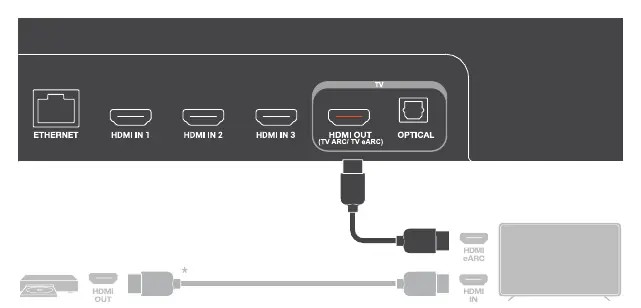
Connect the soundbar to your TV using the HDMI OUT (TV ARC/TV eARC) port. Ensure your TV supports HDMI eARC or ARC for the best audio performance. You can also connect other devices to the HDMI IN ports on the soundbar.
Power and Charging
Connect the soundbar and subwoofer to a power outlet. The detachable speakers must be charged by attaching them to the main soundbar unit or via the USB-C port on the side of the speaker.
Sound Calibration
Sound calibration optimizes the audio for your room. Follow these steps:
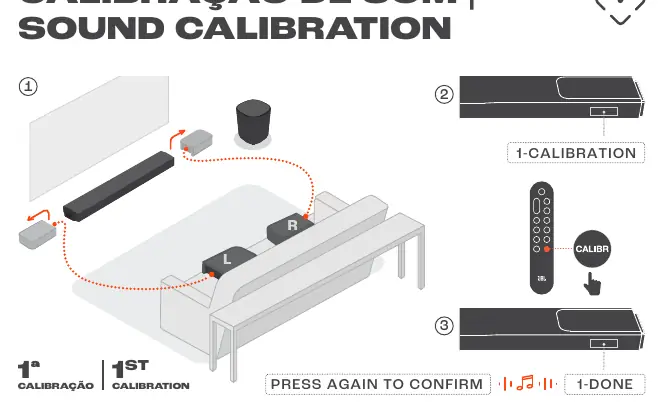
- Place the detachable speakers on the couch as indicated in the diagram.
- Press the CALIBR button on the remote control.
- Follow the on-screen prompts for the 1st and 2nd calibration steps.
- Confirm the calibration when prompted.
Bluetooth and Stereo Pairing
To pair the rear speakers via Bluetooth:
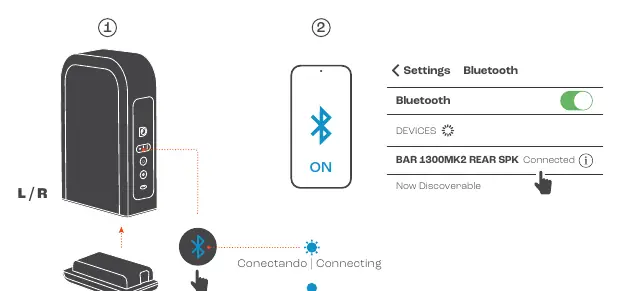
- Ensure the speakers are powered on.
- Use your mobile device settings to find and connect to "BAR 1300MK2 REAR SPK".
- For stereo pairing of rear speakers, press and hold the Bluetooth button on the speakers for more than 5 seconds.
App Setup
Download the JBL One app on your Android or iOS device. Connect your device to the Wi-Fi network and follow the in-app instructions to complete the speaker setup and access additional features.
Technical Specifications
The system features an 11.1.4 channel configuration. The soundbar supports HDMI eARC, Bluetooth v5.3 (main bar) and v5.4 (surround speakers), and Wi-Fi IEEE 802.11 a/b/g/n/ac/ax. The detachable surround speakers offer up to 10 hours of playtime.
Manufacturer information
JBL
Practical help
Common problems
Rear speakers not connecting
Ensure they are charged and follow the Bluetooth pairing procedure.
Sound calibration fails
Ensure the detachable speakers are placed correctly on the couch as shown in the guide.
USB playback issues
USB playback is only available on US and APAC versions; other versions use USB for service only.
Before use
- Check all components in the box (soundbar, subwoofer, detachable speakers, cables).
- Ensure your TV supports HDMI eARC or ARC.
- Charge the detachable speakers before first use.
- Download the JBL One app on your mobile device.
Specs in practice
- Sound system
- 11.1.4 channels for immersive audio.
- Power supply
- 100-240V AC, 50/60Hz.
- Detachable speaker battery
- Up to 10 hours of playtime.
- HDMI version
- HDCP 2.3, supports HDR10+ and Dolby Vision.
Images and diagrams
- Wall mounting diagram shows the required spacing (647mm) and screw dimensions.
- Connection diagram illustrates HDMI eARC/ARC setup between the soundbar and TV.
- Calibration diagram shows the placement of detachable speakers on the couch.
Model compatibility
- USB playback is region-specific (US/APAC only).
- 5.6-5.64 GHz band is disabled in Australia/New Zealand.

Manual page author
Michael Turner
Technical manual editor
Reviews PDF manuals for structure, safety notes, and practical product details so readers can find the right information quickly.