Electronics / Speakers & Soundbars
JBL EON 700 Series Quick Start Guide
Quick start guide for the JBL EON 700 Series. Learn how to power on the unit, connect inputs, adjust channel gains, navigate the LCD menu, and pair Bluetooth audio devices.
Table of contents
Quick Start Guide
This guide provides the essential steps to set up and operate your JBL EON 700 Series speaker. For complete documentation, visit www.jblpro.com/eon700.
Powering On the Unit
- Connect the power cord to the AC Power Connector (F).
- Press the Power Button (B) for 0.5 seconds to engage power.
Connecting Inputs
- Turn the Channel Gains (J) all the way to the left before connecting any inputs.
- Connect your devices to the Input Jacks (G, H, I).
Setting Up Channels
- Insert input into the desired channel.
- Slowly turn the Main Volume (C) knob to increase your main volume.
- Adjust the Channel Gain knobs until your desired volume is achieved.
LCD Display and Navigation
Press the Main/Menu knob (C) to access the LCD display. Use this knob to navigate through settings and configurations.
Bluetooth Audio Pairing
This device supports Bluetooth audio streaming. To connect your device:
- Press the Main/Menu knob and navigate to the Settings field.
- Select BT Audio Pairing.
- Find the EON700 Speaker on your device and connect.
- It is recommended to download the JBL Pro Connect app from the App Store or Google Play to ensure your speaker firmware is up to date.
Rear Panel Controls
The rear panel features the following controls and inputs:
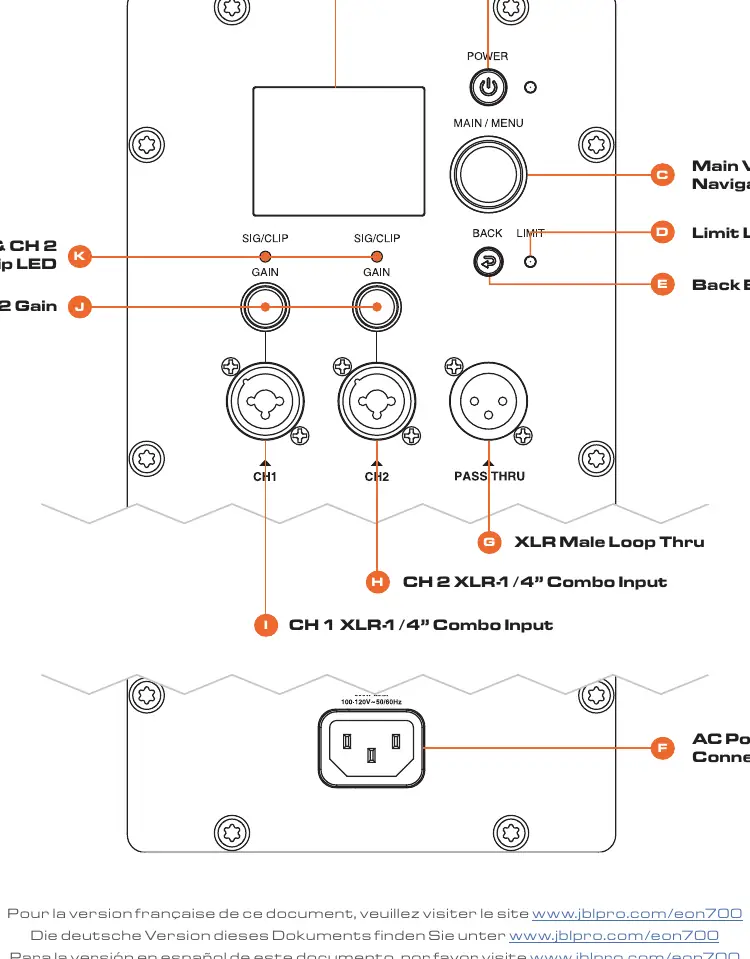
- A: LCD Panel
- B: Power Button
- C: Main Volume / Menu Navigation
- D: Limit LED
- E: Back Button
- F: AC Power Connector
- G: XLR Male Loop Thru
- H: CH 2 XLR-1/4" Combo Input
- I: CH 1 XLR-1/4" Combo Input
- J: CH 1 & CH 2 Gain
- K: CH 1 & CH 2 Signal Clip LED
Official resources from the manual
Manufacturer information
JBL
Practical help
Common problems
No sound output
Ensure Channel Gains (J) are turned up and the Main Volume (C) is adjusted to an audible level.
Bluetooth device not connecting
Ensure you have navigated to the 'BT Audio Pairing' menu on the LCD display and that the speaker is in pairing mode.
Before use
- Connect the power cord to the AC Power Connector
- Turn Channel Gains fully to the left before connecting any inputs
- Download the JBL Pro Connect app
- Ensure speaker firmware is up to date
Images and diagrams
- B: Power Button
- C: Main Volume / Menu Navigation
- E: Back Button
- F: AC Power Connector
- G: XLR Male Loop Thru
Model compatibility
- Supports Bluetooth audio streaming
- Compatible with JBL Pro Connect app

Manual page author
Emily Carter
User documentation editor
Prepares concise manual descriptions and highlights the most useful setup, operation, and maintenance information for readers.