Electronics / Headphones Earbuds
User Manual for JBL Tune 125BT Bluetooth Headphones
Quick start guide and user manual for the JBL Tune 125BT Bluetooth headphones. Learn how to pair, use multi-point connection, understand LED indicators, and view technical specifications.
Table of contents
Manual images
Click an image to enlargeQuick Guide from the Manual
The JBL Tune 125BT headphones are designed for wireless audio playback. To begin using them, power on the device to automatically enter pairing mode. Select "JBL TUNE 125BT" in your device's Bluetooth settings to connect. The headphones support multi-point connection, allowing you to connect to two devices simultaneously.
What's in the Box
- JBL Tune 125BT Headphones
- Ear tips (S, M, L sizes)
- Charging cable
- Quick Start Guide
How to Wear
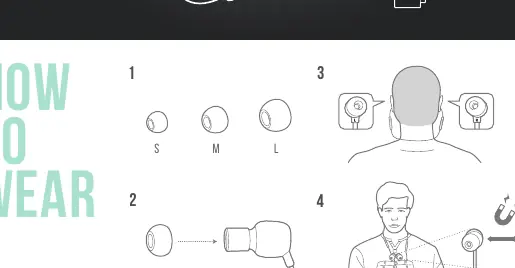
For the best fit and audio performance, select the appropriate ear tip size (S, M, or L). Insert the earbuds into your ears and ensure they are positioned comfortably.
Power On & Connect
To power on and connect:
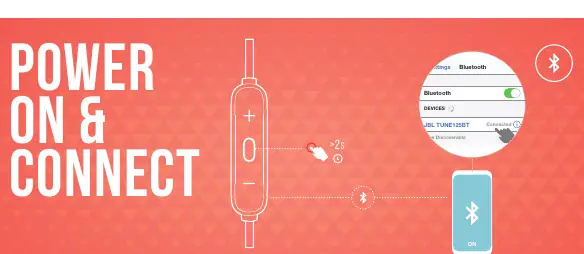
- Power on the headphones. They will automatically enter pairing mode.
- Open the Bluetooth settings on your device.
- Select "JBL TUNE 125BT" from the list of available devices to connect.
Button Commands
The inline remote control allows you to manage playback and calls:
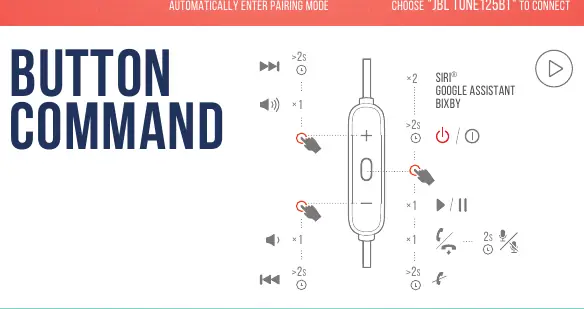
- Volume Up/Down: Press the + or - buttons.
- Play/Pause: Press the center button once.
- Next Track: Press and hold the + button for 2 seconds.
- Previous Track: Press and hold the - button for 2 seconds.
- Voice Assistant (Siri/Google Assistant/Bixby): Press the center button twice.
- Answer/End Call: Press the center button once.
Multi-Point Connection
You can connect to two devices at once:
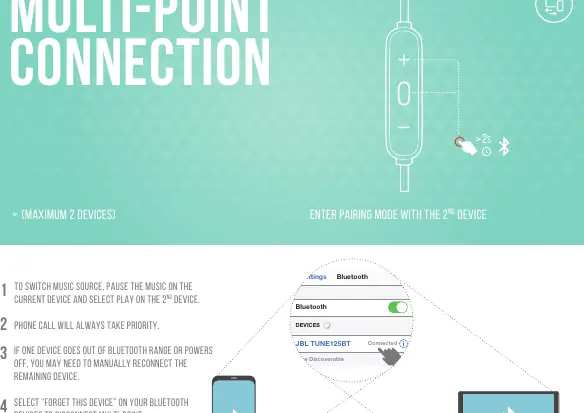
- Connect the first Bluetooth device.
- Enter pairing mode again to connect the second device.
- To switch music sources, pause the music on the current device and select play on the second device.
- Phone calls will always take priority.
- If a device goes out of range or powers off, you may need to manually reconnect the remaining device.
- To disconnect multi-point, select "Forget this device" on your Bluetooth settings.
Charging
Connect the charging cable to the port on the headphones. A full charge takes less than 2 hours. A 10-minute charge provides approximately 1 hour of music playback.
LED Behaviors
- Power On/Off: LED indicates status.
- BT Connecting: Flashing light.
- BT Connected: Solid light.
- Low Battery: Flashing light.
- Charging: Solid light.
- Fully Charged: LED turns off.
Technical Specifications
- Driver Size: 8.6mm dynamic driver
- Power Supply: 5V 1A
- Weight: 18.3g
- Battery Type: Lithium-ion (3.7V / 130mAh)
- Charging Time:< 2 hours
- Music Playtime with BT on: Up to 16 hours
- Frequency Response: 20Hz – 20kHz
- Impedance: 16 ohm
- Sensitivity: 95dB SPL @1kHz 1mW
- Bluetooth Version: 5.0
- Maximum Operation Temperature: 45°C
Manufacturer information
JBL
Practical help
Common problems
Device not connecting
Ensure the headphones are powered on and in pairing mode. Check if your source device has Bluetooth enabled.
Multi-point connection issues
If one device goes out of range or powers off, you may need to manually reconnect the remaining device. Select 'Forget this device' in Bluetooth settings to reset.
Before use
- Charge the headphones fully before first use
- Select the correct ear tip size (S, M, or L) for a secure fit
- Ensure Bluetooth is enabled on your source device
Specs in practice
- Music Playtime
- Up to 16 hours of playback with Bluetooth enabled
- Charging Time
- Less than 2 hours for a full charge
Images and diagrams
- The button command diagram illustrates how to control volume, playback, and voice assistants using the inline remote.
- The LED behavior section explains the light patterns for connection, charging, and battery status.
Model compatibility
- Supports multi-point connection for up to 2 devices simultaneously.

Manual page author
Michael Turner
Technical manual editor
Reviews PDF manuals for structure, safety notes, and practical product details so readers can find the right information quickly.