Electronics / Speakers Soundbars
JBL L82 Classic MkII Bookshelf Loudspeaker User Guide
Comprehensive setup, placement, and wiring guide for the JBL L82 Classic MkII 2-way 8-inch bookshelf loudspeaker, including technical specifications and adjustment instructions.
Table of contents
Overview
The JBL L82 Classic MkII is a high-performance 2-way 8-inch bookshelf loudspeaker designed for premium audio reproduction. This guide provides essential information for the proper setup, placement, and connection of your speakers to ensure optimal sound quality in your listening environment.
Placement and Positioning
Proper placement is critical for achieving the best soundstage and imaging. Survey your room before installation and consider the following guidelines:
- Avoid placing speakers near heat sources such as power amplifiers or radiators.
- Keep the speakers away from humid, dusty, or direct sunlight-exposed areas.
- Position the speakers so the tweeter is at ear level. Using the dedicated JBL JS-80 stands is recommended for achieving the correct height.
- Maintain a distance of 6 to 8 feet between the speakers and angle them towards the listening position.
- Adjust the angle based on your preference: angling them closer to the listener's ears creates a stronger center image, while angling them away provides a more spacious sound.
Wiring and Connections
The L82 Classic MkII features dual sets of gold-plated binding posts, allowing for flexible connection options including standard 2-wire, bi-wire, and bi-amp configurations. Always ensure that positive (+) and negative (-) wires do not touch, as this will cause a short circuit. Maintain correct polarity from the amplifier to the speaker to ensure proper phase.
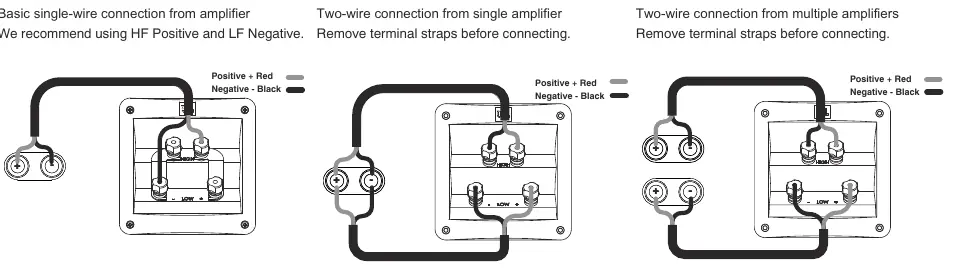
- 2-Wire Connections: A basic single-wire connection from the amplifier.
- Bi-Wire Connections: Uses two wires from a single amplifier; ensure terminal straps are removed before connecting.
- Bi-Amp Connections: Uses two wires from multiple amplifiers; ensure terminal straps are removed before connecting.
Controls and Adjustments
The speaker includes a High Frequency (HF) level control located on the front panel. This allows you to adjust the tweeter output independently from the woofer. The default 0dB setting provides a flat balance. If the high frequencies sound too bright, turn the knob counterclockwise to lower the level. If the sound is dull, turn the knob clockwise to raise the level.
Manufacturer information
JBL
Practical help
Common problems
Short circuit in amplifier channel
Ensure positive and negative bare wires or spades do not touch each other at the binding posts.
High frequencies sound too bright
Turn the HF level control knob counterclockwise.
High frequencies sound dull
Turn the HF level control knob clockwise.
Before use
- Survey the room for optimal placement away from heat sources.
- Ensure speakers are at ear level, preferably using JS-80 stands.
- Check that terminal straps are removed for bi-wire or bi-amp setups.
- Verify correct polarity (+ to +, - to -) from amplifier to speaker.
- Ensure no bare wires are touching to prevent short circuits.
Specs in practice
- Frequency Response
- The range of frequencies the speaker can reproduce (44Hz to 40kHz).
- Crossover Frequency
- The point where the signal is split between the woofer and tweeter (1.7kHz).
Images and diagrams
- The placement diagram shows recommended distances of 20 inches from side walls and 6-8 feet between speakers.
- The wiring diagrams illustrate how to connect 2-wire, bi-wire, and bi-amp configurations to the 4-post terminals.
- The HF level control diagram shows the adjustment range from min to max with a 0dB center point.
Model compatibility
- Recommended amplifier power is 25 to 150W RMS.
- Designed for use with JBL JS-80 speaker stands.

Manual page author
Emily Carter
User documentation editor
Prepares concise manual descriptions and highlights the most useful setup, operation, and maintenance information for readers.