Electronics / Speakers Soundbars
JBL PartyBox Encore Essential Wireless Speaker User Guide
Quick start guide for the JBL PartyBox Encore Essential wireless speaker, covering setup, Bluetooth pairing, playback controls, light show settings, and safety instructions.
Table of contents
Manual images
Jump to the sectionProduct Overview
The JBL PartyBox Encore Essential is a portable wireless speaker designed for high-quality audio streaming. It features a robust design with an IPX4 splashproof rating, making it suitable for various environments. The speaker includes a built-in woofer and tweeters to deliver powerful sound, along with customizable light effects to enhance your party experience.
Getting Started
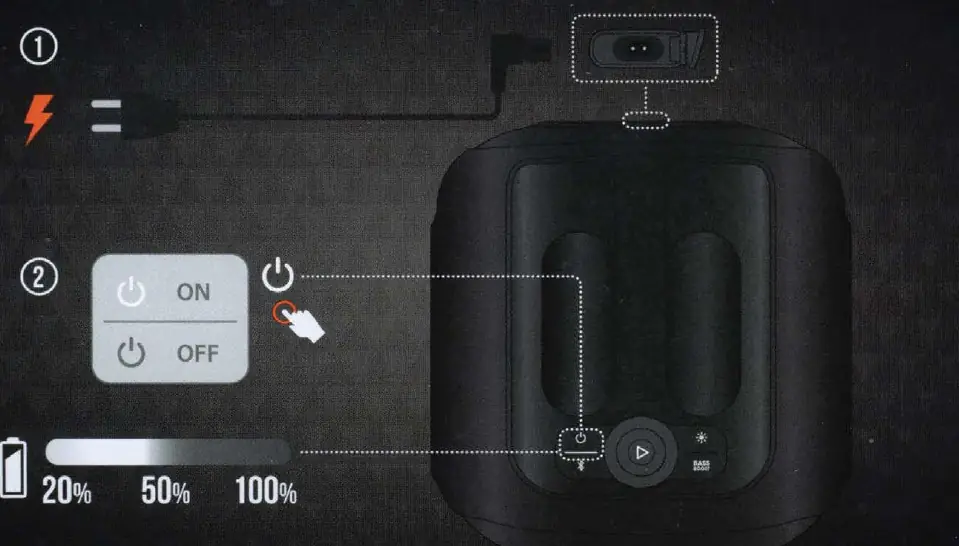
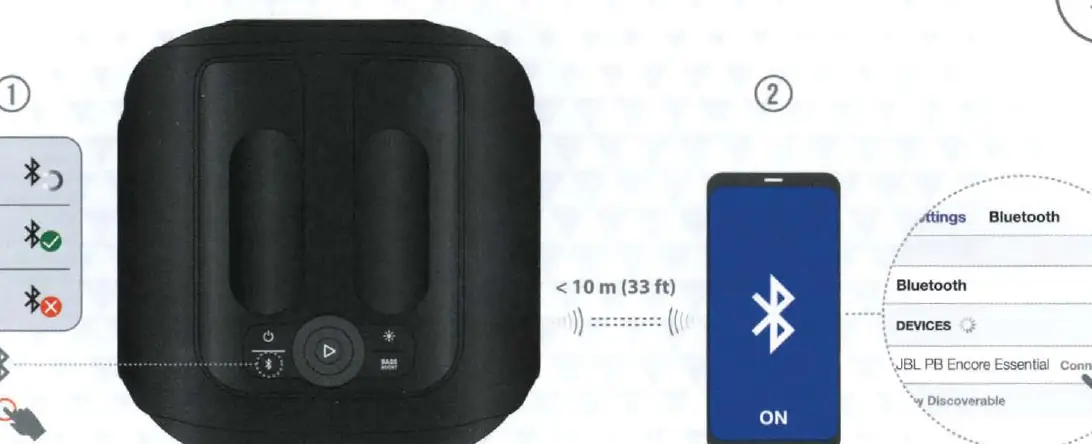
To begin using your speaker, connect it to a power source using the provided AC power cable. Once powered on, you can pair your mobile device via Bluetooth. Ensure your device is within 10 meters (33 feet) of the speaker for a stable connection. For an enhanced experience, download and install the JBL PartyBox app from the Google Play Store or Apple App Store. This app allows you to customize settings and get more from your product.
Operation and Controls
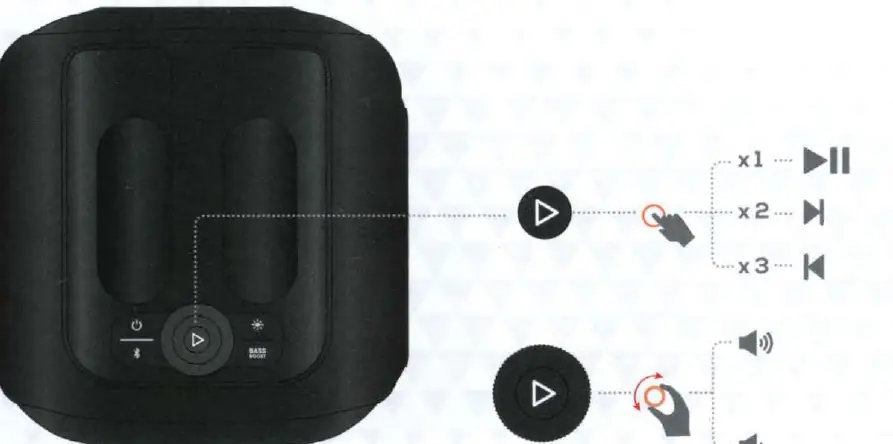
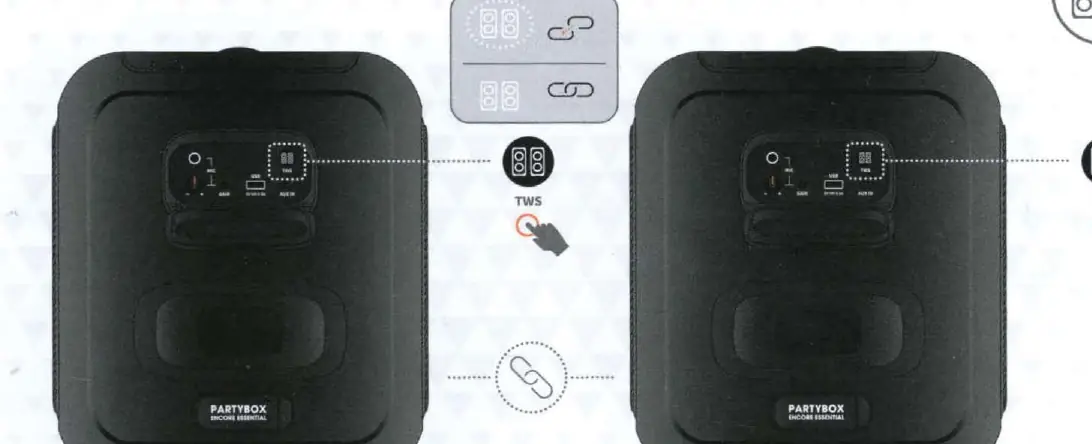
The top panel features intuitive controls for power, Bluetooth pairing, playback, and bass boost. You can play, pause, or skip tracks using the play button: press once to play or pause, twice to skip forward, and three times to skip backward. The light show can be customized by pressing and holding the light button for more than two seconds to cycle through different patterns. The speaker also supports TWS (True Wireless Stereo) mode, allowing you to connect two PartyBox Encore Essential speakers wirelessly for a wider soundstage.
Connectivity and Inputs
The speaker offers versatile connectivity options. You can charge external devices via the USB port (5V/0.5A). It also supports USB playback for audio files in FAT16 or FAT32 formats. Additionally, a wired connection is possible via the AUX IN port, allowing you to connect tablets or phones using a 3.5mm audio cable. A microphone input is available for karaoke or announcements.
Safety and Maintenance
To ensure longevity and safety, keep the speaker away from extreme heat and do not expose it to heavy rain or submersion, despite its IPX4 rating. Always ensure the charging port cover is securely closed when near water to prevent electrical shock. If the speaker is not in use for an extended period, unplug it from the power source. For detailed warranty and safety information, visit the official JBL website.
Manufacturer information
JBL
Practical help
Common problems
Bluetooth connection issues
Ensure the device is within 10 meters and the speaker is in pairing mode.
Speaker not charging
Check the power cable connection and ensure the outlet is functional.
USB playback not working
Ensure the USB drive is formatted as FAT16 or FAT32 and contains supported audio files.
Before use
- Unpack the speaker and verify all components are present.
- Charge the speaker fully before the first use.
- Download the JBL PartyBox app on your smartphone.
- Ensure the charging port cover is closed if using near water.
Specs in practice
- Output power
- 100 W RMS, indicating the speaker's power handling capability.
- Battery life
- Up to 6 hours, depending on volume level and audio content.
- Bluetooth version
- 5.1, ensuring efficient and stable wireless connectivity.
Images and diagrams
- The top panel contains the power, Bluetooth, play/pause, and light show buttons.
- The rear panel houses the USB, AUX IN, and microphone inputs.
- TWS mode allows linking two speakers by pressing the TWS button on both units.
Model compatibility
- USB drives must be formatted as FAT16 or FAT32.
- Supports Bluetooth 5.1 devices.
- Compatible with 3.5mm auxiliary audio cables.

Manual page author
David Miller
Documentation analyst
Organizes user manual content into clear summaries, with attention to model details, product context, and everyday usability.