Home Appliances / Rice Cookers
Lauben Robot Vacuum 15BB User Manual
Quick guide and user manual for the Lauben Robot Vacuum 15BB. Includes setup, cleaning modes, maintenance, and troubleshooting.
Table of contents
Manual images
Click an image to enlargeQuick guide from the manual
This manual provides essential instructions for operating the Lauben Robot Vacuum 15BB. Before first use, ensure the robot is fully charged for 12 hours. Clear the floor of fragile objects, power cords, and loose items to prevent tangling. The device is intended for indoor domestic use only.
Appliance Components
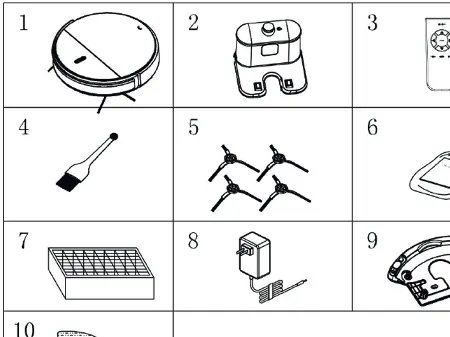
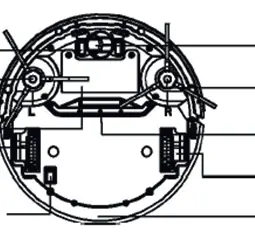
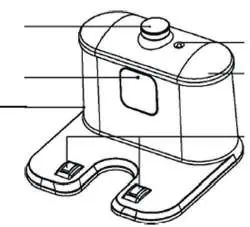
The package includes the robotic vacuum cleaner, charging station, remote control, cleaning brush, side brushes, HEPA filter, power adapter, mop plate, water tank, and mop cloth.
Charging the Battery
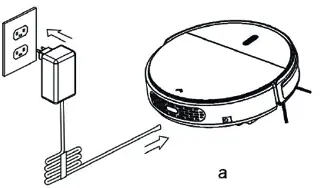
Place the charging station against a wall, ensuring 1 meter of clearance on both sides and 2 meters in front. Connect the adapter to the station. Turn on the main power switch on the bottom of the robot. You can charge the robot by placing it on the station or connecting the adapter directly to the robot. The robot will return to the station automatically when the battery is low or cleaning is finished.
Operation
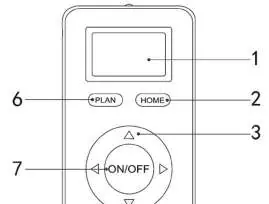
Turn on the robot using the main switch. Use the remote control to start cleaning, schedule tasks, or select modes. The robot features several cleaning modes: Automatic, Spiral, Spot, Wall, and Zigzag. If the robot is in standby mode, press the ON/OFF button on the remote or the main button on the robot to start.
Water Tank and Mop Installation
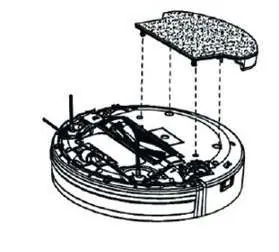
Attach the mop cloth to the bottom of the water tank. Fill the tank with water, ensuring the rubber stopper is secure. Attach the water tank to the bottom of the robot, ensuring the pins are firmly pressed into the mounting holes. Do not use water cleaning on carpets.
Maintenance
Clean side brushes regularly and replace if damaged. Empty and clean the dust bin after each use. Wash the HEPA filter and main filter under running water every 15-30 days and allow them to dry completely before reinserting. Wipe sensors and charging contacts with a soft cloth or cleaning tool.
Troubleshooting
If the robot stops cleaning, check if it was lifted. If the LED flashes red, the battery is low. If the blue and red LEDs flash alternately, the side brush is stuck. For other issues, try resetting the robot using the switch on the control panel or contact your dealer.
Manufacturer information
Lauben
Practical help
Common problems
Robot suddenly stops cleaning
The robot may have been lifted; place it back on the floor and restart with the main switch.
LED flashes red
Battery is low; fully charge the device.
Robot does not change direction when hitting obstacles
Bumper sensor error; check if the sensor is covered by anything.
Blue and red LEDs flash alternately
Side brush is stuck; place the robot on a flat surface and clean the side brush.
Before use
- Remove curtains and loose objects from the floor.
- Clear fragile objects and power cords.
- Ensure the main power switch is turned on.
- Charge the robot for 12 hours before the first use.
- Inform household members that the robot is in operation.
Specs in practice
- Cleaning time
- 90 minutes
- Dust bin capacity
- 180 ml
Images and diagrams
- Charging station setup: Place against a wall with 1m clearance on sides and 2m in front.
- Battery removal: Requires a screwdriver to remove the cover and disconnect the battery connector.
Model compatibility
- Do not use water cleaning on carpets.
- Use only the original battery and AC adapter.
- Do not use in wet or humid environments like bathrooms.

Manual page author
Michael Turner
Technical manual editor
Reviews PDF manuals for structure, safety notes, and practical product details so readers can find the right information quickly.