Electronics / Monitors
Quick Setup Guide for LG 22MR410, 24MR400, and 27MR400 LED Monitors
Quick setup guide for LG 22MR410, 24MR400-BA, 24MR400-BB, and 27MR400 LED monitors. Includes assembly instructions, port connections, and important compatibility warnings.
PDF source: polski · summary: English
Quick answers from the manual
Quick answer
- This guide covers the assembly, connection, and safety precautions for LG 22MR410, 24MR400, and 27MR400 series monitors. p. 1, 6, 7, 8
Key actions
- Assemble the stand p. 6, 7, 8
- Connect power and video cables p. 9, 13
First start
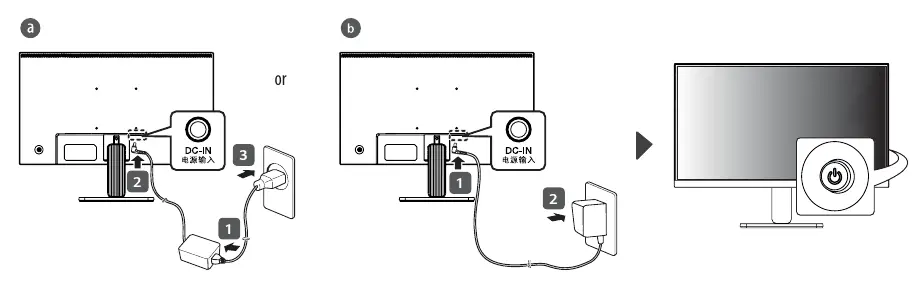
- Connect the power adapter to the DC-IN port and the wall outlet. Connect your video source (HDMI or D-SUB) to the corresponding port on the monitor. p. 9, 13
Show 2 more answers Show less
Problems and fixes
Compatibility issues
Use the supplied cables. Avoid using third-party DVI to HDMI or DP to HDMI cables.
p. 10, 11, 12Where to find it in the PDF
- Assembly 22MR410 p. 6
- Assembly 24MR400 p. 7
- Assembly 27MR400 p. 8
Table of contents
Manual images
Click an image to enlargeQuick Setup Guide
This guide provides essential instructions for setting up your LG LED monitor. Please ensure all components are present before beginning assembly.
Assembly Instructions
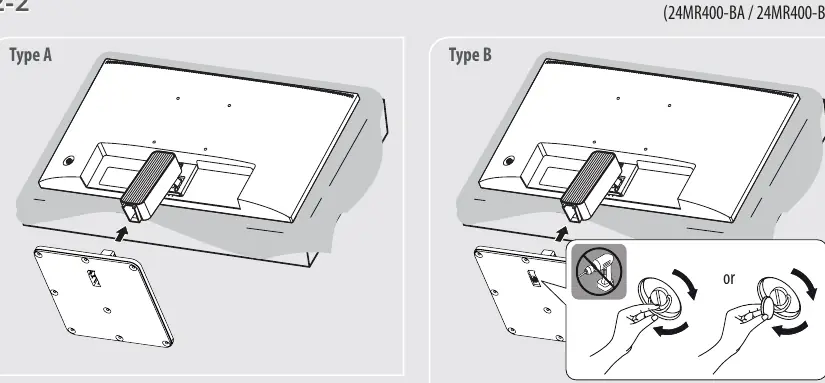
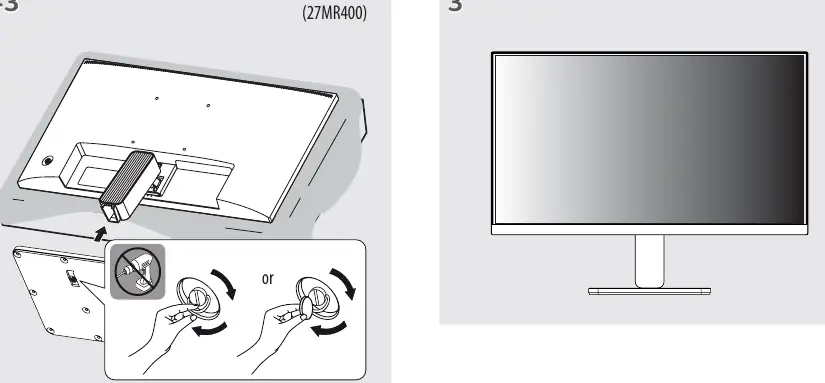
The assembly process varies slightly depending on your specific model:
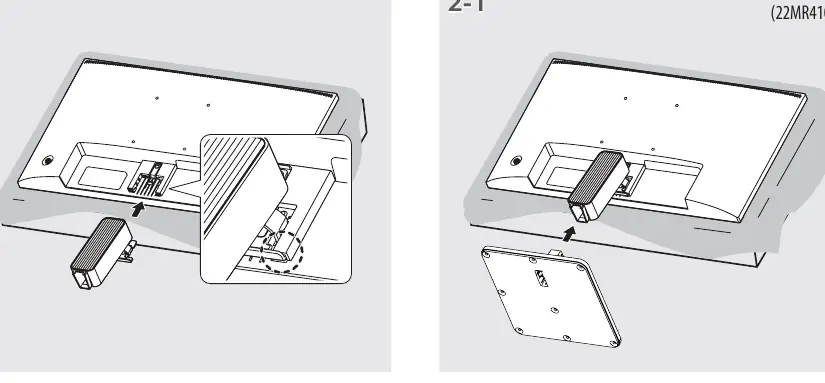
- 22MR410: Insert the stand into the monitor body until it clicks into place.
- 24MR400-BA / 24MR400-BB: Attach the stand to the monitor. Ensure the stand is securely fastened.
- 27MR400: Attach the stand to the monitor. Ensure the stand is securely fastened.
Note: Do not use power tools to tighten screws if applicable; hand-tightening is recommended to avoid damage.
Connecting the Monitor
To connect your monitor, identify the ports on the back of the device:
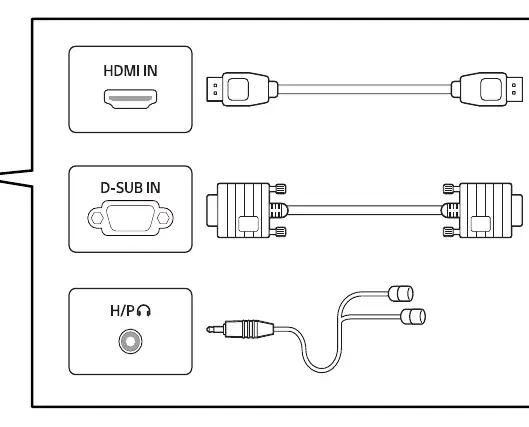
- HDMI IN: Connect your HDMI cable here for video and audio input.
- D-SUB IN: Connect your VGA/D-SUB cable here for video input.
- H/P: Connect headphones or external speakers to this port.
- DC-IN: Connect the provided power adapter here.
Safety and Compatibility
To ensure optimal performance and prevent damage:
- Use Supplied Cables: It is strongly recommended to use the cables provided in the box. Using third-party DVI-to-HDMI or DisplayPort-to-HDMI cables may cause compatibility issues, display artifacts, or device malfunction.
- Screen Care: Do not touch or press the screen surface, as this can cause damage.
- Eye Health: It is recommended to take a 10-minute break after every 30 minutes of use. Children under 2 years old should not watch the screen, and children over 2 years old should not watch for more than 1 hour per day.
Support
For further assistance or to download full manuals, visit the official LG website at www.lg.com.
Official resources from the manual
Manufacturer information
LG Electronics
Practical help
Common problems
Compatibility issues with video cables
Use the cables supplied with the monitor. Using third-party DVI-to-HDMI or DisplayPort-to-HDMI cables may cause the device to malfunction or display incorrectly.
Before use
- Verify all components (stand, cables, power adapter) are included in the package
- Ensure the monitor is placed on a stable surface
- Do not touch the screen surface
- Use the provided power adapter
Show more Show less
Images and diagrams
- Assembly steps for 22MR410, 24MR400, and 27MR400 models
- Power connection diagram
- Port identification diagram
Model compatibility
- Use only supplied cables to avoid compatibility issues
- DVI to HDMI or DP to HDMI cables may cause malfunctions

Manual page author
Michael Turner
Technical manual editor