Electronics / Monitors
LG 24BR750C, 24BR650B, 27BR750C, 27BR650B LED LCD Monitor User Manual
Quick setup guide for LG 24BR750C, 24BR650B, 27BR750C, and 27BR650B LED LCD monitors. Includes assembly instructions, connection diagrams, and technical specifications.
Quick answers from the manual
Quick answer
- This manual provides assembly, connection, and technical specifications for the LG 24BR750C, 24BR650B, 27BR750C, and 27BR650B monitors. p. 1, 3, 4, 5
Key actions
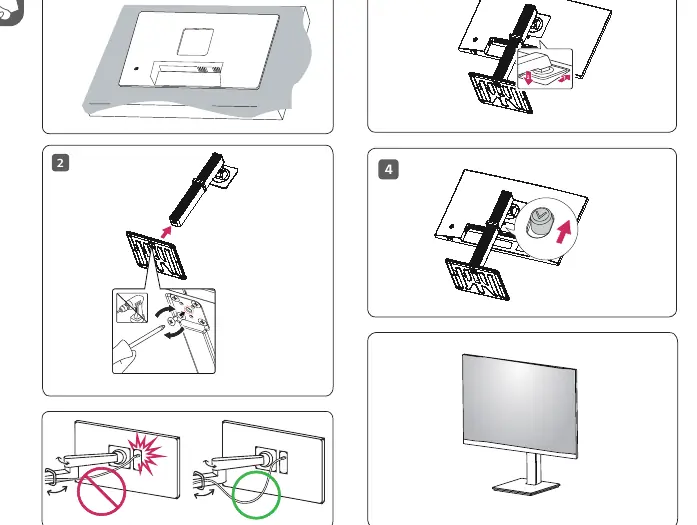
- Assemble the stand using the provided screw. p. 3
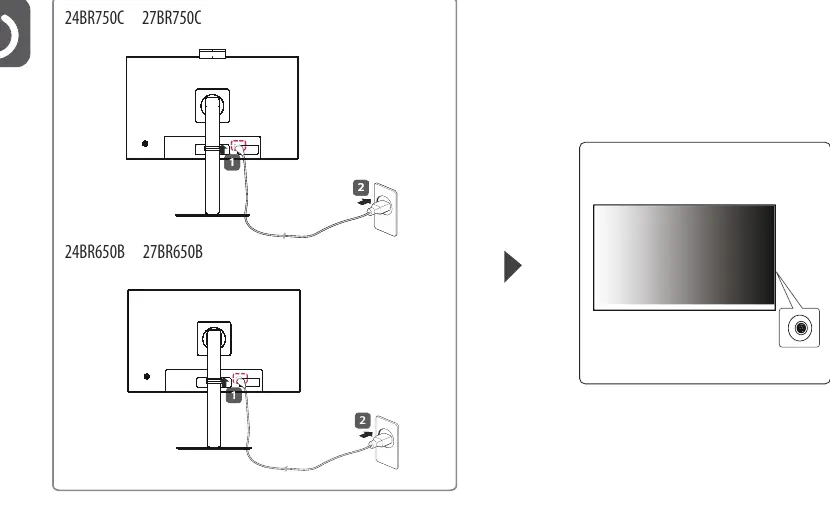
- Connect the power cable and press the power button. p. 7
First start
- Assemble the stand, connect the video cable (DP/HDMI), and connect the power cable. p. 3, 4, 5, 7
Show 3 more answers Show less
Problems and fixes
Compatibility issues
Use the supplied cables instead of third-party DVI/DP to HDMI adapters.
p. 6Technical specifications
| Parameter | Value | Meaning | Pages |
|---|---|---|---|
| Resolution | 1920 x 1080 @ 60 Hz | Recommended resolution | p. 8 |
| Power | 100-240 V~ 50/60 Hz 2.5 A | Power input requirements | p. 8 |
Where to find it in the PDF
- Assembly p. 3
- Connections p. 4, 5
- Technical Specifications p. 8
Table of contents
Manual images
Click an image to enlargeQuick Setup Guide
This manual provides instructions for the setup and installation of the LG LED LCD Monitor series, including models 24BR750C, 24BR650B, 27BR750C, and 27BR650B. It is recommended to use the supplied components for optimal performance.
Assembly
To assemble the monitor, attach the stand to the monitor body. Secure the stand using the provided screw as illustrated in the assembly diagram. Ensure the stand is firmly attached before placing the monitor on a flat surface.
Connections
Connect the monitor to your PC using the supplied cables. Note that connection configurations differ slightly between models:
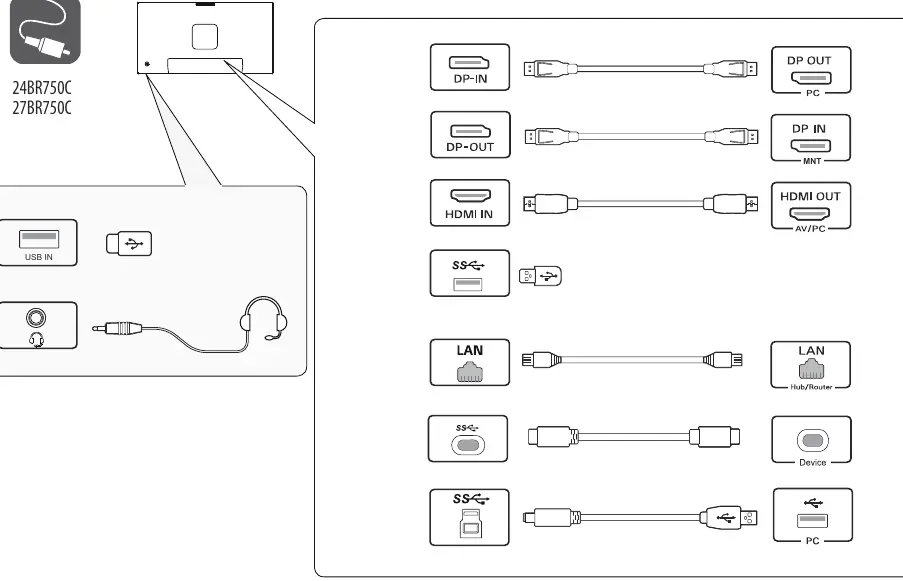
- 24BR750C / 27BR750C: Features specific USB IN and audio ports.
- 24BR650B / 27BR650B: Features specific USB IN and audio ports.
Always use the supplied cables. Using third-party DVI to HDMI or DisplayPort to HDMI cables may cause compatibility issues. The USB port on the product functions as a USB hub.
Power
Connect the power cable to the monitor and plug it into a power outlet. The power button is located on the bottom of the monitor frame.
Technical Specifications
The recommended resolution for all models is 1920 x 1080 at 60 Hz. The power input requirement is 100-240 V~ 50/60 Hz, 2.5 A.
Manufacturer information
LG Electronics
Practical help
Common problems
Compatibility issues with video signal
Avoid using DVI to HDMI or DisplayPort to HDMI cables. Use the supplied cables to ensure proper functionality.
USB hub not working
Ensure you are using the supplied cables provided with the monitor.
Before use
- Verify all components are present in the box
- Use only the supplied cables
- Assemble the stand using the provided screw
- Ensure the power source matches the 100-240V requirement
Show more Show less
Images and diagrams
- Assembly steps 1-4 showing stand attachment
- Connection diagrams for 750C and 650B series
- Power connection and power button location
Model compatibility
- USB port functions as a USB hub
- Use supplied cables to prevent device malfunction

Manual page author
Michael Turner
Technical manual editor