Electronics / Monitors
LG 24BA750 Series LED LCD Monitor Quick Setup Guide
Quick setup guide for LG 24BA750, 24BA650, 27BA750, and 27BA650 monitors. Includes assembly instructions, port connectivity, technical specifications, and compatibility warnings.
Quick answers from the manual
Quick answer
- This guide provides assembly instructions, connectivity options, and technical specifications for the LG 24BA750, 24BA650, 27BA750, and 27BA650 monitors. p. 1, 4, 5, 7
Key actions
- Assemble the monitor stand using the provided screws. p. 4
- Connect devices using the supplied cables. p. 5, 6
Problems and fixes
Compatibility issues
Do not use DVI to HDMI or DP to HDMI cables.
p. 6Show 2 more answers Show less
Technical specifications
| Parameter | Value | Meaning | Pages |
|---|---|---|---|
| Resolution | 1920 x 1080 @ 60 Hz | Recommended resolution | p. 7 |
| Power | 100-240 V~ 50/60 Hz 2.5 A | Power input requirements | p. 7 |
Where to find it in the PDF
- Assembly Instructions p. 4
- Connectivity p. 5
- Technical Specifications p. 7
Table of contents
Manual images
Click an image to enlargeQuick Guide from the Manual
This guide provides essential information for setting up and using your LG LED LCD monitor. It covers assembly, connectivity, and important compatibility warnings to ensure optimal performance.
Assembly
To assemble the monitor, follow these steps:
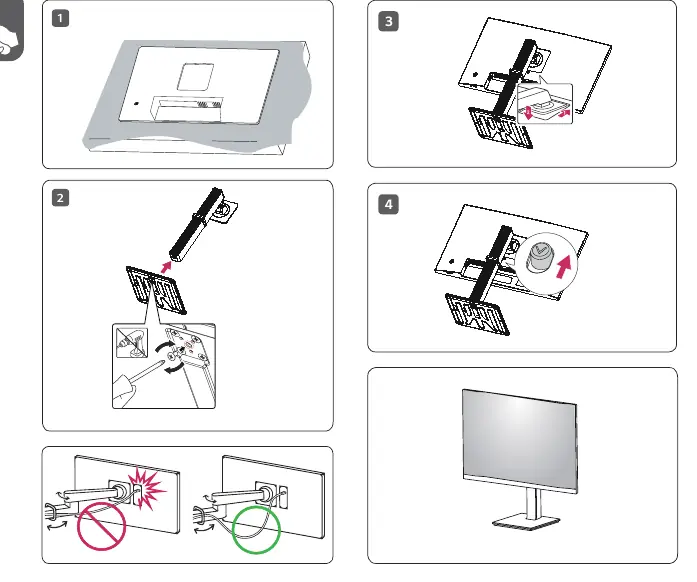
- Place the monitor face down on a flat surface.
- Attach the stand to the monitor.
- Secure the stand using the provided screws.
- Ensure the stand is firmly attached before standing the monitor upright.
Connectivity
The monitor features various ports for connectivity. Ensure you use the supplied cables to prevent device malfunction. The available ports include:
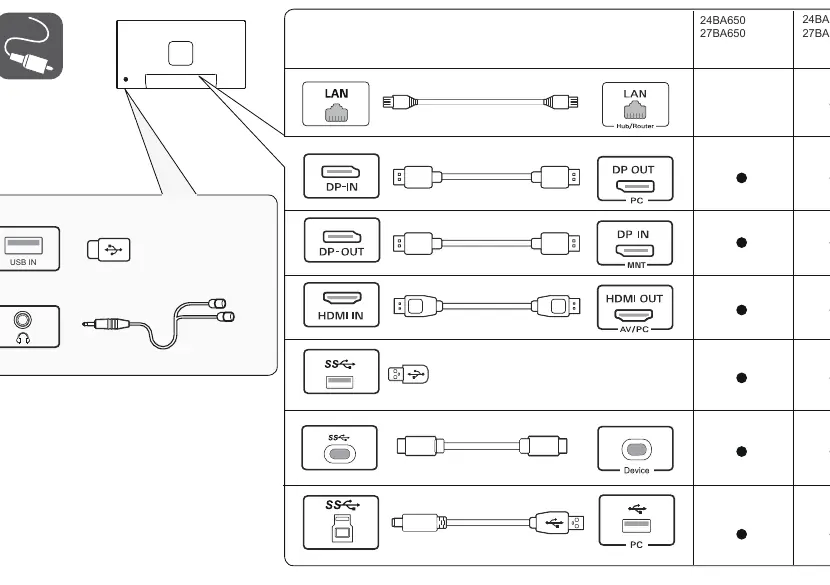
- LAN: For network connection.
- DP-IN / DP-OUT: DisplayPort connections for PC and monitor daisy-chaining.
- HDMI IN: For AV/PC input.
- USB IN: The USB port on the product functions as a USB hub.
Important Warnings
- Compatibility: Using DVI to HDMI or DisplayPort to HDMI cables may cause compatibility issues.
- Supplied Components: It is highly recommended to use the components supplied with the product. Using third-party cables may cause the device to malfunction.
- EPEAT: For EPEAT-applied models, spare parts (base assembly, adapter, cables) are available for 5 years after the end of production.
Technical Specifications
The monitor supports a recommended resolution of 1920 x 1080 at 60 Hz. Power requirements are 100-240 V~ 50/60 Hz, 2.5 A. Dimensions and weights vary by model (24BA650/750 and 27BA650/750) and whether the stand is attached.
Manufacturer information
LG Electronics
Practical help
Common problems
Compatibility issues with video signal
Avoid using DVI to HDMI or DisplayPort to HDMI cables. Use the supplied cables.
Device malfunction
Ensure you are using the cables supplied with the product.
Before use
- Check the box contents for all supplied cables.
- Assemble the stand using the provided screws.
- Ensure the power source is 100-240 V~ 50/60 Hz.
- Verify the monitor is placed on a stable surface.
Show more Show less
Images and diagrams
- Assembly steps show attaching the stand to the monitor and securing it with screws.
- Connectivity diagram shows various ports including LAN, DP-IN, DP-OUT, HDMI, and USB.
Model compatibility
- Using DVI to HDMI or DP to HDMI cables may cause compatibility issues.
- USB port functions as a USB hub.

Manual page author
Michael Turner
Technical manual editor