Lighting / Outdoor Lighting
User Manual for Lightpro Castor 4 178S LED Spotlight
Quick guide for the Lightpro Castor 4 178S LED spotlight. Includes installation instructions for wall and ground mounting, wiring connection, dimmer operation, and maintenance tips.
Quick answers from the manual
Quick answer
- The Lightpro Castor 4 is a 12V outdoor LED spotlight. It can be mounted on a wall or in the ground using the included spike. It features a built-in 6-level dimmer and is compatible with the Lightpro 12V system. p. 6, 8
Key actions
- Mounting on wall/surface p. 6, 8
- Mounting in ground p. 6, 8
First start
- Connect to 12V system p. 5, 10
Maintenance and reset
- Cleaning p. 10, 11
Technical specifications
| Parameter | Value | Meaning | Pages |
|---|---|---|---|
| Power | 3.5W | Maximum power consumption | p. 6, 8 |
Where to find it in the PDF
- Installation p. 6, 7, 8, 9
Table of contents
Manual images
Click an image to enlargeQuick Guide
The Lightpro Castor 4 is a 12V outdoor LED spotlight designed for use with the Lightpro 12-volt lighting system. It features a built-in 6-level dimmer and can be mounted on solid surfaces or in the ground using the included spike. Ensure the system is powered off before performing any maintenance.
Product Description
The Castor 4 (178S) is an LED spot for outdoor use. It is compatible only with the Lightpro 12V system. Any modifications to the product may affect safety, warranty, and functionality.
Packaging Content
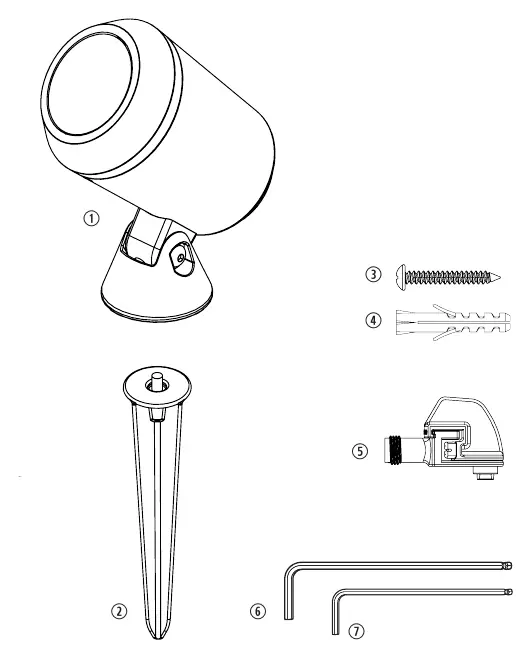
- Castor 4 fixture
- Ground spike
- Screw and plug
- Lightpro connector
- Large and small hex keys
Installation
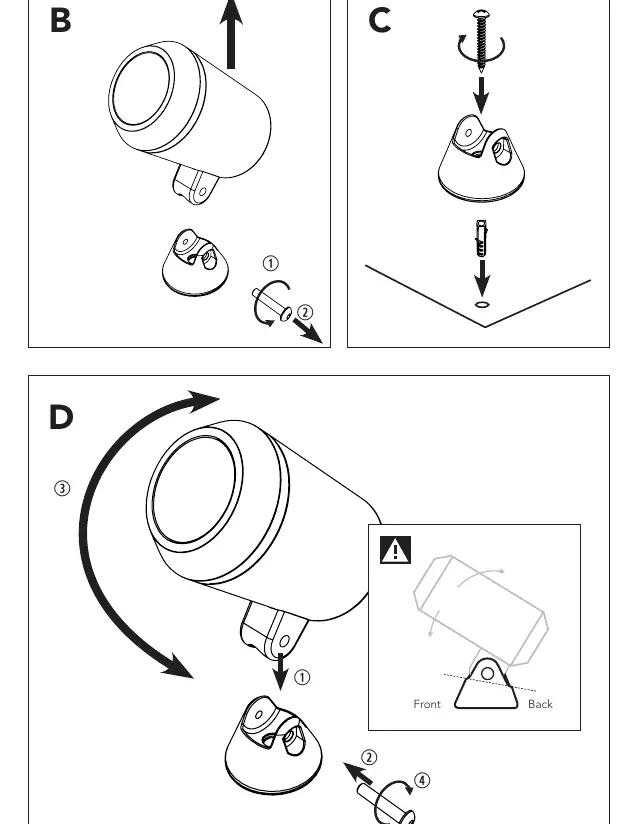
Option 1: Placement on a fixed surface or wall
- Remove the screw from the base using the included large hex key.
- Remove the fixture from the base.
- Mount the base onto the surface using the included screw. If necessary, drill a hole and use the provided plug.
- Place the fixture back into the base.
- Insert the screw and adjust the fixture to the desired position.
- Tighten the screw securely with the large hex key.
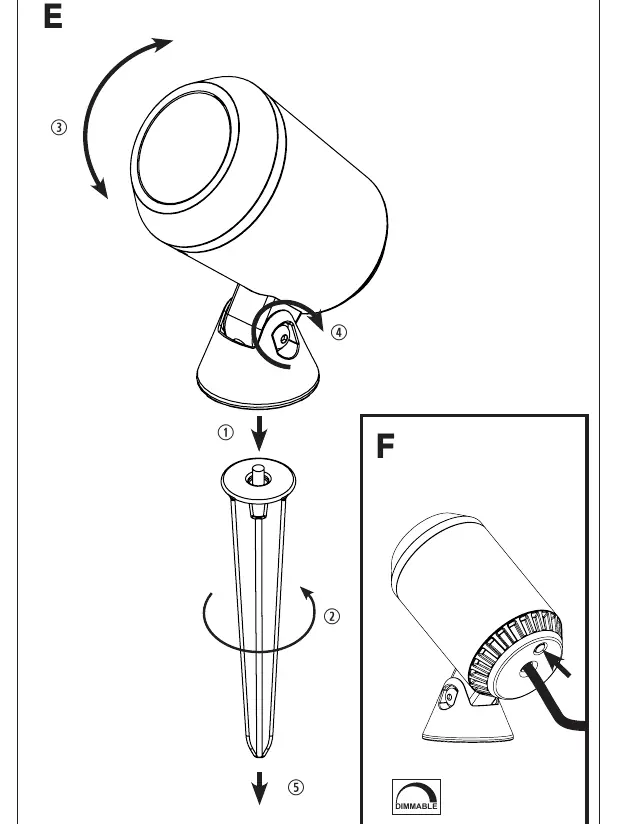
Option 2: Placement in the ground
- Attach the ground spike underneath the base.
- Fasten the spike securely.
- Adjust the fixture to the desired position.
- Tighten the screw using the large hex key.
- Insert the fixture into the ground.
Wiring and System Connection
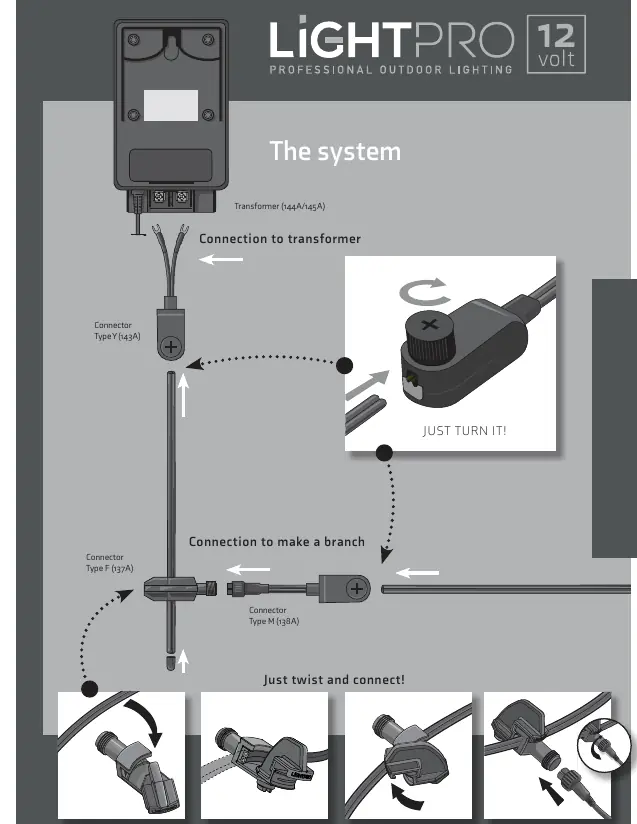
Connect the lights to the main cable using the Lightpro connector. Ensure the cables are laid out to reach the transformer or main cable comfortably. If the product has a drain hole for water, ensure it is pointing downwards.
Dimmer Function
The fixture is equipped with a built-in dimmer. Press the button on the back of the fixture to cycle through the 6 different light output levels.
Maintenance and Safety
- Cleaning: Clean regularly with a soft, clean cloth. Do not use abrasives, high-pressure washers, or aggressive chemical cleaning agents.
- Stainless Steel: Clean parts with a stainless steel cleaning agent once every 6 months.
- Safety: This is a Class III product (12V safety extra-low voltage). Do not embed or brick in the product permanently. Ensure it remains accessible for maintenance.
- Environment: Suitable for temperatures between -20 °C and 50 °C. Do not use in areas where combustible gases, fumes, or liquids are stored.
Technical Specifications
- Product: Lightpro Castor 4 (178S)
- Light Source: LED 3.5W AC/DC 12V
- Luminous Flux: 40 - 400 lm
- Protection Class: IP44
- Cable Length: 1m
- Dimmable: Yes (6 levels)
Practical help
Common problems
Fixture is loose or unstable
Ensure the screw in the base is tightened securely using the provided large hex key.
Light not turning on
Check the connection to the transformer and ensure the 12V system is powered.
Before use
- Verify all parts are present (fixture, spike, screw, plug, connector, hex keys).
- Ensure you have a compatible Lightpro 12V transformer.
- Plan the cable layout before installation.
- Check that the installation location is not prone to water accumulation unless the drain hole is oriented downwards.
Images and diagrams
- Figure A: Identification of all included parts.
- Figure B-D: Step-by-step guide for wall or surface mounting.
- Figure E: Step-by-step guide for ground spike installation.
- Figure F: Location of the dimmer button.
Model compatibility
- Only compatible with the Lightpro 12V system.
- Not suitable for areas with combustible gases, fumes, or liquids.

Manual page author
Emily Carter
User documentation editor
Prepares concise manual descriptions and highlights the most useful setup, operation, and maintenance information for readers.