Lighting / Outdoor Lighting
User Manual for Lightpro Castor 8 Outdoor Spotlight
Quick guide for the Lightpro Castor 8 LED outdoor spotlight. Includes installation instructions for wall or ground mounting, wiring diagrams, and dimmer settings.
Quick answers from the manual
Quick answer
- The Lightpro Castor 8 is a 12V LED outdoor spotlight. It can be mounted on walls or in the ground using the included spike. It features a built-in dimmer with 6 levels. p. 6, 8
Key actions
- Install on wall p. 6, 8
- Install in ground p. 6, 8
First start
- Connect to 12V system p. 5, 11
Problems and fixes
Fixture maintenance
Clean with a soft, clean cloth. Do not use high-pressure washers.
p. 10, 11Maintenance and reset
- Clean stainless steel parts p. 10, 11
Technical specifications
| Parameter | Value | Meaning | Pages |
|---|---|---|---|
| Power | 8W | Maximum power consumption | p. 6, 8 |
| Protection | IP44 | Water resistance rating | p. 6, 8 |
Where to find it in the PDF
- Parts Diagram p. 2
- Installation Steps p. 3, 4
- Wiring System p. 5
Table of contents
Manual images
Click an image to enlargeQuick guide from the manual
The Lightpro Castor 8 is a 12V LED outdoor spotlight designed for use with the Lightpro 12-volt lighting system. It features a built-in dimmer with 6 levels of light output and is rated IP44 for outdoor use. The fixture can be mounted on a solid surface/wall or placed in the ground using the included spike.
Packaging content
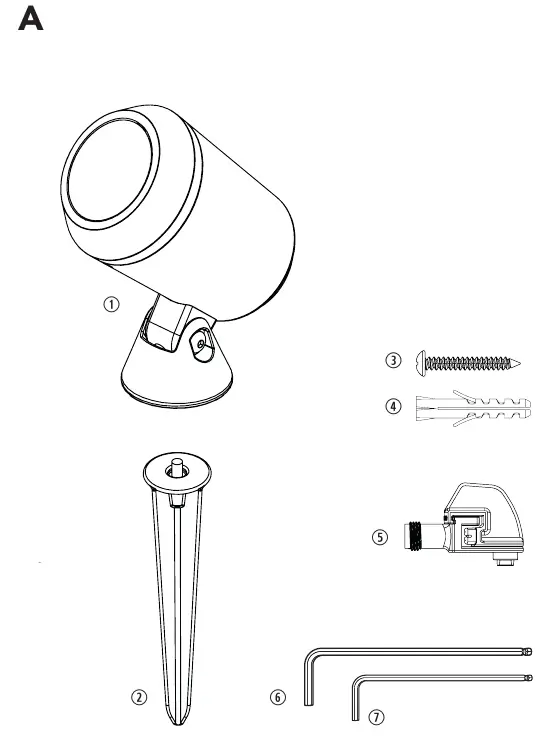
- Castor 8 fixture
- Ground spike
- Screw and plug
- Lightpro connector
- Large and small hex keys
Installation
Option 1: Placement on a fixed surface or wall
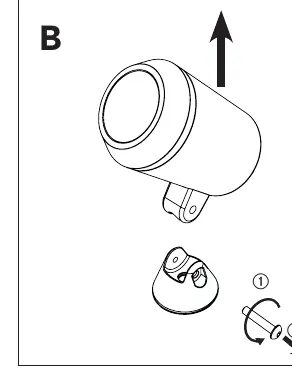
- Use the large hex key to remove the screw from the base.
- Remove the fixture from the base.
- Mount the base onto the surface using the provided screw. If necessary, drill a hole and use the included plug.
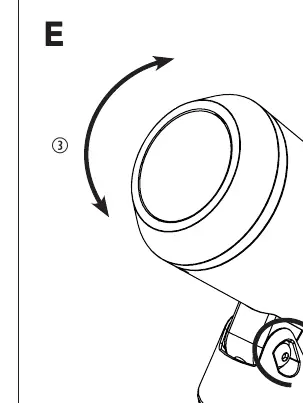
- Place the fixture back into the base, insert the screw, adjust to the desired position, and tighten with the large hex key.
Option 2: Placement in the ground
- Attach the ground spike underneath the base and fasten it securely.
- Place the fixture in the ground.
- Adjust the fixture to the desired position and tighten the screw using the large hex key.
Wiring and system connection
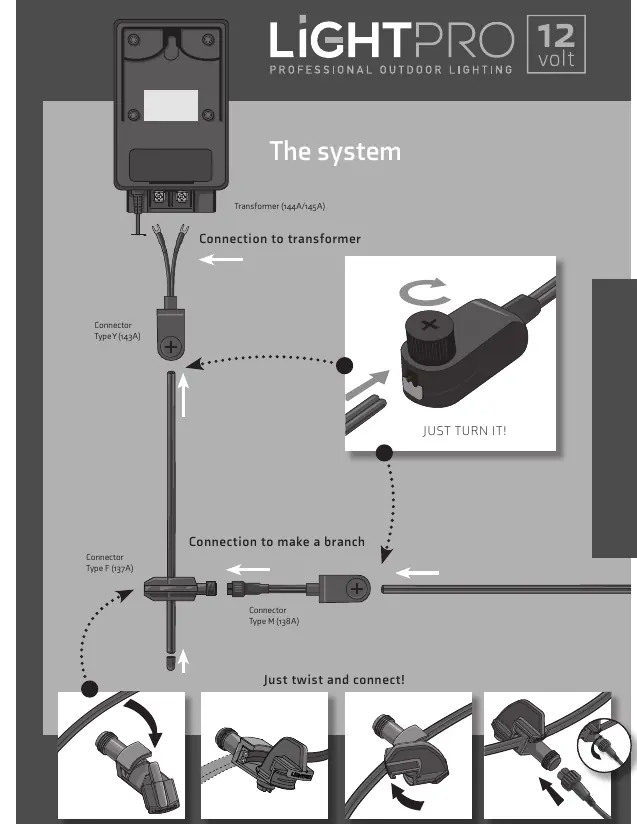
The product must be connected to the Lightpro 12V system. Connect the fixture's plug to the main cable using the provided Lightpro connector. Ensure the connector is twisted securely to make a proper connection.
Dimmer function
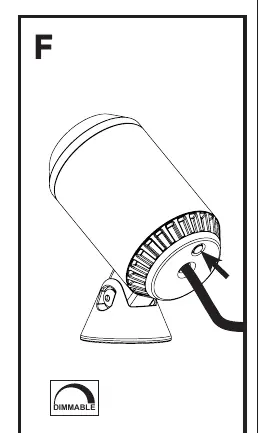
The fixture is equipped with a built-in dimmer. Press the button on the back of the fixture to cycle through the 6 available light output levels.
Safety and maintenance
- Always ensure the product remains accessible for maintenance.
- Do not embed or brick the product in permanently.
- Clean regularly with a soft, clean cloth. Do not use high-pressure washers or aggressive chemicals.
- Clean stainless steel parts with a stainless steel cleaning agent once every 6 months.
- The light source is not replaceable.
- Operating temperature: -20 °C to 50 °C.
Practical help
Common problems
Light does not turn on
Check the connection to the 12V transformer and ensure the system is powered.
Fixture is loose
Ensure the screw in the base is tightened securely using the provided large hex key.
Before use
- Verify all parts are present (fixture, spike, screw, plug, connector, hex keys).
- Ensure you have a compatible 12V Lightpro transformer.
- Plan the cable layout before installation.
- Check that the installation surface is suitable for the mounting method.
Images and diagrams
- Figure A: Parts identification.
- Figure B/C/D: Wall/Surface mounting steps.
- Figure E: Ground spike installation.
- Figure F: Dimmer button location.
Model compatibility
- Must be used with Lightpro 12V system.
- Not suitable for direct connection to mains voltage.

Manual page author
David Miller
Documentation analyst
Organizes user manual content into clear summaries, with attention to model details, product context, and everyday usability.