Tools / Power Tools
User Manual for HiKOKI UR 18DA Cordless Radio
Quick guide and user manual for the HiKOKI UR 18DA cordless radio. Learn how to install the battery, connect the AC adapter, operate radio modes, and maintain your device.
Quick answers from the manual
Quick answer
- This manual provides instructions for operating the HiKOKI UR 18DA Cordless Radio, including battery installation, AC adapter usage, radio tuning, Bluetooth connectivity, and maintenance. p. 8, 9
Key actions
- Install or remove the battery p. 8
- Connect the AC adapter p. 8
- Search for radio stations p. 8
First start
- Install the battery or connect the AC adapter, then press the power button to switch on. p. 8
Problems and fixes
Battery charge is low (symbol displayed)
Use the AC adapter or insert a fully charged battery.
p. 8
Pilot lamp flickers in red (0.2-second intervals)
Check for and take out any foreign objects in the charger's battery connector. If none, the battery or charger may be malfunctioning.
p. 8Error codes
| Code | Meaning | Action | Pages |
|---|---|---|---|
| Pilot lamp blinks (1s on/0.5s off) | Battery overheated | Charging will commence when battery cools. | p. 7 |
Maintenance and reset
- Regularly inspect mounting screws, keep terminals free of swarf and dust, and clean the exterior with a soft dry cloth or cloth moistened with soapy water. p. 9
Technical specifications
| Parameter | Value | Meaning | Pages |
|---|---|---|---|
| Frequency band | DAB/DAB+: 174.928 to 239.200 MHz; FM: 87.5 to 108 MHz; AM: 522 to 1710 KHz | Radio reception ranges | p. 6 |
| Speaker | 8 W x 1 | Audio output power | p. 6 |
| Weight | 1.8 kg | Total weight of the unit | p. 6 |
| Bluetooth | Ver. 4.2 BR/EDR | Bluetooth version | p. 6 |
Where to find it in the PDF
- Parts Diagram p. 2
- Safety Warnings p. 4, 5
- Specifications p. 6
- Charging Instructions p. 7, 8
- Operation Instructions p. 8, 9
- Maintenance p. 9
Table of contents
Manual images
Click an image to enlargeQuick guide from the manual
The HiKOKI UR 18DA is a cordless radio designed for use with HiKOKI 18V slide batteries or the included AC adapter. To get started, ensure your battery is charged or connect the AC adapter to a standard household outlet. Use the MODE button to switch between FM, AM, Bluetooth, and DAB/DAB+ modes. For Bluetooth, select BT mode and pair your device with 'UR18DA'.
Description of parts
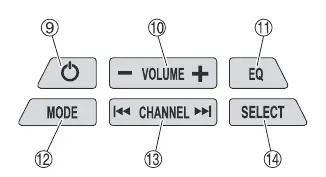
The radio features an antenna, handle, operation panel, display, speaker, and AC adapter port. The operation panel includes buttons for power, volume, equalizer (EQ), mode selection, channel selection, and menu/select functions.
Safety warnings
- Power supply: Use only the specified voltage.
- Battery safety: Do not short-circuit, disassemble, or expose the battery to fire or excessive heat. Keep terminals free of dust and swarf.
- Environment: Do not use in bathrooms, showers, or wet/damp conditions.
- Hearing protection: Avoid continuous exposure to loud noise to prevent permanent hearing loss.
Battery installation
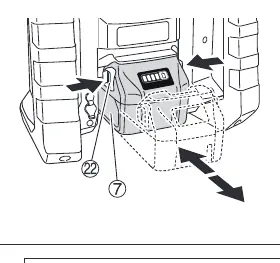
Align the battery with the groove in the tool and slide it into place until it locks with a click. To remove, press the latches on both sides of the battery and withdraw it. If the battery symbol on the display indicates low power, recharge the battery or switch to the AC adapter.
AC adapter installation
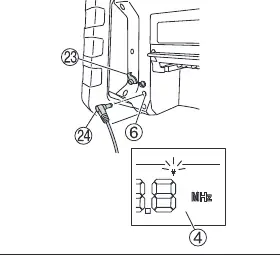
Pull back the rubber cover on the radio and connect the AC adapter to the port. Plug the other end into a standard household outlet. Note that the AC adapter does not charge the battery; it only powers the unit.
Operation
- Power: Press the power button to switch on or off.
- Volume: Use the '+' and '-' buttons to adjust the volume.
- Modes: Press the MODE button to cycle through FM, AM, Bluetooth, and DAB/DAB+.
- Tuning: Use the channel selection buttons to change frequencies. Press and hold briefly to search for the next station with a strong signal.
- Presets: Use the SELECT button to store and recall radio stations.
- EQ: Press the EQ button to adjust treble and bass settings.
Maintenance and inspection
- Screws: Regularly inspect and tighten all mounting screws.
- Terminals: Keep battery and tool terminals free of dust and swarf to prevent malfunctions.
- Cleaning: Wipe the exterior with a soft, dry cloth or a cloth moistened with soapy water. Do not use solvents like gasoline or paint thinner.
- Storage: Store in a cool, dry place away from children, extreme temperatures, and moisture.
Specifications
- Frequency bands: DAB/DAB+ (174.928-239.200 MHz), FM (87.5-108 MHz), AM (522-1710 KHz).
- Power output: 7W (AC adapter or 18V battery).
- Bluetooth: Ver. 4.2 BR/EDR.
- Weight: 1.8 kg.
Manufacturer information
HiKOKI
Practical help
Common problems
Battery not charging
Check for foreign objects in the charger connector or battery terminals. Ensure the battery is fully inserted.
Motor stops during use
This is likely the protection function. Charge the battery or reduce the load on the tool.
Bluetooth not connecting
Ensure the radio is in BT mode and the device is searching for 'UR18DA'.
Before use
- Ensure the battery is fully charged.
- Check that the battery terminals are free of dust and swarf.
- Verify the AC adapter is securely connected if not using battery power.
- Ensure the antenna is properly positioned.
Specs in practice
- Frequency band
- Supports DAB/DAB+ (174.928-239.200 MHz), FM (87.5-108 MHz), and AM (522-1710 KHz).
- Power supply
- Compatible with HiKOKI 18V slide batteries or the provided AC adapter.
Images and diagrams
- Fig 1: Battery installation and removal.
- Fig 2: AC adapter connection.
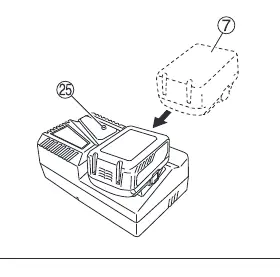
- Fig 3: Battery charging process.
Model compatibility
- Only use HiKOKI 18V slide batteries (e.g., BSL36B18).
- AC adapter is for indoor use only.

Manual page author
Emily Carter
User documentation editor
Prepares concise manual descriptions and highlights the most useful setup, operation, and maintenance information for readers.