Power / Batteries & Chargers
User Manual for Nextech 1080p Smart Wireless Doorbell + Chime
Quick guide for the Nextech 1080p Smart Wireless Doorbell + Chime. Learn how to set up the device, pair it with the Smart Life app, install batteries, and use the two-way audio and recording features.
Table of contents
Manual images
Click an image to enlargeQuick Guide
This guide provides essential instructions for setting up and using your Nextech 1080p Smart Wireless Doorbell. Please ensure you have 2 x 18650 Li-ion batteries (not included) and a 2.4GHz WiFi network available before beginning the setup process.
Box Contents
- 1 x Smart Doorbell Camera
- 1 x Mounting Bracket
- 1 x Mounting Hardware
- 1 x Chime
- 1 x USB Charging Cable
- 1 x User Manual
Product Overview
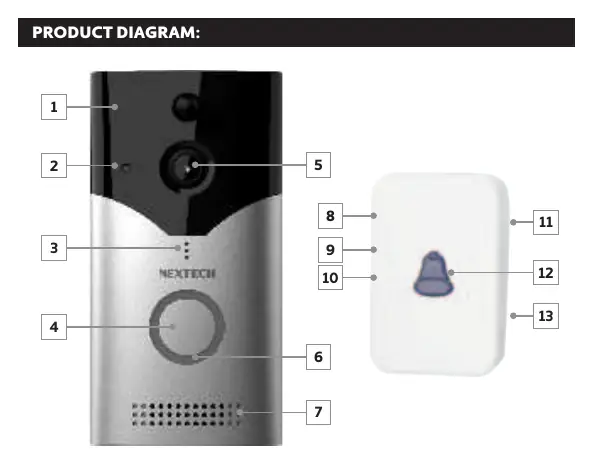
The doorbell features a 170° HD camera, PIR motion sensor, infrared LED for night vision, microphone, and speaker. The chime unit includes volume control and ringtone selection buttons.
Setup and Installation
1. Install the App: Download and install the “Smart Life” app from the Google Play or iOS App Store. Register an account before continuing.
2. Add Device: Open the app, tap the “+” symbol, select “Add Device,” then navigate to “Security & Video Surveillance” and choose “Smart Doorbell.”
3. Reset Device: Ensure batteries are inserted. Press and hold the “Reset” button on the rear of the doorbell until you hear a chime sound. Confirm this in the app.
4. WiFi Connection: Ensure your phone is connected to a 2.4GHz WiFi network. Enter your WiFi password in the app to begin pairing.
5. Scan QR Code: Face the QR code shown on your phone screen towards the doorbell camera until a chime is heard. Press “I Heard a Prompt” to finalize the linking process.
Using the App
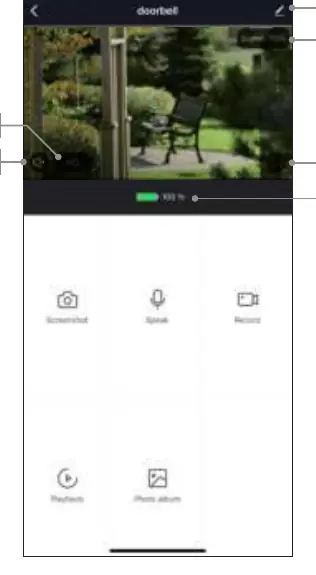
When the doorbell button is pressed, you will receive a notification. Within the app, use the “Monitor Switch” to enable two-way audio. Press and hold the “Speak” button to talk through the doorbell. You can also view recorded photos and videos if a MicroSD card is installed.
Technical Specifications
- Video Resolution: 1080p (1920 x 1080)
- Lens Angle: 170°
- Storage: Up to 128GB MicroSD Card (FAT32 format)
- Battery: 2 x 18650 Li-ion Batteries (not included)
- Wireless Frequency: 2.4GHz WiFi
- Standby Time: Up to 6 months
Practical help
Common problems
Device not pairing
Ensure your phone is connected to a 2.4GHz WiFi network. Reset the device by holding the reset button on the rear until a chime sounds.
Cannot hear audio
Press the 'Monitor Switch' button in the app to enable talk, then press and hold the 'Speak' button.
Recordings not saving
Ensure a MicroSD card (up to 128GB, FAT32 format) is installed in the device.
Before use
- Purchase 2 x 18650 Li-ion batteries (not included).
- Download the 'Smart Life' app.
- Ensure your WiFi network is 2.4GHz.
- Have a MicroSD card ready for recording.
Specs in practice
- Video Resolution
- 1920 x 1080 pixels for clear footage.
- Standby Time
- Up to 6 months depending on usage.
Images and diagrams
- The doorbell features a PIR motion sensor, infrared LED for night vision, and a 170-degree camera.
- The chime unit includes volume control and ringtone selection buttons.
Model compatibility
- Requires 2.4GHz WiFi network.
- Requires 2 x 18650 Li-ion batteries.
- MicroSD card must be in FAT32 format.

Manual page author
Emily Carter
User documentation editor
Prepares concise manual descriptions and highlights the most useful setup, operation, and maintenance information for readers.