Smart Home / Smart Doorbells
User Manual for eufy Video Doorbell 1080p (Battery-Powered)
Quick start guide and user manual for the eufy Video Doorbell 1080p (Battery-Powered). Includes installation steps, mounting instructions, charging, and system setup.
Table of contents
Manual images
Click an image to enlargeQuick guide from the manual
The eufy Video Doorbell 1080p (Battery-Powered) system consists of two main parts: the video doorbell and the Wi-Fi Doorbell Chime. The doorbell detects motion at your door and allows you to answer via the eufy Security app. The Wi-Fi Doorbell Chime acts as an indoor digital chime and stores video clips on a user-provided microSD card.
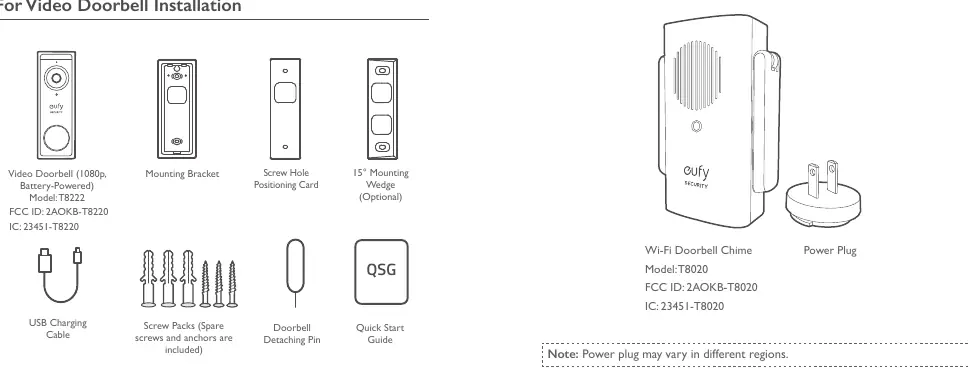
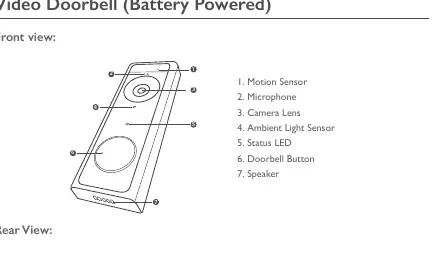
Product Overview
Video Doorbell (Front): Includes motion sensor, microphone, camera lens, ambient light sensor, status LED, doorbell button, and speaker.
Video Doorbell (Rear): Includes micro USB charging port, SYNC/RESET button, and detaching mechanism.
- Power on: Press and release the SYNC button.
- Add to Chime: Press and hold the SYNC button until you hear a beep.
- Power off: Quick-press the SYNC button 5 times in 3 seconds.
- Reset: Press and hold the SYNC button for 10 seconds.
Installation
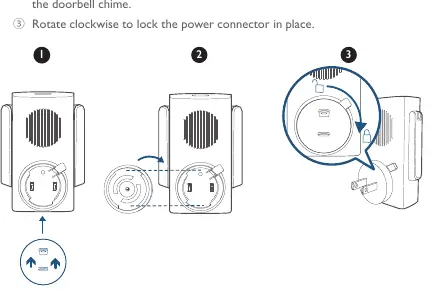
1. Powering on the Wi-Fi Doorbell Chime: Fix the power connector to the chime by aligning the slots and rotating clockwise. Extend the antennas and plug into an AC power supply. The LED will turn solid green when ready.
2. Setting up the System: Download the eufy Security app, create an account, and follow the onscreen instructions to add the Wi-Fi Doorbell Chime and then the doorbell.
3. Finding a Mounting Spot: Check the live view in the app to find the best field of view. Recommended mounting height is 1.2m (48 inches) from the ground. Avoid placing near side walls to prevent IR reflection, which can cause blurry night vision.
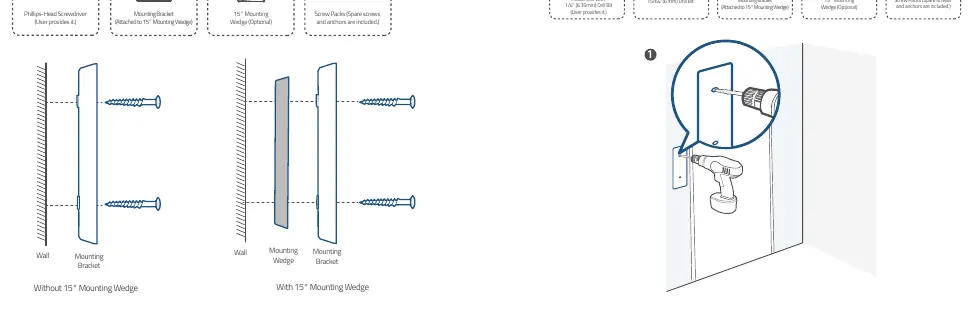
4. Mounting the Bracket: Use the provided positioning card to mark holes. For wooden surfaces, use the provided screws directly. For hard surfaces (brick, concrete, stucco), drill holes with a 6mm (15/64 inch) drill bit and insert anchors before screwing in the bracket.
5. Mounting the Doorbell: Align the doorbell with the top of the bracket and snap the bottom into place.
Charging and Maintenance
Charging: The doorbell comes with an 80% charge. Use a universal USB charger (5V 1A) to fully charge it before mounting. Charging takes approximately 6 hours from 0% to 100%. The LED is red while charging and solid blue when fully charged.
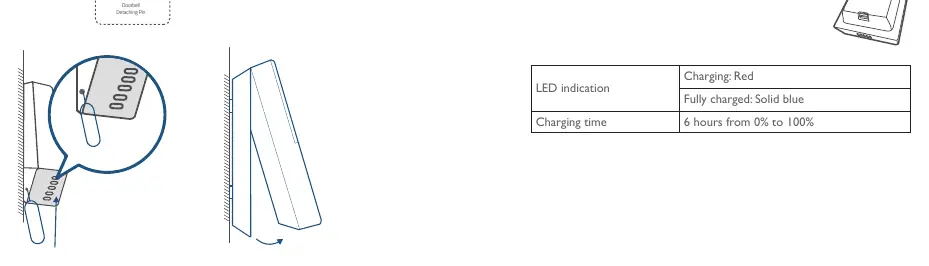
Detaching: Use the provided doorbell detaching pin to release the doorbell from the mounting bracket.
Regulatory and Safety
The device operates on 2.4GHz Wi-Fi. Ensure a distance of at least 20cm between the device and the human body during operation. Do not expose the device to extreme temperatures (suitable range 0°C-40°C) or excessive moisture.
Manufacturer information
eufy
Practical help
Common problems
Doorbell not connecting to Wi-Fi Chime
Press and hold the SYNC button on the doorbell until you hear a beep to initiate pairing.
Night vision is blurry
Ensure the doorbell is not mounted too close to a side wall, as this causes IR light reflection.
Battery life is short
Battery life depends on usage. 15 events per day with 20-second recordings typically lasts up to 4 months.
Before use
- Charge the doorbell fully using a 5V 1A USB charger.
- Download the eufy Security app.
- Check if the mounting surface is wood or hard material (brick/concrete).
- Ensure you have a 6mm (15/64 inch) drill bit if mounting on hard surfaces.
- Plug in the Wi-Fi Doorbell Chime and wait for the solid green LED.
Specs in practice
- Charging Input
- 5V 1A universal USB charger.
- Charging Time
- Approximately 6 hours from 0% to 100%.
- Recommended Mounting Height
- 1.2 meters (48 inches) from the ground.
- Operating Temperature
- 0°C to 40°C.
Images and diagrams
- The mounting bracket installation diagram shows how to use the positioning card to mark holes and drill them.
- The detaching mechanism diagram illustrates inserting the pin into the bottom hole to release the doorbell.
Model compatibility
- Requires 2.4GHz Wi-Fi network.
- MicroSD card required for local video storage (user provided).

Manual page author
Michael Turner
Technical manual editor
Reviews PDF manuals for structure, safety notes, and practical product details so readers can find the right information quickly.