Lighting / Work Lights
User manual for NightSearcher 1000R rechargeable head torch
Quick guide for the NightSearcher 1000R rechargeable head torch. Learn how to charge, operate light modes, use the wave sensor, and understand warranty terms.
Table of contents
Quick guide from the manual
The NightSearcher 1000R is a rechargeable head torch. To begin using it, ensure the battery is fully charged using the provided Type C USB cable. The device features multiple light modes and a wave sensor for hands-free operation.
Charging the head torch
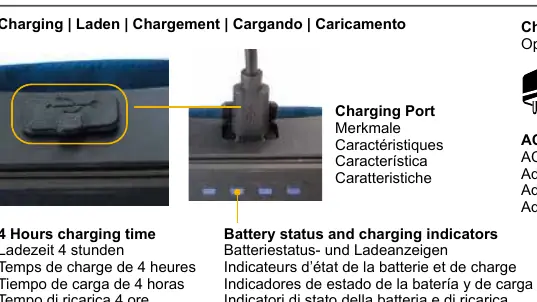
The device requires approximately 4 hours for a full charge. Connect the Type C USB charging cable to the charging port on the battery pack. You can use an AC adaptor, vehicle adaptor, or power bank to charge the unit. Note that these adaptors are not supplied with the product.
Operating modes
Use the power switch and light mode switch to cycle through the available settings:
- Spot high: Maximum focused brightness.
- Spot low: Lower intensity focused beam.
- Flood: Wide beam for area lighting.
- Boost: Combination of spot and flood beams.
- Flashing: Strobe mode.
- Red light: Preserves night vision.
Wave sensor usage
The head torch includes a wave sensor for touchless control. Press the wave sensor switch to activate this feature. Once active, wave your palm across the front of the light to turn it off, and wave again to turn it back on. Press the button again to deactivate the sensor.
Specifications
- Weight: 138.5g
- Dimensions (Light): 27 x 29 x 58mm
- Dimensions (Back): 31.5 x 32 x 93mm
Warranty and support
The product comes with a 3-year standard warranty on manufacturing defects and a 1-year warranty on rechargeable batteries. An extended 5-year warranty is available upon registration. For support, contact NightSearcher via their website or the provided regional offices in the UK, Germany, or Poland.
Manufacturer information
NightSearcher
Practical help
Common problems
Light does not turn on
Ensure the battery is fully charged. Charging takes approximately 4 hours.
Wave sensor is not responding
Ensure the wave sensor switch is activated. Wave your palm across the front of the light to toggle power.
Before use
- Charge the device fully using the provided Type C USB cable.
- Verify the charging port is clear of debris.
- Ensure you have a compatible power source (AC adaptor, vehicle adaptor, or power bank).
Specs in practice
- Charging time
- Approximately 4 hours for a full charge.
Images and diagrams
- The charging port is located on the battery pack.
- The wave sensor switch is separate from the main power/mode switch.
Model compatibility
- Compatible with 12/24V vehicle adaptors (CHIC3.7-LI-ION).
- Compatible with UK/EU mains adaptors (CH-USB-UK/EU).

Manual page author
Emily Carter
User documentation editor
Prepares concise manual descriptions and highlights the most useful setup, operation, and maintenance information for readers.