Lighting / Portable Lighting
User Manual for Trotec UV-TORCHLIGHT 16F UV Torch
Quick guide for the Trotec UV-TORCHLIGHT 16F. Learn how to install batteries, operate the UV torch safely, and understand maintenance and safety warnings.
Quick answers from the manual
Quick answer
- The Trotec UV-TORCHLIGHT 16F is a UV torch used for detecting cracks, leaks, or UV markers. It requires 3x AAA batteries and must be used with UV protection glasses. p. 1, 3, 5
Key actions
- Install 3x AAA batteries p. 1
- Wear UV protection glasses p. 3, 5
First start
- Insert 3x AAA batteries into the compartment following the polarity markings. p. 1
Problems and fixes
Device not working
Check battery installation and polarity.
p. 1Maintenance and reset
- Clean with a dry cloth; do not use abrasive cleaners. p. 4, 6
Technical specifications
| Parameter | Value | Meaning | Pages |
|---|---|---|---|
| Battery | 3x AAA | Power source | p. 1 |
Where to find it in the PDF
- Battery Installation p. 1
- Operation p. 2
Table of contents
Manual images
Click an image to enlargeQuick guide from the manual
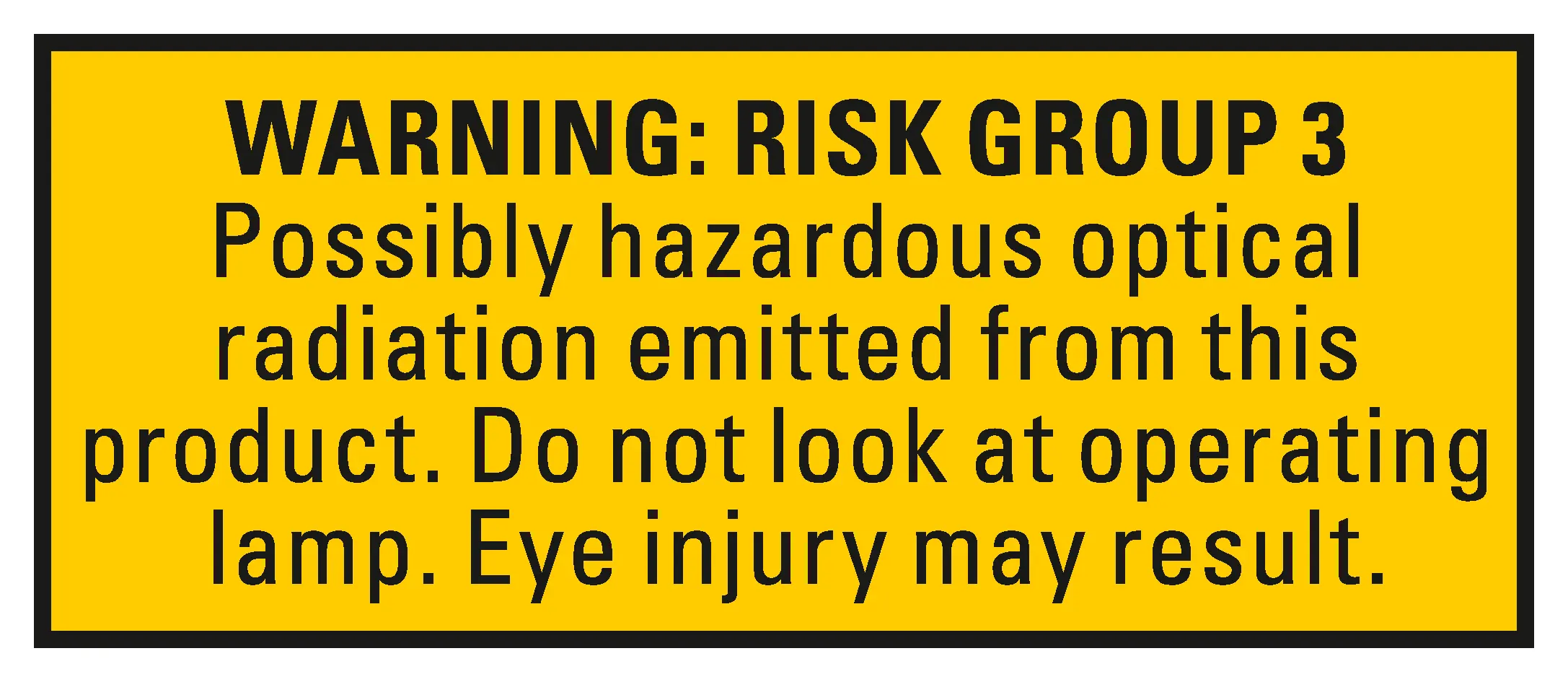
The Trotec UV-TORCHLIGHT 16F is a specialized UV torch designed for detecting cracks, leaks, or identifying UV markers (e.g., for banknote or hygiene checks). Important: This device emits UV-A radiation (Risk Group 3). Never look directly into the light beam and do not point the torch at people or animals. Always wear UV protection glasses when operating the device.
Safety warnings
Read all safety instructions before use. Failure to follow these can result in serious injury or fire.
- UV Radiation: The device generates UV-A radiation (
- Eye Protection: Always use suitable UV-filter glasses (CE-EN166) to prevent eye damage.
- Handling: Do not use the device in explosive atmospheres, underwater, or in aggressive environments.
- Children: Keep the device and batteries away from children.
- Modifications: Unauthorized structural changes are prohibited.
Battery installation
The device requires 3x AAA batteries (LR03 1.5V or HR03 1.2V).
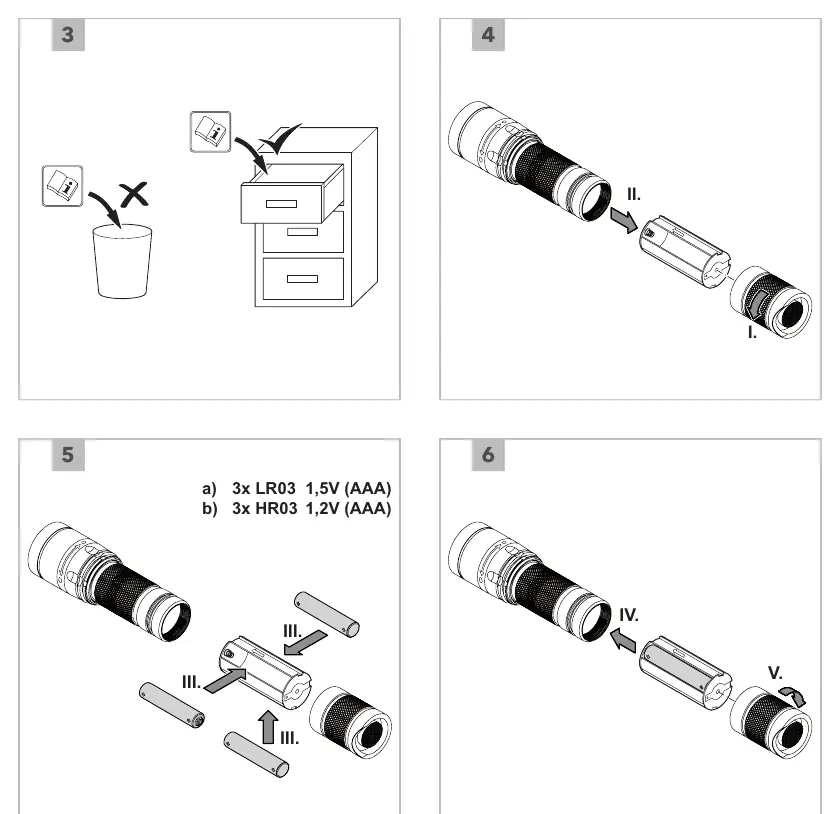
- Open the battery compartment.
- Insert 3x AAA batteries, ensuring correct polarity as marked in the compartment.
- Close the battery compartment securely.
Operation
The torch is operated via a simple switch mechanism:
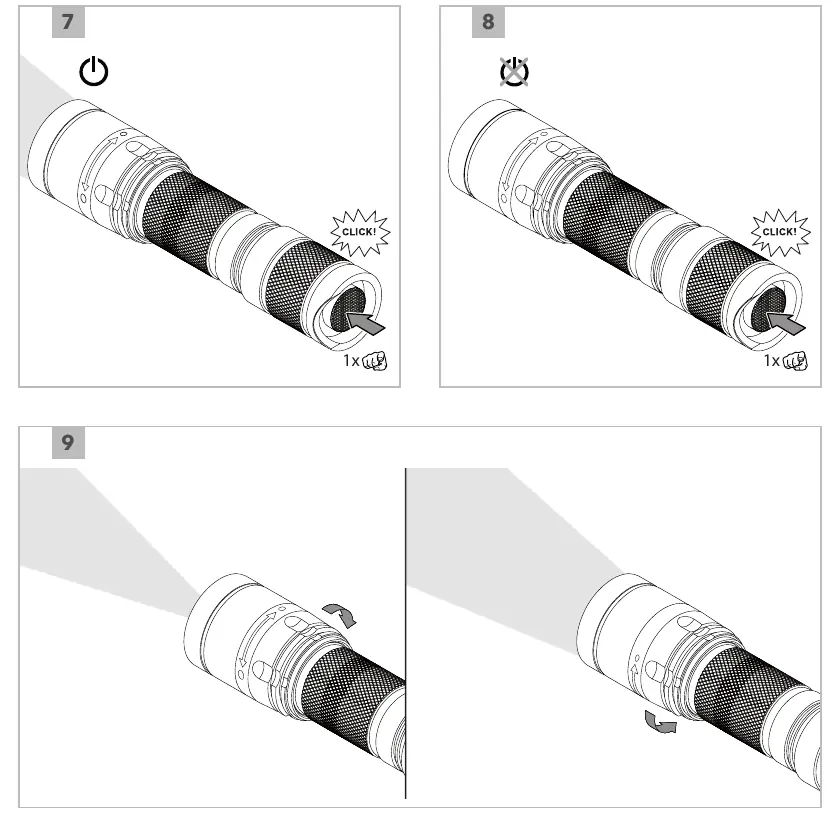
- Switching On/Off: Press the button at the end of the handle until you hear a click to turn the device on or off.
- Usage: Point the light at the object to be inspected. For best results, use in lower ambient light conditions.
Maintenance and disposal
- Cleaning: Do not use abrasive cleaners, solvents, or sharp tools. Wipe with a clean, dry cloth.
- Storage: Remove batteries if the device will not be used for an extended period. Store in a cool, dry place.
- Disposal: Do not dispose of this device in household waste. Use designated collection points for electrical and electronic equipment (WEEE Directive 2012/19/EU). Batteries must be disposed of separately according to local regulations.
Practical help
Common problems
Device does not turn on
Check if batteries are inserted correctly according to polarity markings and ensure they are fresh (3x AAA).
UV light appears weak
Replace the batteries with new ones.
Before use
- Wear UV protection glasses.
- Wear covering clothing.
- Ensure no people or animals are in the light path.
- Check battery polarity before insertion.
- Ensure the device is not damaged.
Specs in practice
- Risk Group 3
- Indicates high-intensity UV radiation; do not look directly into the beam.
- Battery Type
- Requires 3x AAA (LR03 1.5V or HR03 1.2V).
Images and diagrams
- Steps 1-6: Battery installation process.
- Steps 7-9: Operation and switching.
Model compatibility
- Use only batteries specified in the technical data.
- Do not mix different battery types or new and used batteries.

Manual page author
Emily Carter
User documentation editor
Prepares concise manual descriptions and highlights the most useful setup, operation, and maintenance information for readers.