Sports / Fitness
Ninebot eKickScooter C2 Lite User Manual
Comprehensive user manual for the Ninebot eKickScooter C2 Lite, covering product diagrams, specifications, safety, operation, and maintenance.
Table of contents
Product Overview
The Ninebot eKickScooter C2 Lite is a compact and efficient electric scooter designed for children aged 6-10 years. It features a lightweight frame, intuitive controls, and multiple speed modes to ensure a safe and enjoyable riding experience. The scooter is equipped with a drum brake, ambient lighting, and a clear vehicle status display to keep the rider informed at all times.
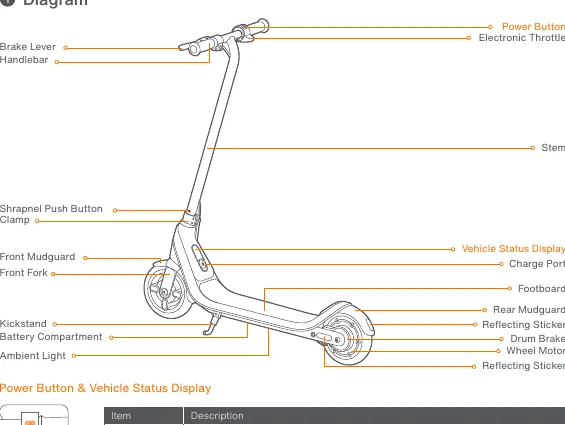
Operation and Controls
The scooter is operated via a single power button located on the handlebar. To power on the scooter, press the button. Once powered on, a single press switches between speed modes, while a triple press toggles the ambient light on or off. To power off, press and hold the button for 2 seconds. The vehicle will automatically turn off after 5 minutes of inactivity.
Speed Modes
- D (Standard mode): Max. speed 12 km/h (7.5 mph).
- S (Sport mode): Max. speed 16 km/h (9.9 mph).
- E (Power-assisting mode): Max. speed 16 km/h (9.9 mph).
Battery and Charging
The battery status is indicated by 4 bars on the display. When the battery power drops below 15%, the first bar flashes red, indicating that the scooter should be charged immediately. If the power drops below 10%, the first bar flashes red and a buzzer sounds. Always charge the scooter in an environment between 0-45°C.
Safety and Maintenance
The Ninebot eKickScooter C2 Lite is certified to ANSI/CAN/UL-2272 standards. Users are responsible for disposing of electrical and electronic waste at designated collection points to prevent environmental harm. Regular maintenance, such as checking tire pressure and ensuring all bolts are tightened, is essential for safe operation. Do not mix old batteries with unsorted municipal waste; use separate collection systems for battery recycling.
Manufacturer information
Segway-Ninebot
Practical help
Common problems
Battery level below 15%
The first battery bar will flash red. Please charge your scooter immediately.
Battery level below 10%
The first battery bar will flash red and the buzzer will ring. Charge the scooter immediately.
Before use
- Ensure the battery is fully charged.
- Check that the handlebar is securely tightened.
- Verify that the brake lever is functioning correctly.
- Ensure the tires are in good condition.
- Check that the ambient light is working if needed.
- Confirm the rider is within the recommended age (6-10 years) and weight (20-50 kg) limits.
Specs in practice
- Payload Capacity
- The maximum weight the scooter can support, between 20-50 kg (44-110 lbs).
- Charging Duration
- The approximate time required to fully charge the battery, which is about 5.5 hours.
- Nominal Power
- The continuous power output of the motor, rated at 120 W.
Images and diagrams
- The handlebar contains the electronic throttle and brake lever.
- The stem connects the handlebar to the front fork and wheel.
- The footboard houses the battery compartment and kickstand.
- The rear wheel contains the motor and drum brake.
- The vehicle status display shows speed modes and battery levels.
Model compatibility
- Certified to ANSI/CAN/UL-2272 by TUV Rheinland.
- Battery complies with UN/DOT 38.3 and ANSI/CAN/UL-2271.
- Complies with EU Electromagnetic Compatibility Directive 2014/30/EU.
- Complies with RoHS Directive 2011/65/EU and amendment 2015/863.

Manual page author
Emily Carter
User documentation editor
Prepares concise manual descriptions and highlights the most useful setup, operation, and maintenance information for readers.