Power / Portable Power Stations
Omnicharge Omni 20c+ User Manual
Quick guide for the Omnicharge Omni 20c+ portable power bank. Learn how to calibrate the battery, use USB-C and USB-A ports, activate Hub mode, and understand screen icons and settings.
Quick answers from the manual
Quick answer
- The Omni 20c+ is a portable power bank with a 71Wh capacity, featuring 100W/60W USB-C ports, dual QC 3.0 USB-A ports, and 10W wireless charging. It also functions as a USB hub for file transfers. p. 4, 10, 12
Key actions
- Calibrate battery p. 3
- Activate Hub mode p. 9
First start
- Calibrate the battery within the first 7 days. p. 3
Problems and fixes
Wireless charging interruptions
Fine-tune phone position for better coil alignment.
p. 11Maintenance and reset
- Recharge at least every 6 months. p. 3
Technical specifications
| Parameter | Value | Meaning | Pages |
|---|---|---|---|
| Capacity | 71Wh (20,100mAh at 3.6V) | Total energy storage. | p. 12 |
| Max Output | 100W | Combined max output for USB-A/USB-C ports. | p. 10 |
Where to find it in the PDF
- Battery Calibration p. 3
- Ports and Buttons p. 4
- Technical Specifications p. 12
Table of contents
Manual images
Click an image to enlargeQuick Start and Battery Calibration
To ensure accurate battery percentage readings, you must calibrate the battery within the first seven days of receiving the product. Follow these steps:
- Fully discharge the Omnicharge until the screen turns off. Press the Power Button to confirm the empty battery icon appears.
- Fully charge the Omnicharge to 100% to finish the calibration.
Note: The battery must be recharged at least every 6 months to avoid over-depletion, which can cause malfunctions not covered by warranty.
Ports and Buttons
The device features multiple ports and controls:
- 60W USB-C port: For charging devices.
- 100W USB-C port: High-power output.
- Quick Charge USB (QC 3.0): Two ports for standard USB-A devices.
- Wireless Charging: Located on the top surface.
- Power and Menu Button: Used for power control and menu navigation.
- USB Hub Button: Activates Hub mode.
- USB-C Output Button: Toggles USB-C ports on/off.
Using Hub Mode
The Omni 20c+ can function as a USB hub to transfer files between devices:
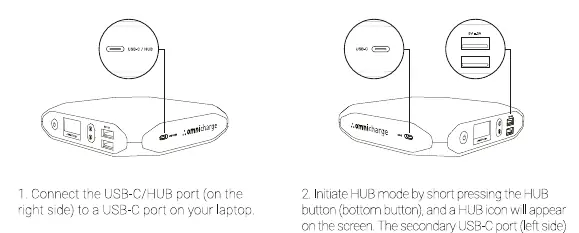
- Connect the USB-C/HUB port (right side) to a USB-C port on your laptop.
- Short press the HUB button. A HUB icon will appear on the screen.
- The secondary USB-C port and the two USB-A ports can now be used to transfer files from smartphones, flash drives, cameras, or other standard devices.
Wireless Charging
To use wireless charging:
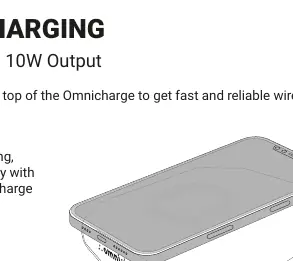
- Place your phone on top of the Omnicharge.
- For optimal charging, align your phone horizontally with the back edge of the Omnicharge.
- A flashing wireless icon indicates the phone has been detected.
- If charging is interrupted, fine-tune the phone's position to correct alignment deviations between the transmitter and receiver coils.
Menu Navigation
Double press the Power/Menu button to enter the menu. Use the USB-C Output button (Move Up) and USB Hub button (Move Down) to navigate. Options include:
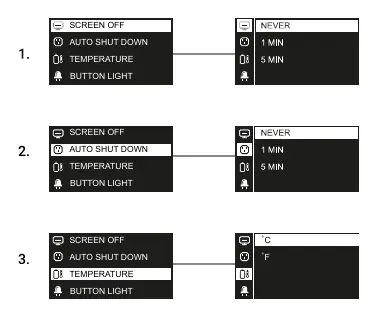
- Screen Off Timer: Set auto shut-off time (default 5 min).
- Auto Shut Down: Set power auto shut-off time (default 5 min).
- Temperature: Toggle between Celsius and Fahrenheit.
- Button Light: Turn button lights on or off.
- About: View model name, capacity, firmware version, and serial number.
Safety and Protection
The device includes several protection features:
- Low Temperature Protection: Charging circuit shuts off if the battery is too cold.
- Overheating Protection: Limits or cuts off power if the battery is too hot.
- Low Power Protection: Cuts off output during pass-through charging if the battery level is low.
- Overpower Protection: Limits or cuts off output if the connected device draws too much power.
- Overvoltage Protection: Shuts off the input charging circuit if input voltage exceeds limits.
Practical help
Common problems
Battery percentage reading is inaccurate
Calibrate the battery by fully discharging it until the screen turns off, then fully charging it to 100%.
Wireless charging stops after a few seconds
This is likely due to alignment deviations. Fine-tune the phone's position on the Omnicharge until charging becomes stable.
Device is charging the power bank instead of being charged
Ensure the Omnicharge is powered on before plugging in your device.
Before use
- Calibrate the battery within the first 7 days of receipt.
- Ensure the device is powered on before connecting external devices.
- Place phone horizontally towards the back of the unit for wireless charging.
Specs in practice
- USB-C Output
- Left port up to 60W; Right port up to 100W.
- Operating Temperature
- 0°C to 40°C.
Images and diagrams
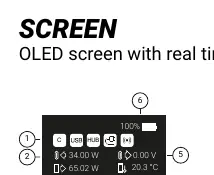
- The OLED screen displays real-time metrics including battery percentage, temperature, and power output for each port.
- The status icons (C, USB, HUB) indicate which features are currently active.
Model compatibility
- USB-A ports are QC 3.0 compatible.
- Wireless charging is Qi compatible (10W output).

Manual page author
Emily Carter
User documentation editor
Prepares concise manual descriptions and highlights the most useful setup, operation, and maintenance information for readers.