Music / Guitar Effects
User Manual for Peavey PV10AT and PV10BT Compact Mixer
Comprehensive user guide for the Peavey PV10AT and PV10BT compact mixers. Includes setup instructions, channel control explanations, Auto-Tune operation, USB/Bluetooth connectivity, and technical specifications.
Table of contents
Manual images
Click an image to enlargeQuick Guide from the Manual
The Peavey PV10AT and PV10BT are studio-quality compact mixers designed for small venues and home recording. The PV10AT model includes Antares Auto-Tune functionality. Key features include 4 mic preamps, Bluetooth connectivity, USB-A MP3 playback, USB-B streaming, and Kosmos-C audio enhancement. Ensure proper ventilation with at least 8 inches of clearance on top and 12 inches on the sides and back.
Channel Controls (1-8)
Channels 1-8 feature comprehensive control for shaping your sound:

- Gain: Adjusts input sensitivity. Use the Solo system to monitor levels and avoid distortion.
- 150 Hz Hi-Pass Filter: Removes low-frequency rumble and noise.
- Compression (Ch 1-2): Controls peak levels for live sources.
- Mid-Morph EQ: A unique EQ that cuts at 250Hz (muddy sounds) or boosts at 4kHz (vocal intelligibility).
- Aux Send: Sends signal to stage monitors or external processors.
- Pan Control: Places the signal in the stereo field.
- Mute Switch: Silences the channel from the main mix, aux, and effects.
Stereo Channels (9/10)
These channels are designed for stereo sources like MP3 players, CD players, or external processors. If only one jack is used, it acts as a mono source. Use the Stereo In Level to control the volume.
Master Section and Outputs
The master section controls the final output of the mixer:
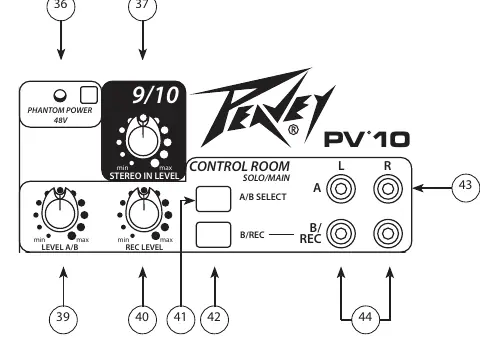
- Main Level Faders: Control the overall volume sent to the Main Left/Right outputs.
- Control Room Monitor: Allows for independent monitoring of the mix. The A/B switch lets you toggle between two sets of monitors.
- Phantom Power (48V): Provides power to condenser microphones. Do not use with unbalanced dynamic mics.
- Main Outputs: Available as balanced XLR and 1/4" TRS connectors.
Auto-Tune Operation (PV10AT)
The PV10AT features Antares Auto-Tune. To operate:
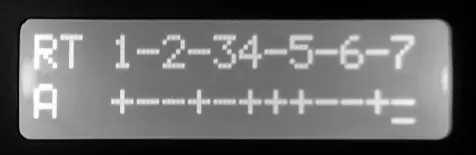
- Press the Auto-Tune button to enter Edit Mode.
- Use the EFX Select knob to navigate presets.
- Press the knob to select a preset, then edit the Key, Speed, and Detune parameters.
- Use the footswitch (optional) to bypass Auto-Tune between songs to avoid processing spoken banter.
USB and Bluetooth Connectivity
Bluetooth: Press the Pairing button to connect. The LED indicates status (flashing = available, solid = paired). To clear memory, hold the button for 5 seconds.
USB Playback (USB A): Insert a flash drive with MP3 files. Use the Media Select knob to navigate folders and songs.
USB Recording (USB B): Connect to a computer for DAW recording. Use the USB To Control Room control to monitor the return signal from the computer.
Technical Specifications
- Frequency Response: 14 Hz to 25 kHz (+0 dB/-1 dB) at max gain.
- Total Harmonic Distortion:<0.006% typical.
- Power Requirements: 100-240 VAC, 50/60 Hz, 15 Watts.
- Dimensions: 12.75" W x 15.1" D x 2.1875" H.
Practical help
Common problems
Signal clipping/distortion
Reduce the input Gain or EQ boost. Ensure the Clip LED is not lit.
Auto-Tune sounds robotic on speech
Use footswitch #2 to bypass Auto-Tune between songs or increase the Speed setting.
Bluetooth not pairing
Ensure the mixer is in pairing mode (flashing LED). If full, clear memory by holding the Pairing button for 5 seconds.
No sound from USB playback
Ensure the Digital Source Selector is set to USB A and the drive is inserted correctly.
Before use
- Verify power supply is 15VDC, 1A (Peavey part 30908119).
- Ensure 8" clearance on top and 12" on sides/back for ventilation.
- Set all channel levels to the detent (mid-rotation) initially.
- Connect microphones to XLR inputs; use 1/4" for line/instrument sources.
- Set headphone level to 'min' before putting on headphones.
Specs in practice
- 150 Hz Hi-Pass
- Cuts low frequencies to remove stage rumble or wind noise.
- 48V Phantom Power
- Provides power for condenser microphones; do not use with unbalanced dynamic mics.
Images and diagrams
- The block diagram illustrates the signal flow from inputs (XLR/Line) through the preamp, EQ, and compressor stages.
- It shows the routing of the Aux and EFX buses, and how the Solo system intercepts signals for monitoring.
- The diagram highlights the separation of the Main L/R bus from the Control Room and USB streaming outputs.
Model compatibility
- USB B port compatible with Windows Vista/7/8, Mac OS X 10.0+, and iOS devices.
- 1/4" inputs on channels 5/6 and 9/10 are mono unless both jacks are connected (stereo).

Manual page author
Michael Turner
Technical manual editor
Reviews PDF manuals for structure, safety notes, and practical product details so readers can find the right information quickly.