Electronics / Audio
Peavey Session-LTD 400 Preamp Pedal User Guide
Quick guide for the Peavey Session-LTD 400 Preamp Pedal. Learn about control settings, power requirements, connection chains for amplifiers and sound systems, and usage tips.
Table of contents
Quick guide from the manual
The Peavey Session-LTD 400 Preamp Pedal is designed to replicate the preamp section of the original 1974 Peavey Session 400 amplifier. It is not a boost pedal and does not contain a built-in amplifier, meaning it cannot drive speakers or headphones directly. It must be connected to an external amplifier or PA system. Important: Always use a 9VDC, negative-tip power supply. Using a positive-tip power supply will damage the unit and void the warranty.
Control Functions
The pedal features several controls to shape your tone:
- Volume Control: Sets the gain of the input preamp. It does not indicate power output.
- Bass Control: Part of an electronic crossover; provides boost and cut for bass frequencies.
- Treble Control: Part of an electronic crossover; provides boost and cut for treble frequencies.
- Mid Control: A cut-type control to tailor midrange frequencies.
- Sensitivity Control: Allows the player to cut or boost sensitivity to manage noise or signal levels.
- Shift Control: Selects the specific frequency range in the midrange spectrum to cut.
- Presence Control: Adjusts the extreme top end (treble) and brings out upper harmonics.
- Bypass Switch: Hard-bypass switch with anti-click circuitry for quiet operation.
Connections and Power
The pedal includes an instrument input and an output capable of driving PA systems, instrument amplifiers, or signal processors. The unit can be powered by a 9V battery, though operating time is limited to approximately two hours due to the 25V preamp design. For extended use, a wall-wart power supply (9VDC, 250mA or greater, negative tip) is recommended.
Usage and Connection Chains
Depending on your setup, use the following signal chains:
- For Sound Systems (In-ear/Stage monitors): Instrument output -> Volume pedal -> Effects -> Session-LTD -> Direct box -> Sound system input.
- For Combo Amplifiers (Peavey style): Instrument -> Volume Pedal -> Effects -> Session-LTD -> POST EQ Return (allows use of amp's internal reverb).
- Alternative Combo Setup: Instrument -> Volume Pedal -> Effects -> Session-LTD -> POWER AMP IN (bypasses internal reverb).
- Alternative Combo Setup: Instrument -> Volume Pedal -> Effects -> Session-LTD -> Normal amp input (allows access to amp tone controls).
Quick Start Settings
The manual provides suggested settings for different instruments:
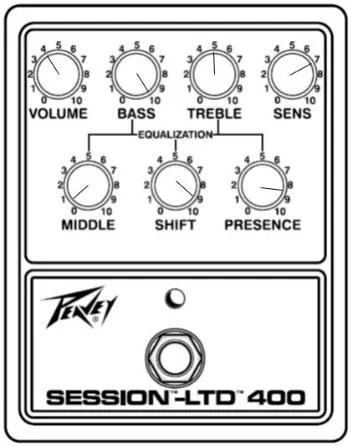
- Classic 1974 Session 400: Use the provided control layout to emulate the original sound.
- Modern Steel: Adjust settings to suit modern steel guitar requirements.
- Fiddle: Specific settings are recommended to optimize the preamp for fiddle performance.
Practical help
Common problems
Unit not powering on or acting erratically
Verify the power supply is 9VDC with a negative tip. Using a positive tip supply will damage the unit.
Battery drains very quickly
The unit is a 25V preamp; a 9V battery will only last for approximately two hours. Use a wall-wart power supply for longer sessions.
No sound output
The pedal has no built-in amplifier. Ensure it is connected to an external PA system, instrument amplifier, or signal processor.
Before use
- Verify power supply is 9VDC, negative tip, 250mA or greater.
- Ensure you are connecting to an external amplifier or PA system.
- If using a battery, be aware of the short operating time (approx. 2 hours).
- Check that the signal chain matches your intended output (PA vs. Combo Amp).
Specs in practice
- 9VDC (NEG TIP)
- Standard barrel-type power supply requirement with negative polarity at the center pin.
Images and diagrams
- The pedal features 7 rotary knobs for tone shaping and a bypass switch.
- The rear panel contains the instrument input, output, and power supply jack.
Model compatibility
- Designed to replace the preamp section of an amplifier.
- Not a boost pedal; it is an exact duplicate of the original Session 400 preamp.
- Compatible with most combo amps, PA systems, and signal processors.

Manual page author
Michael Turner
Technical manual editor
Reviews PDF manuals for structure, safety notes, and practical product details so readers can find the right information quickly.