Electronics / Amplifiers Receivers
User Manual for Peavey Bandit Supreme Teal Stripe Preamp Pedal
Quick guide for the Peavey Bandit Supreme Teal Stripe Preamp Pedal. Learn how to use the Supersat control, EQ settings, gain switches, and power requirements.
Table of contents
Quick Guide for Peavey Bandit Supreme
The Peavey Bandit Supreme Teal Stripe Preamp Pedal is a precise recreation of the 2nd generation Peavey Bandit 112/Supreme 160 "Teal Stripe" Lead channel circuit from circa 1990. It features active EQ, hard bypass, and versatile output options for use with power amps, mixers, or instrument amplifiers.
Control Descriptions
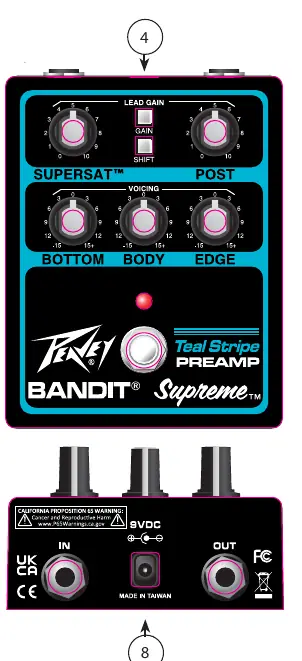
- 1. SUPERSAT Control: A transistor simulation of tube distortion (soft clipping).
- 2. POST GAIN: Controls the overall volume level of the lead channel. Adjust this after achieving your desired sound.
- 3. BOTTOM, BODY, and EDGE EQ: Active tone controls. BOTTOM varies low frequency boost/cut (+/-15 dB). BODY varies mid frequency boost/cut (+/-15 dB). EDGE varies high frequency boost/cut (+/-15 dB). Note: The Edge control is not functional on the normal channel.
- 4. GAIN and SHIFT Switches: GAIN switch boosts overall system gain (depress to activate). SHIFT switch changes the frequency at which the "body" control operates.
- 5. SWITCH: Hard-bypass switch with anti-click circuitry for quiet operation.
- 6. IN: Input signal from your instrument.
- 7. OUTPUT: Signal output for driving power amps, effects returns, mixers, or PA systems. Output impedance is 1 kΩ.
- 8. POWER SUPPLY: Input for standard 9VDC barrel-type, negative tipped power supply (#30908180) or 9V battery (#00050130).
Power Supply
The pedal operates on a standard 9VDC (negative tip) power supply. The positive and negative rails are generated internally by a high-efficiency inverter circuit.
Practical help
Common problems
No sound output
Ensure the instrument is connected to the IN jack, the output is connected to an amplifier or mixer, and the 9V power supply or battery is properly installed.
Edge EQ control not working
The Edge control is not functional when the pedal is set to the normal channel.
Before use
- Ensure you have a 9VDC negative tip power supply or a 9V battery.
- Connect your instrument to the IN jack.
- Connect the OUTPUT to your amplifier, mixer, or effects return.
- Set the POST GAIN to a low level before turning on to avoid sudden volume spikes.
Specs in practice
- Output Impedance
- 1 kΩ, suitable for driving power amps, mixers, and PA systems.
- Power Requirement
- 9VDC (Negative Tip) or 9V battery.
Images and diagrams
- The front panel contains 8 numbered controls: Supersat, Post Gain, EQ (Bottom, Body, Edge), Gain/Shift switches, Bypass switch, Input, Output, and Power input.
Model compatibility
- The pedal is designed to drive power amps, effects returns, mixers, DDAW, PA systems, and instrument amplifiers.

Manual page author
David Miller
Documentation analyst
Organizes user manual content into clear summaries, with attention to model details, product context, and everyday usability.