Lighting / Smart Lighting
Philips Hue Outdoor Light Bar 17466/P7 User Manual
Quick guide for installing and setting up your Philips Hue outdoor light bar 17466/P7. Includes mounting instructions for grass and hard surfaces, power connection, and system limitations.
Quick answers from the manual
Quick answer
- This manual provides installation and setup instructions for the Philips Hue outdoor light bar (17466/P7). It covers mounting methods for grass and hard surfaces, power supply requirements, and system limitations. p. 1, 4, 6, 7
Key actions
- Mounting in grass p. 6
- Mounting on hard surface p. 7
- Connecting power p. 8
First start
- Visit the setup website p. 10
Technical specifications
| Parameter | Value | Meaning | Pages |
|---|---|---|---|
| Power Supply | Philips Hue 24V SELV IP67 | Required power supply type | p. 11 |
| Max Cable Length | 35m / 114ft | Maximum system length | p. 11 |
Where to find it in the PDF
- Installation p. 6, 7
- Power Connection p. 8
- System Diagram p. 11
Table of contents
Manual images
Click an image to enlargeImportant Information
This device is an outdoor lighting fixture. You must use only a Philips Hue 24V SELV IP67 LED power supply. Do not attempt to use other power sources as this may damage the device or cause safety hazards. Ensure the total cable length does not exceed 35 meters (114 ft) and the total wattage does not exceed the capacity of your power supply (40W or 100W).
What is Included
- Outdoor light bar
- Connection cable
- Connector
- Mounting hardware (stakes for grass, screws/plugs for hard surfaces)
Installation
The light bar can be installed in two ways depending on the surface:
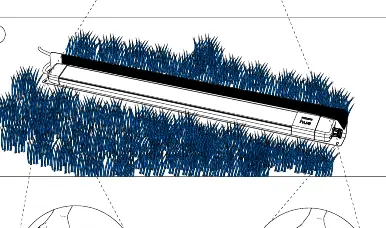
Installation in Grass
- Position the light bar in the desired location.
- Use the provided ground stake to secure the light bar into the grass.
- Ensure the light bar is stable and level.
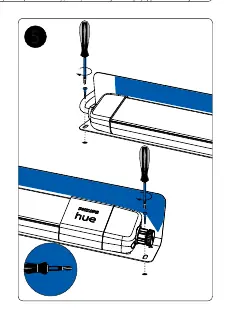
Installation on Hard Surface
- Mark the drilling points using the light bar base as a template.
- Drill holes and insert the provided wall plugs.
- Secure the light bar base to the surface using the provided screws.
Power Connection
To connect the system:
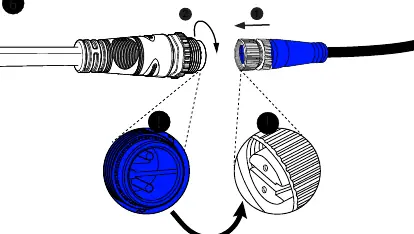
- Ensure the power supply is unplugged before making connections.
- Connect the light bar cable to the power supply cable.
- Align the connectors carefully and tighten the locking ring to ensure a secure, waterproof connection.
- Plug the power supply into an outdoor-rated socket.
System Limitations
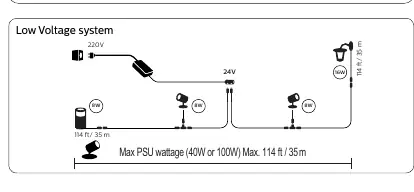
- Maximum Cable Length: 35 meters (114 ft).
- Power Supply: Must be 24V SELV IP67.
- Wattage: Do not exceed the maximum wattage of your power supply (40W or 100W).
Setup and Configuration
Once installed and powered, follow the instructions provided in the Philips Hue app or visit www.philips-hue.com/getstarted to configure your lighting system and connect it to your Hue Bridge or Bluetooth network.
Official resources from the manual
Manufacturer information
Philips
Practical help
Common problems
Light does not turn on
Check if the 24V power supply is plugged in and if the cable connectors are fully tightened and clean.
System limit reached
Ensure the total cable length is under 35m (114ft) and the total wattage of connected lights does not exceed the PSU capacity (40W or 100W).
Before use
- Verify you have a Philips Hue 24V SELV IP67 power supply.
- Check the installation surface (grass or hard surface) to select the correct mounting hardware.
- Ensure all cable connectors are free of debris before connecting.
- Plan the layout to ensure the total cable length does not exceed 35m.
Specs in practice
- 24V SELV IP67
- Required power supply specification for safe outdoor operation.
- Max 35m / 114ft
- The maximum total length of the low voltage cable system.
- Max PSU wattage
- The maximum power load the PSU can handle (40W or 100W).
Images and diagrams
- The diagram on page 11 illustrates the low voltage system layout, showing how to connect multiple lights to a single power supply.
- Page 4 shows the required spacing and safety clearance for the light bars.
Model compatibility
- Compatible only with Philips Hue 24V low voltage systems.

Manual page author
David Miller
Documentation analyst
Organizes user manual content into clear summaries, with attention to model details, product context, and everyday usability.