Lighting / LED Lamps
User Manual for Hoftronic Smart Ceiling Light
A comprehensive guide for the Hoftronic Smart Ceiling Light. Includes installation instructions, app pairing procedures, safety guidelines, and maintenance tips.
Quick answers from the manual
Quick answer
- The Hoftronic Smart Ceiling Light is a smart fixture requiring installation by a qualified electrician and setup via the Hoftronic Smart app. p. 1, 2, 3
Key actions
- Install the light p. 3
- Pair with app p. 2
First start
- Download the Hoftronic Smart app, register, and follow the in-app instructions to add the device. p. 2
Problems and fixes
Device not pairing
Ensure the light is flashing rapidly. Toggle power On-Off-On-Off-On-Off-On to reset to pairing mode.
p. 2Maintenance and reset
- Clean with soft, dry cloths only. Do not use chemical detergents. p. 8
Where to find it in the PDF
- Installation Instructions p. 3
- App Setup p. 2
Table of contents
Quick guide from the manual
The Hoftronic Smart Ceiling Light is a Wi-Fi and BLE-enabled lighting fixture designed for both indoor and outdoor use. This manual provides essential information for installation and smart app configuration. Please note that installation must be performed by a qualified electrician in accordance with local electrical and building regulations.
Installation instructions
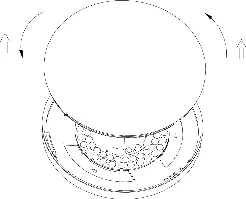
- Preparation: Ensure the AC/Mains power is completely disconnected and cannot be accidentally reconnected during the installation process.
- Opening: Twist the ceiling light's diffuser counter-clockwise to open the fixture.
- Wiring: Thread the power cable through the cable gland. Connect the lead (live) and neutral wires to the corresponding ports on the quick connector.
- Closing: Once wiring is secure, twist the ceiling light's diffuser clockwise to close the fixture.
App setup and pairing
To control your light remotely, you must connect it to the Hoftronic Smart App:
- Download: Scan the QR code on the packaging or search for "Hoftronic Smart" in the Apple App Store or Google Play Store.
- Account: Register an account using your mobile number or email address.
- Add Device: Tap the "+" icon in the top right corner of the "Home" page. Select 'Lighting' and choose the device type 'Ceiling light BLE+Wi-Fi'.
- Pairing Mode: The light must be flashing rapidly to pair. If it is not, perform the following sequence: Turn the light On-Off-On-Off-On-Off-On.
- Confirmation: Confirm in the app that the light is flashing rapidly (2x per second) to complete the connection.
Safety and maintenance
- Safety: Do not install if you are a minor or have a mental disability. Ensure the product is not covered and has free air access.
- Maintenance: Perform maintenance only when the power is off and the product has cooled down. Clean using only soft, dry cloths. Do not use chemical detergents.
- Environment: Do not use in unfavorable conditions such as dust, moisture, vibrations, or explosive atmospheres.
Manufacturer information
Hoftronic
Practical help
Common problems
Light not connecting to the app
Ensure the light is in pairing mode (flashing rapidly). If not, toggle the power switch: On-Off-On-Off-On-Off-On.
Installation safety
The product must be installed by a qualified electrician. Ensure power is disconnected before starting.
Before use
- Ensure power supply is disconnected.
- Verify mobile device OS is at least iOS 9 or Android 4.4.
- Download the Hoftronic Smart App.
- Ensure the installation area is suitable for the IP rating.
- Check that the cable diameter matches the cable gland.
Specs in practice
- IP Protection
- Ensure the correct cable diameter is used for the cable gland to maintain the intended IP protection level.
- Compatibility
- Works with Amazon Alexa, Google Assistant, and Siri.
Model compatibility
- Suitable for both indoor and outdoor use.
- Requires Wi-Fi and Bluetooth (BLE) for smart features.

Manual page author
Michael Turner
Technical manual editor
Reviews PDF manuals for structure, safety notes, and practical product details so readers can find the right information quickly.