Health / Personal Care
User Guide for Philips 23-in-1 Trimmer 9000 Series MG9561/30
Quick guide for the Philips 23-in-1 Trimmer 9000 Series (MG9561/30). Learn about features, attachments, charging, and maintenance for your all-in-one grooming kit.
PDF source: NO · summary: English
Quick answers from the manual
Quick answer
- The Philips 23-in-1 Trimmer 9000 Series (MG9561/30) is an all-in-one grooming tool for face, head, and body. It features 23 tools, OneBlade technology, and a 120-minute battery life. p. 1, 2, 3
Key actions
- Charging the device p. 3, 4
- Cleaning the device p. 3
First start
- Charge the device fully before first use. p. 3, 4
Show 3 more answers Show less
Maintenance and reset
- Rinse the device under running water for cleaning. p. 3
Technical specifications
| Parameter | Value | Meaning | Pages |
|---|---|---|---|
| Battery Type | Lithium Li-ion | Rechargeable battery | p. 4 |
| Runtime | 120 minutes | Cordless operation time | p. 3, 4 |
| Charging Time | 60 minutes | Time to full charge | p. 4 |
Where to find it in the PDF
- Product Overview p. 1
- Features p. 2, 3
- Specifications p. 4
Table of contents
Manual images
Click an image to enlargeQuick guide from the manual
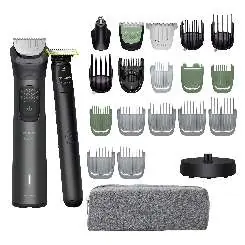
The Philips 23-in-1 Trimmer 9000 Series (MG9561/30) is a versatile grooming tool designed for face, head, and body care. This device features 23 tools, including the OneBlade technology for precise styling and shaving, and a high-performance battery providing up to 120 minutes of runtime. The device is 100% waterproof, allowing for both wet and dry use.
Features and Technology
- BeardSense Technology: Scans beard density 125 times per second to adjust power for consistent results.
- OneBlade Technology: Designed for styling and shaving with 6000 cuts per minute, featuring a glide coating and rounded tips to protect the skin.
- Self-sharpening blades: Steel blades that maintain sharpness without the need for oil.
- Ergonomic Design: Features a rubber grip for better control and comfort during use.
Attachments and Combs
The kit includes 23 tools to cover all grooming needs:

- Precision Comb: 11 length settings in 0.2 mm increments (1–3 mm).
- Adjustable Combs: 3–7 mm, 9–13 mm, 16–20 mm.
- Hair Combs: 4 mm, 9 mm, 12 mm, 16 mm.
- Body Combs: 3 mm, 5 mm.
- Eyebrow Comb: 6 mm.
- Specialized Attachments: Metal trimmer, nose trimmer, OneBlade handle and blade, body trimmer, and wide hair clipper (41 mm).
Charging and Battery
The device is powered by a Lithium Li-ion battery.
- Runtime: Up to 120 minutes.
- Charging Time: 60 minutes for a full charge.
- Quick Charge: A 5-minute quick charge provides enough power for one trimming session.
- Indicator: The battery indicator shows status (low, empty, charging, full).
- Charging Method: USB-A charging (5V / ≥1A). Note: The adapter is not included.
Usage and Maintenance

- Wet and Dry Use: The trimmer is 100% waterproof and can be used in the shower.
- Cleaning: The device is easy to clean by rinsing under running water.
- Travel: Includes a travel case and a travel lock feature to prevent accidental activation.
Manufacturer information
Philips
Practical help
Common problems
Battery running low
Check the battery indicator. Charge the device using a USB-A cable (5V/1A). A 5-minute quick charge provides enough power for one session.
Trimming unevenly
Ensure the correct comb is securely attached and the blade is clean. Check if the battery is sufficiently charged.
Before use
- Charge the device fully before the first use.
- Ensure the desired attachment or comb is securely clicked into place.
- Check the battery indicator to ensure sufficient power.
- Ensure the device is clean.
Show more Show less
Specs in practice
- Charging Time
- 60 minutes for a full charge.
Images and diagrams
- The kit includes various combs for different hair lengths and body areas.
- The precision comb allows for 0.2 mm adjustments.
- The battery indicator is located on the handle.
Model compatibility
- USB-A adapter is not included in the box.
- The device is 100% waterproof.

Manual page author
Michael Turner
Technical manual editor