Smart Home / Smart Switches
User Manual for Philips Hue Wall Switch Module
Quick installation and setup guide for the Philips Hue Wall Switch Module. Learn how to safely install the module, connect wires, replace the battery, and configure it with the Hue app.
Table of contents
Manual images
Click an image to enlargeQuick guide from the manual
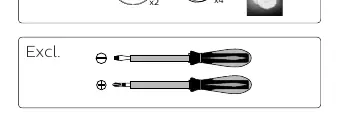
The Philips Hue Wall Switch Module allows you to make your existing wall switches smart. Before beginning, ensure you have the necessary tools: a flathead screwdriver and a Phillips screwdriver. Please note that in some countries, work on electrical installations is only allowed by a qualified electrician. If you are unsure, contact a local electrician or authority.
Important Safety Warning: The electrical circuit and the attached light source will always remain powered after installation. Always turn off the circuit at the breaker when replacing a light fixture or the module battery.
Installation
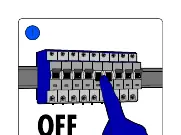
- Turn off the main power circuit at the breaker.
- Open your existing wall switch.
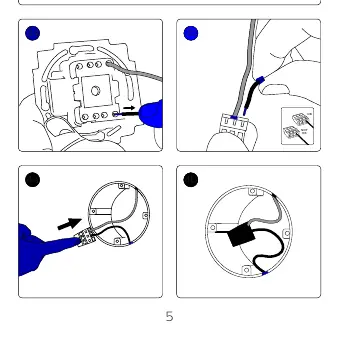
- Connect the wires to the module as shown in the wiring diagrams for single or double switches.
- Place the module into the wall box.
- Close the wall switch.
- Turn the power back on at the breaker.
- Use the Philips Hue app to configure the module.
Battery Replacement
The module uses a CR 2450 battery. To replace it:
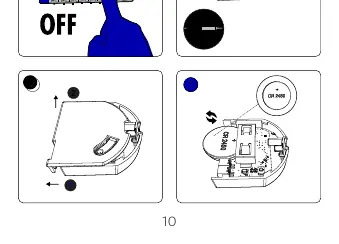
- Turn off the power at the circuit breaker.
- Open the wall switch to access the module.
- Remove the module from the wall box.
- Use a screwdriver to open the module casing.
- Replace the old battery with a new CR 2450 battery.
- Close the casing and reinstall the module.
- Turn the power back on.
Configuration
After installation and restoring power, ensure your internet connection is active. Open the Philips Hue app on your smartphone to complete the setup and link the switch module to your lighting system. For further support, visit www.philips-hue.com/wallswitchmodulesupport.
Official resources from the manual
Manufacturer information
Philips
Practical help
Common problems
Circuit remains powered
The electrical circuit and attached light source will always be powered after installation. You must turn off the circuit at the breaker when replacing a light fixture or the module battery.
Installation restrictions
In some countries, work on electrical installations is only allowed by a qualified electrician. Contact a local electrician or authority if you are not qualified.
Before use
- Ensure you have a flathead screwdriver.
- Ensure you have a Phillips screwdriver.
- Verify local regulations regarding electrical installation work.
- Turn off the main power circuit at the breaker before starting any work.
Specs in practice
- Battery Type
- CR 2450
Images and diagrams
- Steps 1-13 detail the wiring process for single and double switches.
- Steps 14-15 cover power restoration and app configuration.
- Steps 1-5 on page 10-11 detail the battery replacement process.
Model compatibility
- Requires Philips Hue Bridge for full functionality.

Manual page author
Emily Carter
User documentation editor
Prepares concise manual descriptions and highlights the most useful setup, operation, and maintenance information for readers.