Lighting / Controllers & Dimmers
User Manual for EcoDim Eco-Dim.05 Zigbee Smart Dual Dimmer Switch
Quick guide for the EcoDim Eco-Dim.05 Zigbee Smart Dual Dimmer Switch. Includes installation steps, wiring diagrams, MIN/MAX light adjustment, and Zigbee pairing instructions.
Table of contents
Manual images
Click an image to enlargeQuick guide from the manual
The EcoDim Eco-Dim.05 Zigbee is a smart dual dimmer switch designed for 2x0-100W LED lighting. This guide provides essential information for installation, configuration, and integration into your Zigbee smart home network. Always ensure the electricity is switched off before performing any installation work.
Product Overview
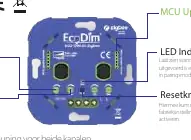
The device features two rotary knobs for dimming, a reset button for pairing and factory resets, and an LED indicator for status updates. It supports voice control via Amazon Alexa and Google Assistant and is compatible with various smart home apps.
Specifications
- Input voltage: 220-240V~ 50Hz
- Load: 2x100W LED / 2x10-100W Halogen/Incandescent
- Dimming type: R,C Phase cut
- Working temperature: -10-40°C
- Operation: Push/Turn button
- Weight: 83g
Installation
Warning: Installation must be carried out by a qualified specialist in compliance with local regulations. Ensure the power supply is switched off during all work.
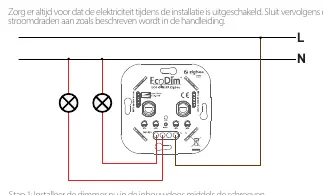
- Install the dimmer in the mounting box using the screws.
- Connect the wires as indicated in the connection diagram.
- Switch the electricity back on.
- Switch on the connected lights by pressing the dimmer shaft.
- Adjust the MIN/MAX settings as described below.
- Connect the dimmer to your SMART home system if required.
- Place back the cover plate and dimmer knob.
MIN/MAX Adjustment
To ensure optimal performance, you can adjust the minimum and maximum light levels:
- MIN adjustment: Switch on the lights. Insert a screwdriver into the MIN slot and turn to the left. When the light becomes unstable, turn slightly back to the right until the light remains steady.
- MAX adjustment: Switch on the lights. Insert a screwdriver into the MAX slot and turn to the right. When the light becomes unstable, turn slightly back to the left until the light remains steady.
Zigbee Operation
Factory Reset
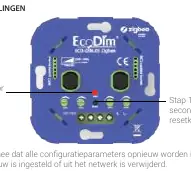
- Press and hold the reset button for at least 5 seconds.
- The indicator will stay red for 10 seconds when the reset is complete. Note that all configuration parameters will be reset.
Include to the Zigbee Network
- Remove the device from any previous Zigbee network if it has already been added.
- Press the reset button twice.
- The indicator starts blinking blue and stays solid for 10 seconds when pairing succeeds.
Removing the Device
There are two methods to remove the device from the Zigbee network:
- Method 1: Use your Zigbee Hub interface to wipe or reset the device.
- Method 2: Press the reset button three times. The indicator will start blinking purple and stay on for 10 seconds when removal is complete.
Manufacturer information
EcoDim B.V.
Practical help
Common problems
Pairing fails
Ensure the device is removed from any previous Zigbee network before attempting to pair.
Light is unstable
Adjust the MIN/MAX settings using a screwdriver to stabilize the light output.
TouchLink not working
Ensure both devices are not yet added to a Zigbee network and are within 10cm of each other.
Before use
- Ensure electricity is switched off before installation.
- Verify the load is within 2x0-100W LED range.
- Check if the wall box is suitable for installation.
- Have a small screwdriver ready for MIN/MAX adjustment.
Specs in practice
- Dimming type: R,C Phase cut
- Indicates the method used to dim the lights, compatible with most LED and halogen bulbs.
- Input voltage: 220-240V~ 50Hz
- Standard mains power requirement for the device.
Images and diagrams
- The wiring diagram illustrates the connection of Live (L) and Neutral (N) lines to the dimmer and the two light circuits.
- The reset button is located on the front panel for pairing and factory reset operations.
Model compatibility
- Compatible with Amazon Alexa, Google Assistant, Philips Hue, Homey, Aeotec SmartThings, Trust, WINK, AduroSmart.
- Suitable for Berker by Hager, Busch-Jaeger, Gira, JUNG, Kopp, Merten by Schneider, PEHA cover materials.

Manual page author
Emily Carter
User documentation editor
Prepares concise manual descriptions and highlights the most useful setup, operation, and maintenance information for readers.