Power / Batteries & Chargers
User Manual for Pisen 2-in-1 Wireless Charging Stand TP-C30
Quick guide for the Pisen 2-in-1 Wireless Charging Stand (TP-C30). Learn about technical specifications, LED indicator status, safety precautions, and device usage.
Quick answers from the manual
Quick answer
- The Pisen TP-C30 is a 2-in-1 wireless charging stand. It features a magnetic charging area for phones and a desktop charging area for phones or earphones. Status is indicated by an LED light (Blue: Standby, Green: Foreign body, Red: Charging). p. 1
Key actions
- Remove foreign objects if the green light flashes. p. 1
Problems and fixes
Green light flashing
Foreign body detected. Remove metal or magnetic objects.
p. 1Technical specifications
| Parameter | Value | Meaning | Pages |
|---|---|---|---|
| Standby power | 1.2W MAX | Power consumption when idle | p. 1 |
| Transmission distance | 3-6mm | Effective charging range | p. 1 |
| Working Temperature | -10°C-40°C | Operating environment range | p. 1 |
Where to find it in the PDF
- Product Overview and Specifications p. 1
Table of contents
Manual images
Click an image to enlargeQuick guide from the manual
The Pisen 2-in-1 Wireless Charging Stand (TP-C30) is designed to charge mobile phones and earphones wirelessly. It features two distinct charging areas: a magnetic area for mobile phones and a desktop area for other compatible devices. Ensure the device is placed on a stable surface and keep magnetic cards away from the charging area to prevent interference.
Product Overview
The device consists of the following main components:
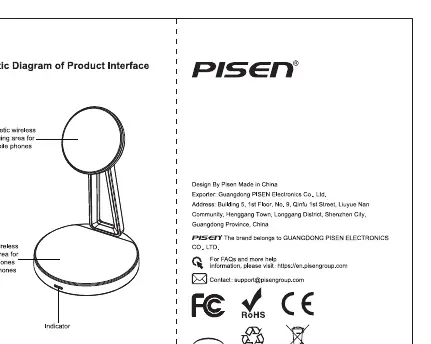
- Magnetic wireless charging area: Located on the upper part of the stand for mobile phones.
- Desktop wireless charging area: Located on the base for mobile phones and earphones.
- Indicator: Displays the current charging status.
LED Indicator Status
The indicator light provides feedback on the charging status:
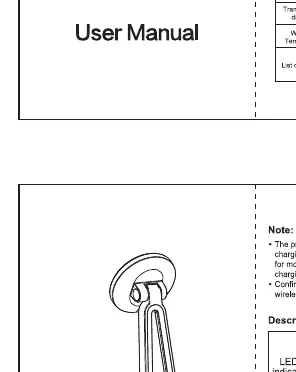
- Blue light (always on): Standby mode.
- Green light (flashing): Foreign body detected. Please remove any metal or magnetic objects from the charging area.
- Red light (always on): Wireless charging is in progress.
Safety Precautions
To ensure safe operation, please adhere to the following guidelines:
- Do not place the product on carpets, textiles, or other flammable materials.
- Do not bump, squeeze, disassemble, or puncture the product.
- Do not expose the product to high temperatures or humid environments.
- Keep magnetic cards, bank cards, and similar items away from the product during charging to avoid damage.
- If the product expands or shows defects, discontinue use immediately and contact your distributor.
Technical Specifications
- Standby power: 1.2W MAX
- Transmission distance: 3-6mm
- Working temperature: -10°C to 40°C
Manufacturer information
Guangdong Pisen Electronics Co., Ltd.
Practical help
Common problems
Green indicator light is flashing
A foreign body has been detected. Remove any metal or magnetic objects from the charging area.
Device not charging
Ensure the phone is correctly aligned with the charging area and that no magnetic cards or metal objects are interfering.
Before use
- Place the charging stand on a flat, stable surface.
- Ensure the power adapter is compatible with the device requirements.
- Remove any phone cases containing metal or magnetic materials.
- Keep the device away from direct sunlight and heat sources.
Specs in practice
- Transmission distance
- The effective range (3-6mm) within which the device can charge through a phone case.
- Working temperature
- The safe operating environment range (-10°C to 40°C).
- Standby power
- The maximum power consumption (1.2W) when the device is plugged in but not actively charging.
Images and diagrams
- The upper section is the magnetic wireless charging area for phones.
- The base section is the desktop wireless charging area for phones and earphones.
- The indicator light is located on the base to show status.
Model compatibility
- Supports Qi standard mobile phones.
- Magnetic charging area is specifically for iPhone 12 series and newer models supporting magnetic charging.

Manual page author
David Miller
Documentation analyst
Organizes user manual content into clear summaries, with attention to model details, product context, and everyday usability.