Power / Batteries & Chargers
User Manual for Powerology 1.5mm Tip Smart Apple iPad Transparent Pencil
Quick guide for the Powerology 1.5mm Tip Smart Apple iPad Transparent Pencil. Learn how to charge, connect via Bluetooth, replace the nib, and troubleshoot common issues.
Table of contents
Manual images
Click an image to enlargeQuick Guide
The Powerology Smart Apple iPad Transparent Pencil is designed for tapping, sliding, scrolling, writing, and drawing on compatible iPads. It features magnetic charging, Bluetooth connectivity, and a replaceable nib.
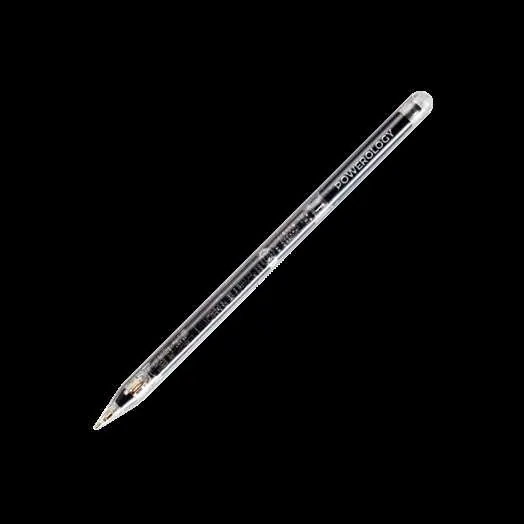
- Activation: Press and hold the top button for 3 seconds to turn the pen on or off.
- Auto-off: The pen automatically shuts down after 10 minutes of inactivity.
- Charging: Attaches magnetically to the side of compatible iPads.
- Compatibility: Works with iPads released in 2018 and later.
Product Overview
The device consists of the following key components:

- Power Button: Located at the top; press and hold for 3 seconds to switch ON/OFF.
- Indicator Light: Displays operational status.
- Replaceable Pen Nip: Can be unscrewed and replaced when worn.
- Built-In Battery: Charged via the iPad's magnetic charger.
Instructions for Use
To use the pencil, press and hold the top button for 3 seconds. The indicator light will illuminate. You can use the pencil for tasks like tapping, sliding, and scrolling. The line thickness is adjustable, and you can rest your hand on the screen while writing without accidental contact.
Bluetooth Function
To enable advanced features, connect the pencil via Bluetooth:
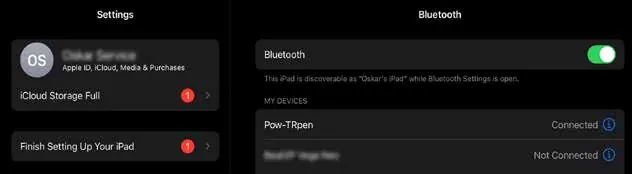
- Open the Bluetooth panel on your iPad.
- Search for the device named Pow-TRpen.
- Click and pair. Wait 5 to 10 seconds for the initial connection.
- Once connected, you can swipe right on your Home page to add the battery widget and monitor the pencil's battery level.
- A single click on the tip navigates back to the Home page; a double-click enables multitasking.
Charging
The pencil charges magnetically when attached to the side of a compatible iPad. Charging status is indicated by the light:
- Solid Red: Device is charging.
- Solid Green: Device is fully charged (light turns off after 30 seconds).
- Solid Blue: Device is in operation.
Compatible Devices
This device is compatible with iPads released in 2018 and later. It does not work with earlier versions. Ensure your iPad model is supported before use. Supported models include various iPad Pro, iPad Air, and iPad mini versions released from 2018 onwards.
Troubleshooting
- Dashed/Broken Lines: Ensure the pen nib is properly positioned and tightened. If the issue persists, replace the nib, check if your screen protector is too thick or damaged, or restart the iPad.
- Inability to Write: Ensure the application is open and supports stylus input. Confirm the iPad model is compatible and that the pencil is successfully connected via Bluetooth. Restart the pencil if necessary.
- Power Issues: Check the battery level and verify if the device is operational.
Warranty and Contact
Products purchased directly from the Powerology website or shop come with a 24-month warranty. Products bought from verified retailers are eligible for a 12-month warranty. You can extend your warranty by visiting powerology.me/warranty and submitting the required details within 48 hours of purchase. For support, contact [email protected].
Official resources from the manual
Manufacturer information
Powerology
Practical help
Common problems
Dashed or broken lines while drawing
Check if the pen nib is properly positioned and tightened. Replace the nib if worn. Check if the screen protector is too thick or damaged. Restart the iPad.
Inability to write
Ensure the application is open and supports stylus input. Confirm iPad compatibility. Check Bluetooth connection status and restart the pencil.
Issues turning on the pencil
Check the battery level and ensure the device is charged.
Before use
- Verify your iPad model is from 2018 or later.
- Charge the pencil using the iPad's magnetic charging feature.
- Press and hold the top button for 3 seconds to activate.
- Pair via Bluetooth (Pow-TRpen) for advanced features.
- Check the battery widget on your iPad to monitor power levels.
Specs in practice
- Working Time
- Approximately 9-11 hours (average 10 hours).
- Charging Time
- 2 hours.
- Standby Time
- 12 months.
Images and diagrams
- The power button is located at the top of the pencil.
- The indicator light shows charging status (Red) and full charge (Green).
- The pen nib is replaceable by unscrewing it.
Model compatibility
- Compatible with iPads released in 2018 and later.
- Does not work with earlier iPad versions.

Manual page author
Michael Turner
Technical manual editor
Reviews PDF manuals for structure, safety notes, and practical product details so readers can find the right information quickly.