Power / Batteries & Chargers
User Manual for Powerology Skye 10000mAh MagSafe Power Bank
Quick guide for the Powerology Skye 10000mAh MagSafe Power Bank. Learn about charging, LED indicators, safety precautions, and optimal performance guidelines.
Table of contents
Manual images
Click an image to enlargeQuick guide from the manual
The Powerology Skye 10000mAh MagSafe Power Bank is a portable charging solution featuring 20W Power Delivery and MagSafe compatibility. To ensure optimal performance, use only with MagSafe-compatible phone cases and avoid charging in environments exceeding 40°C. The device features a USB-C port for both input and output, and an LED screen to monitor battery status.
Product Overview
This power bank provides a 10,000mAh capacity, suitable for multiple charges. It includes built-in safety features such as overcharge protection and temperature control. The device is designed for portability and efficient charging on the go.
Schematic View
The device consists of three main components:
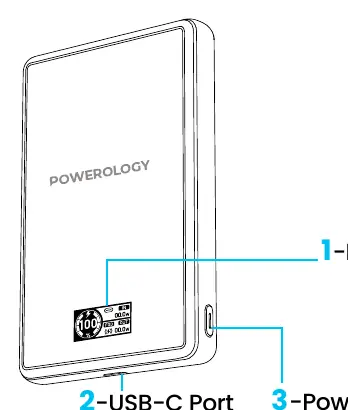
- Power Status Indicator Screen: Displays current battery level and power status.
- USB-C Port: A high-speed connection port for charging the device and connected peripherals.
- Power Button: Used to turn the device on or off.
LED Power Indicator
The display provides real-time feedback on the device status:
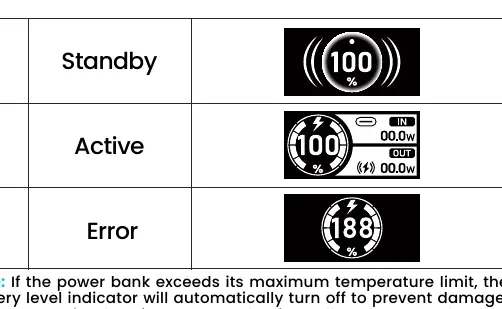
- Standby: Indicates the device is idle.
- Active: Shows the device is currently charging or discharging.
- Error: Indicates a fault. Note: If the power bank exceeds its maximum temperature limit, the indicator will automatically turn off to prevent damage. Allow the device to cool down completely before reuse.
Guidelines for Optimal Performance
- Compatibility: Only use with MagSafe-compatible phone cases for seamless attachment and charging.
- Charger Requirements: Avoid using chargers with an output of 5V/1A (5W) or lower, as they may not provide adequate power.
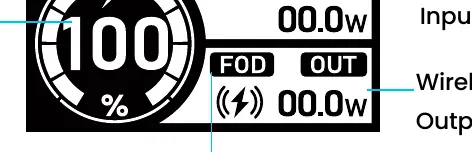
- Charging Speed: Wireless charging is generally slower than wired charging due to technological limitations.
- Temperature: Maintain an operating environment between 0°C and 40°C. Avoid excessively hot environments.
- Alignment: Ensure the device and charger are properly aligned to maximize efficiency and stability.
Safety Precautions
- Store in a cool, dry place away from direct sunlight or extreme heat.
- Do not operate in hot or humid environments.
- Use only recommended power supplies; third-party products may cause damage.
- Do not disassemble or repair the unit yourself.
- If unused for an extended period, charge and discharge at least once every three months.
- Do not use harsh chemicals for cleaning.
- Avoid dropping or applying excessive force to the unit.
Disposal and Warranty
Dispose of the battery according to local regulations; separate different types of cells and tape terminals to prevent short-circuits. Products purchased directly from the Powerology website or store come with a 24-month warranty. Products bought from verified retailers are eligible for a 12-month warranty, which can be extended by registering on powerology.me/warranty within 48 hours of purchase.
Official resources from the manual
Manufacturer information
Powerology
Practical help
Common problems
Power bank turns off automatically
The device has exceeded its maximum temperature limit. Allow it to cool down completely before using it again.
Slow charging speed
Avoid using chargers with an output of 5V/1A (5W) or lower. Ensure the device is properly aligned.
Wireless charging not working
Ensure your phone case supports MagSafe technology and is properly aligned with the charger.
Before use
- Verify your phone case is MagSafe compatible.
- Ensure the power bank is charged.
- Check that the charging environment is between 0°C and 40°C.
- Use a compatible power adapter (avoid 5V/1A or lower).
Specs in practice
- Input/Output
- USB-C port supporting up to 20W Power Delivery
- Wireless Charging
- 15W output, compatible with iPhone and Android
Images and diagrams
- 1: Power Status Indicator Screen
- 2: USB-C Port (Input/Output)
- 3: Power Button
Model compatibility
- Requires MagSafe compatible phone cases for wireless charging.
- Not compatible with non-MagSafe cases.

Manual page author
David Miller
Documentation analyst
Organizes user manual content into clear summaries, with attention to model details, product context, and everyday usability.