Power / Batteries & Chargers
Powerology 10000mAh MagSafe Power Bank User Manual
Quick guide for the Powerology 10000mAh MagSafe Power Bank. Learn how to use wireless and wired charging, understand LED indicators, and follow safety precautions.
Table of contents
Manual images
Click an image to enlargeQuick Guide
This power bank is designed for iPhones with wireless charging capabilities and supports both wired and wireless charging. It features an integrated intelligent charging controller and multiple safety mechanisms. Before first use, ensure the device is fully charged using a compatible adapter and cable.
Product Overview
The device includes the following components:
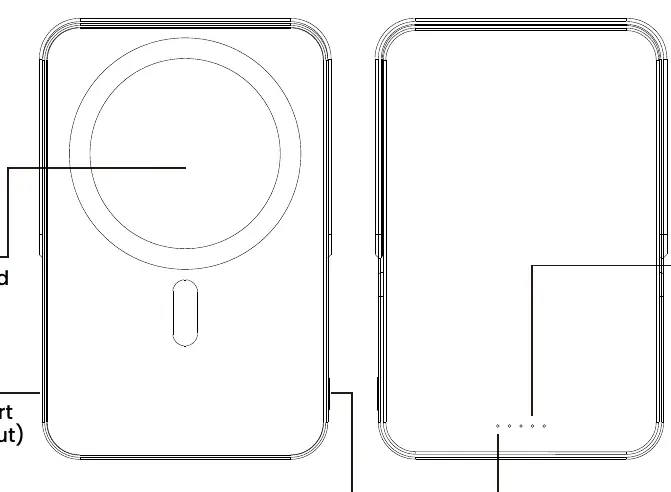
- Wireless Charging Pad: Located on the front surface for magnetic alignment.
- Type-C Charging Port: Used for both input (charging the power bank) and output (charging other devices).
- Battery Level Check Button: Press to check the remaining charge or manually activate wireless charging.
- LED Indicators: Displays battery level and wireless charging status.
Wireless Charging
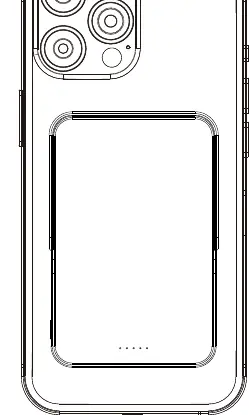
To charge a compatible iPhone, simply place it on the wireless charging pad. The device will automatically align and begin charging without needing to press any buttons. Wireless charging will deactivate automatically approximately 3 seconds after the phone is removed.
Charging Indicators
The LEDs indicate the battery level during charging and discharging. When charging the power bank, the LEDs blink to show progress:
- 0-25%: LED1 blinking, others off.
- 25-50%: LED1 on, LED2 blinking, others off.
- 50-75%: LED1 and LED2 on, LED3 blinking, LED4 off.
- 75-99%: LED1, LED2, LED3 on, LED4 blinking.
- Fully Charged: All LEDs on.
- Charging Error: All LEDs blinking.
When using the wireless charging feature, the wireless charging LED status indicates:
- Standby: On.
- Working: Solid on.
- Error: Blinking.
- Off: Off.
Warnings and Precautions
- Safety: Do not disassemble, puncture, or expose the product to water, fire, or temperatures exceeding 140°F (60°C).
- Ventilation: Avoid using the product in poorly ventilated areas like inside clothes or under pillows.
- Medical Devices: Maintain a distance of at least 20 cm from implanted medical devices such as pacemakers.
- Storage: Keep the power level at about 50% when not in use for extended periods and store in a cool, dry place.
- Magnetic Cards: Keep away from ID and bank cards to prevent demagnetization.
Specifications
- Battery: Li-ion 10000mAh.
- Type-C Input: 5V/3A, 9V/2A (18W).
- Type-C Output: 5V/3A, 9V/2.22A, 12V/1.67A (20W).
- Wireless Output: 15W.
- Simultaneous Output: 10W Max.
- Operating Temperature: -10°C to 45°C.
- Dimensions: 106.7 x 71.5 x 16mm.
Manufacturer information
Powerology
Practical help
Common problems
Battery level does not display after pressing the button.
The power bank may be in a protection state. Charge the power bank to restore its functionality.
Wireless charging is not working.
Ensure the phone is properly aligned on the pad. Check that the phone case is non-metallic and not thicker than 3mm. Ensure the power bank has sufficient charge.
Before use
- Fully charge the power bank before the first use.
- Use an adapter and charging cable that comply with the specified input requirements.
- Ensure the wireless charging pad is clean and free of foreign objects.
- Verify that your phone case is non-metallic and not thicker than 3mm.
Specs in practice
- Type-C Input
- 5V/3A, 9V/2A (18W) - Use this port to recharge the power bank.
- Type-C Output
- 5V/3A, 9V/2.22A, 12V/1.67A (20W) - Use this port for wired charging of devices.
- Wireless Output
- 15W - Maximum power delivered to the device wirelessly.
- Simultaneous Output
- 10W Max - The maximum combined power when using both wired and wireless charging at the same time.
Images and diagrams
- The product features a wireless charging pad on the front face.
- The Type-C port is located on the side for input/output.
- LED indicators are located on the bottom edge to show battery status.
- A battery level check button is provided to manually trigger status checks.
Model compatibility
- Specifically designed for iPhones with wireless charging capabilities.
- Compatible with a wide range of mainstream mobile phones and digital devices.
- Maintain a distance of at least 20 cm from implanted medical devices such as pacemakers and cochlear implants.

Manual page author
Emily Carter
User documentation editor
Prepares concise manual descriptions and highlights the most useful setup, operation, and maintenance information for readers.