Power / Batteries & Chargers
Powerology Legacy X1 10000mAh Power Bank User Guide
Quick guide for the Powerology Legacy X1 10000mAh Power Bank. Learn how to calibrate the battery, use the charging ports, understand button functions, and troubleshoot common issues.
Table of contents
Manual images
Click an image to enlargeQuick guide from the manual
To ensure optimal performance and accurate battery level readings, perform a full discharge and charge cycle 1-2 times before first use. This calibrates the digital display chip and activates the battery cells. Always use a CCC-certified 5V power adapter for charging.
Product Overview
The Powerology Legacy X1 is a compact 10000mAh power bank featuring a digital display, a flexible charging lanyard, and dual input/output ports (USB-C and Lightning). It supports 20W PD fast charging.
Schematic View
The device features the following components:
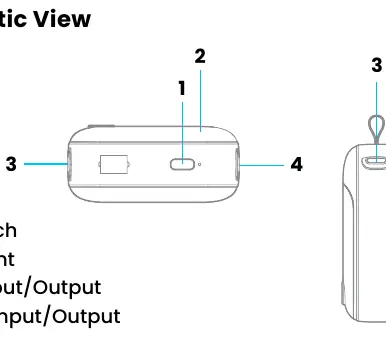
- Power Switch: Used to activate the output and display.
- Battery Light: Digital display showing remaining percentage.
- Type-C Input/Output: Main port for charging the bank or devices.
- Lightning Input/Output: Secondary port for charging the bank or devices.
Button Function
- Short Press: Activates the output outlet for external discharge and turns on the digital display.
- Double Click: Turns off the mobile power output and the indicator.
Charging Instructions
The power bank uses an LED digital display to show the battery level with 1% accuracy. When charging devices, do not use the built-in lanyard cable to suspend the power bank, as the weight may damage the connection. Ensure the power bank is fully charged before first use and avoid overcharging by unplugging it once it reaches 100%.
Safety Precautions
- Charge in a well-ventilated area to prevent overheating.
- Do not expose to extreme temperatures (above 45°C or below -10°C).
- If not used for extended periods, charge at least once every 3 months.
- Keep the device dry and do not clean with chemical agents.
- Do not disassemble, puncture, or expose the battery to fire or water.
- Stop using immediately if the device shows signs of bulging or excessive heat.
- Intended for use in non-tropical climates with a maximum operating temperature of 25°C.
Troubleshooting
If the power bank cannot be charged, check that the adapter and cable are functioning correctly and use a branded, compatible power adapter. If the power bank cannot charge other devices, ensure it has sufficient charge, verify the voltage compatibility of the connected device, and check that all cable connections are secure.
Warranty and Contact
Products purchased directly from the Powerology website or store come with a 24-month warranty. Products bought from verified retailers are eligible for a 12-month warranty. You can extend the warranty by visiting https://www.powerology.me/warranty and submitting the required details within 48 hours of purchase. For support, contact [email protected] or visit https://www.powerology.me/.
Official resources from the manual
Manufacturer information
Powerology
Practical help
Common problems
Power bank cannot be charged
Check if the power adapter and connecting cable are functioning correctly. Use a suitable, branded power adapter.
Power bank cannot charge other devices
Ensure the power bank has enough charge. Verify that the device voltage is compatible with the power bank output and check that cables are properly connected.
Incorrect battery level readings
Perform a full discharge and charge cycle 1-2 times to allow the digital display chip to calibrate.
Before use
- Perform a full discharge and charge cycle 1-2 times for calibration.
- Ensure the power bank is fully charged before first use.
- Use a CCC-certified 5V power adapter.
- Check that the charging cable is compatible.
Specs in practice
- Battery Capacity
- 10000mAh, 38.5Wh total energy storage.
- USB-C Output
- Supports up to 22.5W Max for fast charging.
- Lightning Input
- Supports up to 20W Max.
Images and diagrams
- 1: Power Switch
- 2: Battery Light (Digital Display)
- 3: Type-C Input/Output
- 4: Lightning Input/Output
Model compatibility
- Use compatible cables for safe and efficient power transfer.
- Do not connect devices that do not meet the required output parameters.
- Intended for use in non-tropical climates.

Manual page author
Michael Turner
Technical manual editor
Reviews PDF manuals for structure, safety notes, and practical product details so readers can find the right information quickly.