Electronics / Monitor Accessories
StarTech.com 14.1" Privacy Screen for Laptops
Quick guide for the StarTech.com 14.1" privacy screen. Learn how to install the filter, use the flip-up feature, and maintain your screen for optimal privacy and blue light reduction.
Table of contents
Quick guide from the manual
This privacy screen is designed for laptops with a 14.1-inch display and a 16:10 aspect ratio. It provides privacy by darkening the screen from side angles while reducing blue light exposure. The filter is touch-compatible and features a flip-up design for easy sharing of content without removing the filter.
Product Overview
The privacy screen uses microlouver technology to restrict the viewing angle to +/- 30 degrees from the center. It is an ultra-thin, robust solution that protects the screen from scratches, dust, and fingerprints while maintaining touch sensitivity.
Installation
The privacy screen is intended for use on screens with raised bezels. You can install it using one of the following methods included in the package:
- Adhesive strips: For a semi-permanent attachment.
- Slide-mount tabs: Allows the filter to be slid on and off.
- Flip-up tabs: Enables the screen to be lifted up quickly to share content without removing the filter entirely.
Usage and Benefits
- Privacy: Darkens the screen from side views to protect sensitive data in public spaces or open offices.
- Eye Comfort: Blocks up to 51% of blue light emitted from the screen, helping to reduce digital eye strain, headaches, and dry eyes.
- Touch Compatibility: The thin design ensures the laptop's touch functionality remains responsive.
Package Contents
- 1 x Privacy screen
- 1 x Set of adhesive strips
- 1 x Set of mounting tabs
- 2 x Flip-up tabs
- 1 x Lift tab
- 1 x Plastic sleeve
- 1 x Cleaning cloth
- 1 x Quick start guide
Specifications
- Screen Size: 14.1 inches
- Aspect Ratio: 16:10
- Viewing Angle: +/- 30 degrees from center
- Light Transmission: 60%
- Warranty: 2 years
Practical help
Common problems
Screen appears too dark
This is the intended function of the privacy filter. Ensure you are viewing the screen from directly in front (within the 60-degree viewing angle) for optimal brightness.
Filter does not fit the screen
Verify that your laptop screen is exactly 14.1 inches and has a 16:10 aspect ratio before attempting installation.
Touch screen is unresponsive
Ensure the filter is installed correctly and is flush against the screen. Clean the screen and the filter with the provided cloth to remove debris that might interfere with touch sensitivity.
Before use
- Verify your laptop screen size is 14.1 inches.
- Confirm your screen aspect ratio is 16:10.
- Check if your laptop screen has a raised bezel.
- Clean the laptop screen thoroughly using the included cleaning cloth.
- Choose the preferred mounting method (adhesive, slide tabs, or flip-up tabs).
Specs in practice
- Viewing Angle (+/- 30 degrees)
- The screen is clearly visible from the front, but darkens significantly when viewed from the sides to prevent prying eyes.
- Blue Light Reduction (51%)
- The filter blocks over half of the harmful blue light emitted by the display, reducing eye strain.
- Light Transmission (60%)
- The percentage of light that passes through the filter, balancing privacy with screen brightness.
Images and diagrams
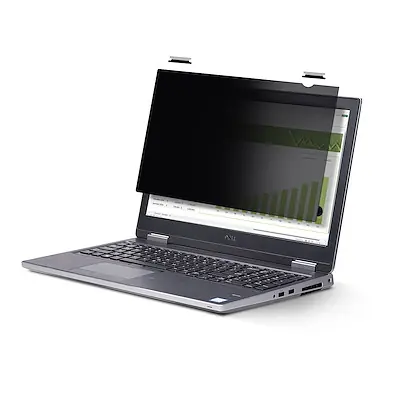
- The privacy screen attaches to the front of the laptop display.
- Flip-up tabs allow the user to lift the filter away from the screen without removing it completely.
Model compatibility
- Designed specifically for 14.1-inch 16:10 displays.
- Best suited for laptops with raised bezels.

Manual page author
Emily Carter
User documentation editor
Prepares concise manual descriptions and highlights the most useful setup, operation, and maintenance information for readers.