General / Mounts Stands
Installation Guide for SIIG 04-1349A Heavy Duty Gas Spring Aluminum Desk Monitor Arm
Quick installation and adjustment guide for the SIIG 04-1349A monitor arm. Learn how to mount via C-clamp or grommet, adjust gas spring tension, and configure VESA plates for your display.
Table of contents
Manual images
Jump to the sectionQuick guide from the manual
The SIIG 04-1349A is a heavy-duty gas spring monitor arm designed for desk mounting. Before installation, ensure your desk can support the weight of the monitor and the arm. The product supports monitors up to 49 inches with a weight capacity between 3kg and 23kg. It is intended for indoor use only and should be installed by professionals or those comfortable with hardware assembly.
Installation
The arm offers two primary mounting methods depending on your desk configuration:
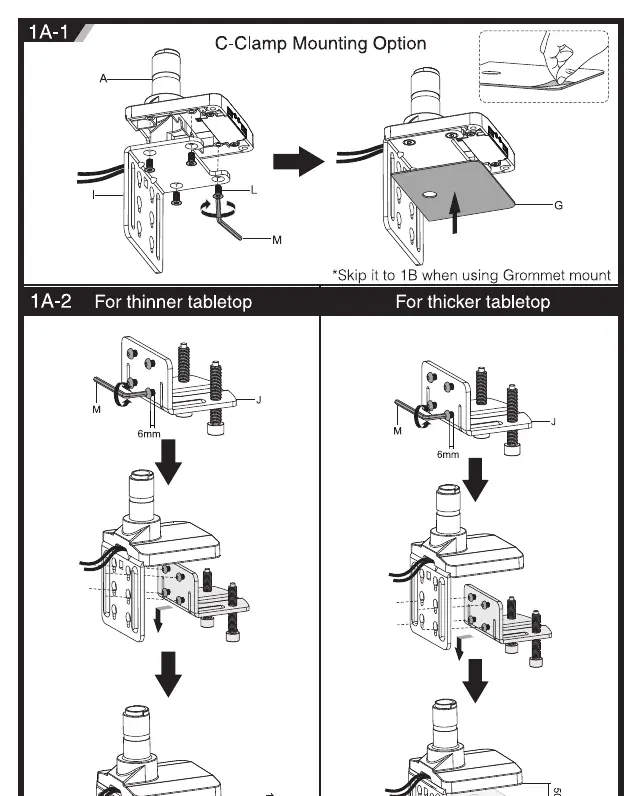
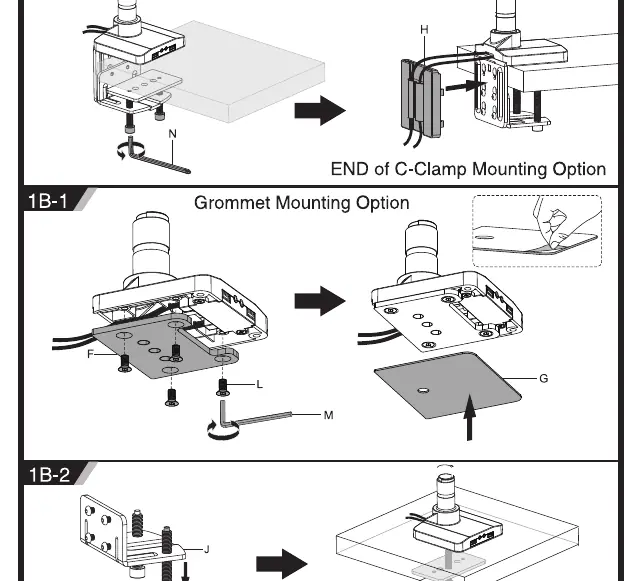
- C-Clamp Mounting: Suitable for standard tabletops. Attach the clamp assembly to the desk edge. Adjust the clamp width to fit your tabletop thickness (thinner or thicker settings available). Ensure the clamp is tightened securely.
- Grommet Mounting: Suitable for desks with existing cable management holes. Secure the base through the hole using the provided hardware.
VESA mounting
The arm supports various VESA patterns (75x75, 100x100, 200x100, 200x200). Choose the appropriate mounting option based on your monitor type:
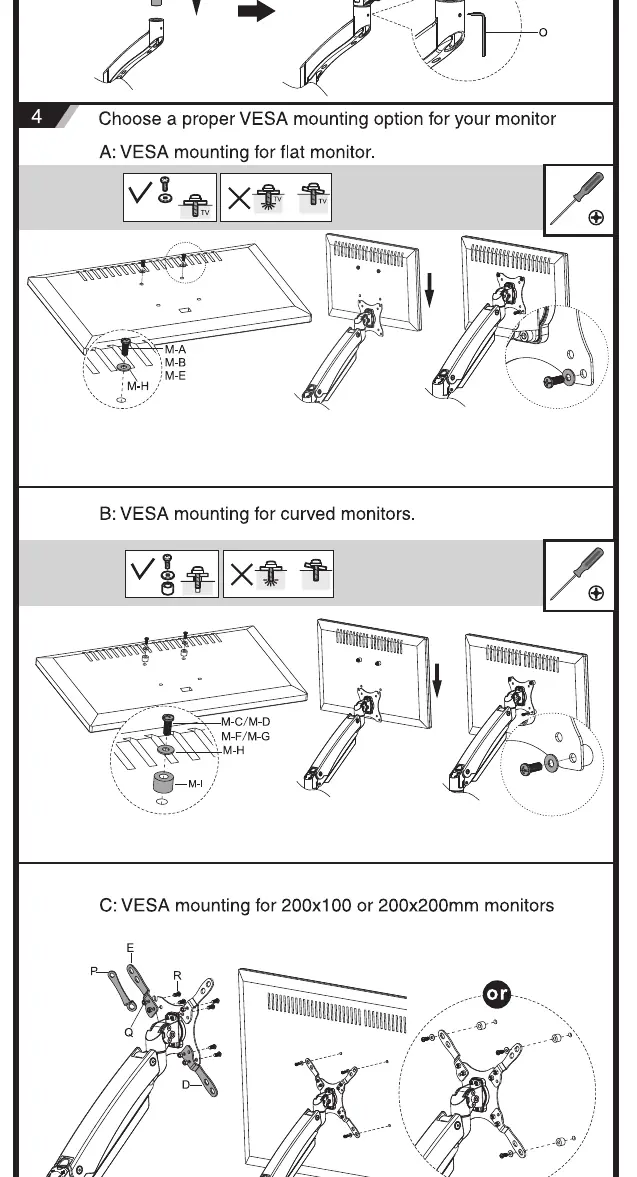
- Flat Monitors: Use the standard VESA plate configuration.
- Curved Monitors: Use the provided spacers and longer screws if necessary to ensure a flush fit.
- Large Monitors (200x200): Attach the extension brackets to the VESA plate before mounting to the monitor.
Adjustments
Once the monitor is attached, you may need to adjust the gas spring tension to ensure the arm holds the monitor at the desired height:
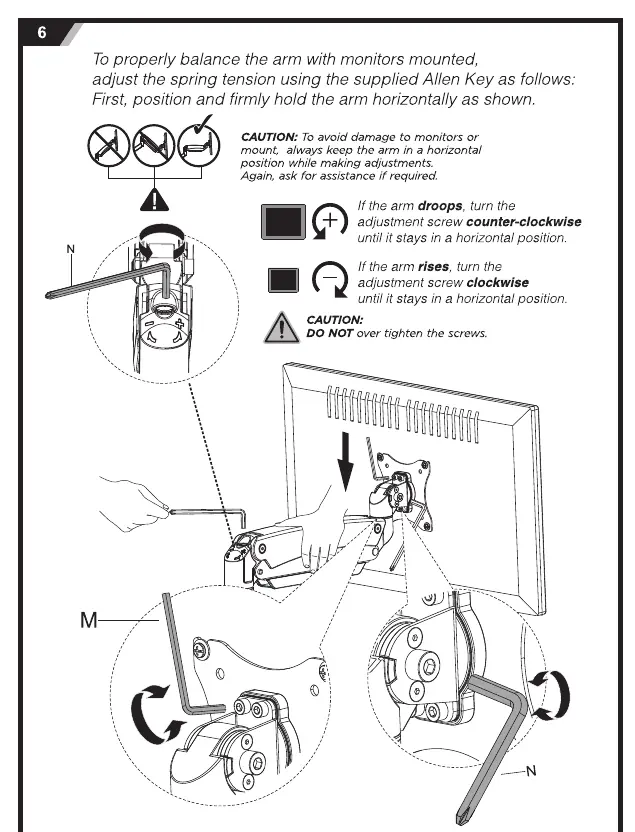
- If the arm droops: Turn the adjustment screw counter-clockwise.
- If the arm rises: Turn the adjustment screw clockwise.
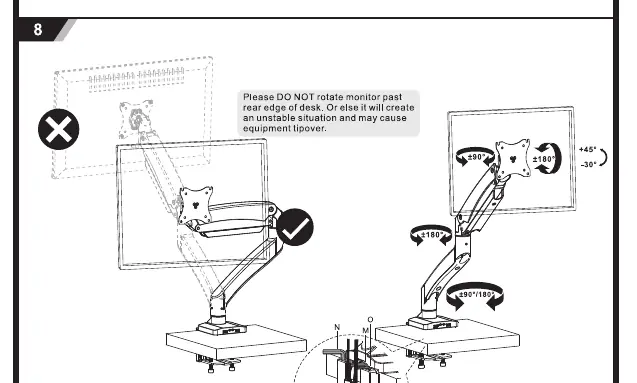
- Rotation and Tilt: If the display does not stay in the desired position, tighten the specific screws located at the joints. Do not rotate the monitor past the rear edge of the desk to avoid instability.
Safety and maintenance
Regular maintenance is required to ensure safe operation:
- Check that the bracket is secure and safe to use at regular intervals (at least every three months).
- Do not exceed the rated weight capacity of 23kg.
- Do not overtighten mounting screws.
- Keep small parts away from children as they pose a choking hazard.
Manufacturer information
SIIG, Inc.
Practical help
Common problems
Monitor arm droops (falls down)
Turn the gas spring adjustment screw counter-clockwise until the arm stays in a horizontal position.
Monitor arm rises (springs up)
Turn the gas spring adjustment screw clockwise until the arm stays in a horizontal position.
Monitor does not hold tilt or rotation position
Tighten the specific screws at the joint to increase friction.
Before use
- Verify desk thickness is compatible with the chosen mounting method (C-Clamp or Grommet).
- Confirm monitor weight is between 3kg and 23kg.
- Check that the monitor VESA pattern matches the supported sizes (75x75, 100x100, 200x100, 200x200).
- Ensure you have a clear workspace for installation.
- Verify all components from the parts list are present.
Specs in practice
- Weight Capacity
- 3kg to 23kg (6.6 - 50.7 lbs). Do not exceed this range.
- VESA Compatibility
- Supports 75x75, 100x100, 200x100, and 200x200 mm patterns.
- Max Monitor Size
- Supports up to 49 inches.
Images and diagrams
- The manual provides specific diagrams for C-Clamp vs Grommet installation.
- Tension adjustment is performed using the provided Allen Key on the arm joint.
- VESA mounting diagrams distinguish between flat, curved, and large (200x200) monitor configurations.
Model compatibility
- Designed for indoor use only.
- Must be installed on solid wood, concrete, or brick surfaces.
- Do not rotate the monitor past the rear edge of the desk to prevent tipping.

Manual page author
Emily Carter
User documentation editor
Prepares concise manual descriptions and highlights the most useful setup, operation, and maintenance information for readers.