Electronics / Headphones Earbuds
User Manual for pTron Zenbuds Evo X2 Pro
Quick guide for pTron Zenbuds Evo X2 Pro. Learn how to pair, charge, use touch controls, switch modes, and troubleshoot your earbuds.
Quick answers from the manual
Quick answer
- To pair your pTron Zenbuds Evo X2 Pro, open the charging case lid, wait for the earbuds to pair with each other (white lights blink), and select 'pTron OWS' in your phone's Bluetooth settings. p. 1
Key actions
- Resetting p. 2
First start
- Charge the earbuds fully, then open the case to initiate pairing mode. p. 1
Show 4 more answers Show less
Problems and fixes
One earbud not working
Place both in case, take out together, wait for pairing.
p. 2Maintenance and reset
- Press the reset button on the charging case for 4-5 seconds. p. 2
Technical specifications
| Parameter | Value | Meaning | Pages |
|---|---|---|---|
| Charging Time | 1 to 1.5 hours | Time required to fully charge the case. | p. 1 |
| Wireless Range | 10 meters | Maximum distance from connected device. | p. 3 |
Where to find it in the PDF
- Charging and Pairing p. 1
- Controls and Troubleshooting p. 2
- Safety and Warranty p. 3
Table of contents
Manual images
Click an image to enlargeQuick guide from the manual
The pTron Zenbuds Evo X2 Pro are wireless earbuds featuring touch controls, environmental noise cancellation (ENC), and a charging case. The device is set to 50% default volume. Ensure you charge the earbuds fully before the first use and keep them within a 10-meter range of your connected device.
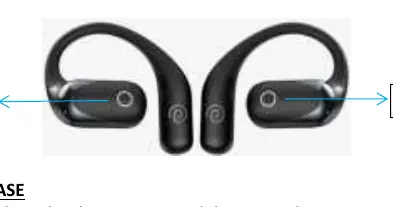
Charging
Charging the Case: Connect the provided C-type USB cable to the charging case and plug the USB end into a 5V/1A power source. The indicator light glows orange while charging and turns off when fully charged. Charging takes approximately 1 to 1.5 hours.
Charging the Earbuds: Place both earbuds into the charging case. They will start charging automatically. The indicator lights on the earbuds flash white while charging and turn off when fully charged.
Power On/Off
Power On: Open the charging case lid or take the earbuds out of the case. Alternatively, press and hold the Touch Sensitive Area (TSA) on both earbuds for 5 seconds simultaneously.
Power Off: Place both earbuds back into the charging case; they will turn off automatically.
Bluetooth Pairing
- Open the charging case lid.
- Wait 2-3 seconds for the left and right earbuds to pair with each other (white lights will blink).
- Turn on Bluetooth on your phone and select pTron OWS to connect.
- The earbuds will respond with a voice prompt Connected.
Control Functions
Mode Change
Long touch the TSA on either earbud to switch between Movie Mode and Music Mode.
Calls
- Answer: Tap the TSA once.
- End: Double tap the TSA.
- Reject: Double tap the TSA.
Music
- Play/Pause: Touch the TSA once.
- Next Song: Touch the right earbud TSA twice.
- Previous Song: Touch the left earbud TSA twice.
Voice Assistant
Touch the TSA four times on either earbud to activate the default smart voice assistant.
Mono (Single) Earbud Usage
You can use a single earbud by taking only one out of the case. It will automatically enter pairing mode. Note that next/previous song functions are not available in mono mode. To switch back to stereo, simply take the other earbud out of the case.
Troubleshooting
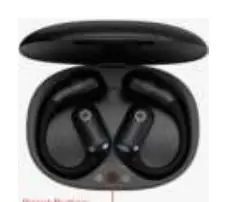
- One earbud not working: Place both in the case, take them out together, and wait for them to pair.
- Not connecting/scanning: Place earbuds in the case, close the lid, then open it and press the reset button on the case for 4-5 seconds.
- Disconnecting during calls: Ensure earbuds are charged to 100% and restart the connection.
Safety Precautions
- Keep the device away from extreme heat and humidity.
- Use only the included USB cable or a high-quality DC5V-1A charger.
- Do not over-charge the product.
- Listen at a reasonable volume to protect your hearing.
- Do not open or tamper with the product or battery.
Practical help
Common problems
One earbud is not working
Place both earbuds in the charging case, take them out together, wait for them to pair, and reconnect via Bluetooth.
Earbuds not connecting or scanning
Place earbuds in the case, close the lid, open it, and press the reset button on the case for 4 to 5 seconds until lights blink.
Earbuds disconnecting during phone calls
Ensure earbuds are charged to 100% before use and restart the earbuds.
Before use
- Charge the earbuds to 100%
- Ensure you are using a 5V/1A power source for the case
- Keep the device within 10 meters of the connected phone
- Enable voice assistant functionality in your media device settings if it does not activate
Show more Show less
Images and diagrams
- The TSA is located on the outer surface of each earbud.
- The reset button is located on the charging case.
Model compatibility
- Compatible with Bluetooth-enabled media devices.
- Wireless range is up to 10 meters.

Manual page author
David Miller
Documentation analyst