Electronics / Speakers & Soundbars
User Manual for pTron Fusion RB Bluetooth Soundbar
Quick guide for the pTron Fusion RB Bluetooth Soundbar. Learn how to pair via Bluetooth, use TWS mode, play music via USB/TF/AUX, and troubleshoot common connectivity or sound issues.
Table of contents
Manual images
Click an image to enlargeQuick guide from the manual
The pTron Fusion RB Bluetooth soundbar comes with a default volume set at 60%. You can adjust the volume using the control panel on the speaker. Ensure the device is fully charged before first use for optimal performance.
Power and Pairing
To power on the speaker, slide the power button towards the right. The speaker will respond with a voice prompt and the LED light will turn on. To pair with your device:
- Open the Bluetooth settings on your device.
- Search for and select pT Soundbar to connect.
- The speaker will automatically connect to the last paired device if it is within 10 meters.
To power off, slide the power button towards the left.
Playback Modes
The speaker supports multiple playback modes:
- Bluetooth Mode: Default mode upon powering on.
- AUX Mode: Connect a 3.5mm aux cable to the speaker to automatically enter AUX mode.
- TF/USB Mode: Insert a TF card or USB drive (up to 32GB) into the respective slots to activate playback.
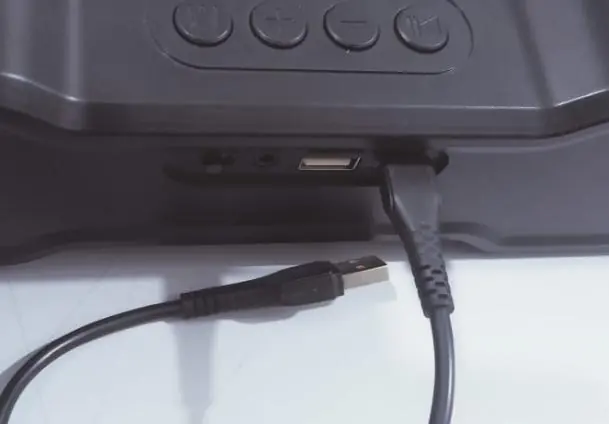
- FM Mode: Press the Mode (M) button once to switch to FM mode. Press and hold the Play/Pause button for 2 seconds to automatically search for channels. Note: The charging cable must be connected to act as an antenna in FM mode.
Controls and LED Lights
Use the control panel buttons for playback and settings:
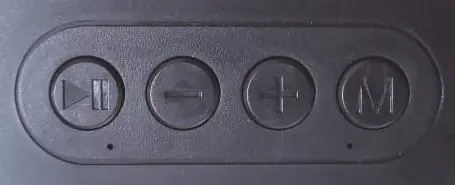
- Play/Pause Button: Single press to play/pause. Double press to redial the last number. Long press for TWS mode.
- Minus (-) Button: Single press for the previous song. Long press to decrease volume.
- Plus (+) Button: Single press for the next song. Long press to increase volume.
- Mode (M) Button: Single press to switch modes. Long press (2 seconds) to change LED light modes. Press and hold 8 times to turn off the lights.
TWS Connection
To connect two speakers simultaneously:
- Turn on both speakers and place them within 1 meter of each other.
- Long-press the Play/Pause button on one of the speakers. They will pair automatically.
- Search for pT Soundbar on your phone and connect.
- To disconnect, press the Play/Pause button.
Charging
Connect the USB Type-C cable to the speaker's charging port and the other end to a 5V/1A power source. The charging LED will glow continuously while charging and turn off when fully charged.
Troubleshooting
- Connectivity Issues: Turn off the speaker, charge to 100%, unpair from your phone, restart your phone, and re-pair.
- Distorted Sound: Check for equalizer settings on your device, remove obstacles between the speaker and the device, and ensure the speaker is sufficiently charged.
Safety Precautions
- Keep the device away from extreme heat, humidity, and corrosive environments.
- Use only the recommended 5V/1A charger and the provided USB cable.
- Do not overcharge the battery.
- Do not jam the ports or attempt to open the device.
- Keep out of reach of children.
Practical help
Common problems
Speaker will not connect to Bluetooth
Turn off the speaker, charge it to 100%, unpair the device from your phone, restart your phone, and try pairing again.
Distorted sound or low quality
Check if your device has equalizer settings applied, remove obstacles between the speaker and device, and ensure the speaker is not low on battery.
FM radio not working
Ensure the charging cable is connected, as it acts as an antenna for FM mode.
Before use
- Charge the speaker to 100% using a 5V/1A power source.
- Ensure the Bluetooth device is within 10 meters of the speaker.
- Check that TF cards or USB drives are formatted correctly and do not exceed 32GB.
- Keep the charging cable plugged in when using FM mode.
Show more Show less
Specs in practice
- Bluetooth 5.3
- The wireless standard used for connecting your audio source to the speaker.
- TWS (True Wireless Stereo)
- Allows you to pair two Fusion RB speakers together for simultaneous playback.
Images and diagrams
- Play/Pause: Single press for play/pause, double press to redial, long press for TWS.
- Minus (-): Single press for previous track, long press to lower volume.
- Plus (+): Single press for next track, long press to increase volume.
- Mode (M): Single press to cycle modes, long press to change LED light effects.
Model compatibility
- Supports TF cards and USB drives up to 32GB.
- Compatible with any Bluetooth-enabled device.
- FM mode requires the charging cable to be connected to function as an antenna.

Manual page author
David Miller
Documentation analyst