Electronics / Headphones Earbuds
User Guide for Rand McNally ClearDryve 220a Bluetooth ANC Headset
Quick guide for the Rand McNally ClearDryve 220a Bluetooth ANC Headset. Learn how to pair, use call controls, manage music, adjust ANC, and troubleshoot common issues.
Quick answers from the manual
Quick answer
- To pair the ClearDryve 220a, ensure the headset is powered off, then press and hold the MFB until the LED blinks blue and red, indicating it is in pairing mode. p. 8
Key actions
- Mute/Unmute during a call p. 11
First start
- Charge the battery before first use. p. 6
Show 1 more answers Show less
Where to find it in the PDF
- Parts and Layout p. 3, 4
- Getting Started p. 6, 7, 8
- Call and Music Controls p. 9, 10, 11, 12
Table of contents
Manual images
Click an image to enlargeQuick Start Guide
To get started with your ClearDryve 220a, ensure the battery is fully charged. To power on, press the Multi-function button (MFB). To enter pairing mode, ensure the headset is powered off, then press and hold the MFB until the LED blinks blue and red. You can then select ClearDryve from your device's Bluetooth settings.
What's in the Box
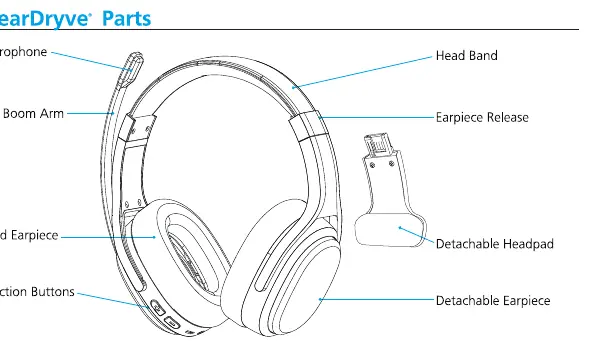
- ClearDryve convertible headset
- Audio cable
- Charging cable
- Hard-sided carrying case
- Detachable earpiece (pre-assembled)
- Detachable headpad
Function Button Layout
The headset features several controls on the earpiece:
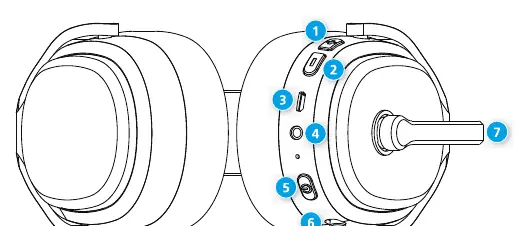
- Vol + / Vol - buttons: Adjust volume and skip tracks.
- USB port: For charging.
- 3.5mm audio input: For wired connection.
- Multi-function button (MFB): Power, pairing, call management, and music playback.
- Active Noise Cancellation (ANC) slider: Turns noise cancellation on or off.
- Mic boom arm: Adjustable for left or right side wear; rotates to mute/unmute.
Getting Started
Charging: Connect the USB cable to the USB port on the headset and the other end to a charger. Powering On/Off: Press the MFB to power on. Press and hold the MFB to power off. Pairing: When powered on for the first time, it automatically enters pairing mode. If you need to pair again, turn the headset off, then press and hold the MFB until you hear 'Pairing'.
Call Mode
Use the MFB for call management:
- Answer/End call: Press the MFB.
- Ignore call: Press and hold the MFB for about 2 seconds.
- Redial: Double-press the MFB.
- Mute/Unmute: Rotate the mic boom arm up (mute) or down (unmute).
- Voice Assistant: Press and hold the MFB for about 3 seconds.
Streaming Music
Use the MFB and volume buttons for music control:
- Play/Pause: Press the MFB.
- Volume: Press Vol + or Vol -.
- Next/Previous Song: Long-press Vol + or Vol -.
More Functions
Active Noise Cancellation (ANC): Slide the ANC switch to turn it on or off. The green light indicates ANC is enabled. Always turn ANC off when not in use to conserve battery. Earpiece Conversion: You can convert the headset from mono (one earpiece) to stereo (two earpieces) by sliding the earpiece off the head band and attaching the desired component.
Troubleshooting
If the headset battery drains quickly, ensure ANC is turned off when not in use. If the device becomes unresponsive, perform a reboot by holding the MFB and Vol+ button simultaneously. If you need to clear pairing history, power off the headset, then press and hold Vol- and MFB until you hear 2 beeps.
Help and Support
For assistance, contact Rand McNally customer support at 877-446-4863, email [email protected], or visit randmcnally.com/support.
Official resources from the manual
Practical help
Common problems
Headset battery drains quickly
Ensure the ANC slider is turned OFF when the headset is not in use.
Device is locked or unresponsive
Reboot the headset by pressing and holding the MFB and Vol+ button simultaneously.
Cannot connect to a new device
Clear the pairing history by powering off the headset, then holding Vol- and MFB until you hear 2 beeps.
Before use
- Charge the battery fully before first use.
- Ensure the ANC slider is in the OFF position when not using the headset.
- Verify the mic boom arm is positioned correctly for your preferred side.
- Pair the headset via your device's Bluetooth settings.
Show more Show less
Specs in practice
- ANC (Active Noise Cancellation)
- Removes more than 90% of ambient noise for clearer audio.
Images and diagrams
- The mic boom arm can be rotated to mute (up) or unmute (down) during calls.
- The headset can be converted between mono and stereo configurations by sliding the earpiece off the head band.
Model compatibility
- Compatible with Bluetooth-enabled phones, tablets, and laptops.
- Can be connected to any standard 3.5mm audio jack.

Manual page author
David Miller
Documentation analyst