Electronics / Gaming Peripherals
User Guide for Razer Opus Wireless Headset
Quick guide for the Razer Opus wireless headset. Learn how to pair via Bluetooth, use ANC and Ambient Awareness, control playback, and maintain your device.
Quick answers from the manual
Quick answer
- The Razer Opus is a wireless headset with ANC, Ambient Awareness, and Gaming Mode. It supports Bluetooth and 3.5mm wired connections. p. 3, 7
Key actions
- Pairing via Bluetooth p. 9
- Toggling ANC/Ambient Awareness p. 11
- Activating Gaming Mode p. 12
First start
- Charge the headset p. 8
Show 4 more answers Show less
Problems and fixes
Device malfunction
Unplug the device and contact the Razer hotline or support.razer.com.
p. 16Maintenance and reset
- Cleaning p. 16
Technical specifications
| Parameter | Value | Meaning | Pages |
|---|---|---|---|
| Battery life | Up to 32 hours with ANC on | Duration of use on a single charge. | p. 7 |
| Drivers | 2 x 40 mm | Speaker driver size. | p. 7 |
| Weight | 270 g | Weight of the headset. | p. 7 |
Where to find it in the PDF
- What's Inside p. 3, 4
- Getting Started p. 8
- Using your Razer Opus p. 10
Table of contents
Manual images
Click an image to enlargeQuick guide from the manual
The Razer Opus is a wireless headset featuring THX-certified sound, Active Noise Cancellation (ANC), and Ambient Awareness. It supports both Bluetooth and wired (3.5mm) connections. The package includes the headset, a premium carry case, a 3.5mm audio cable, a USB-C to USB-A charging cable, and an airline headphone adapter.
Getting started
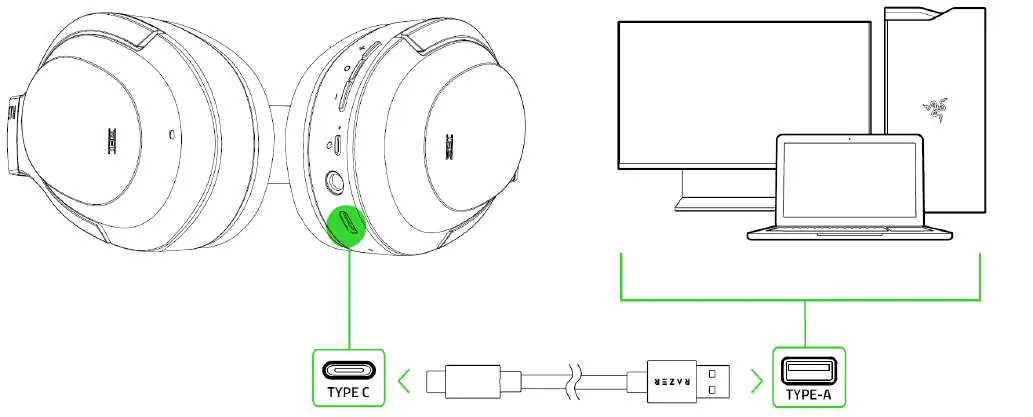
Charging: Connect the headset to a USB Type-A port using the provided charging cable. A depleted battery takes approximately 3.5 hours to fully charge. The status indicator shows the battery level while charging.
Wireless Pairing: While the headset is powered off, press and hold the power button until the status indicator starts blinking blue. Follow your device's instructions to pair with the Razer Opus. Once paired, the indicator will turn static blue.
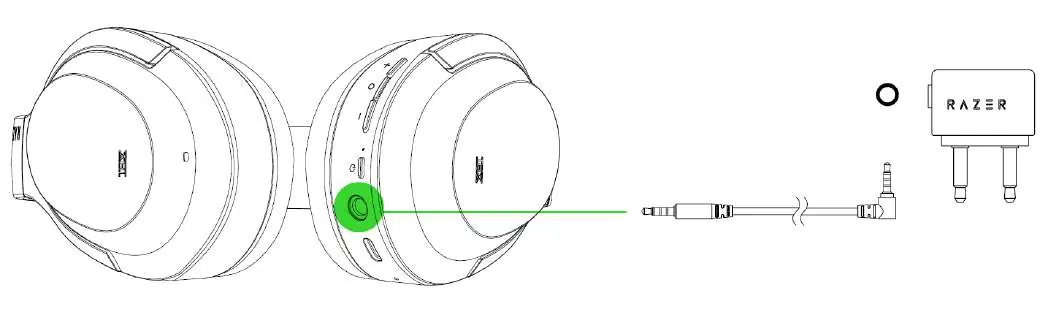
Wired Mode: Connect the headset to any 3.5mm audio socket using the provided 3.5mm audio cable. You can also use the included airline adapter for in-flight audio jacks.
Headset controls
The headset features several buttons for media and call control:
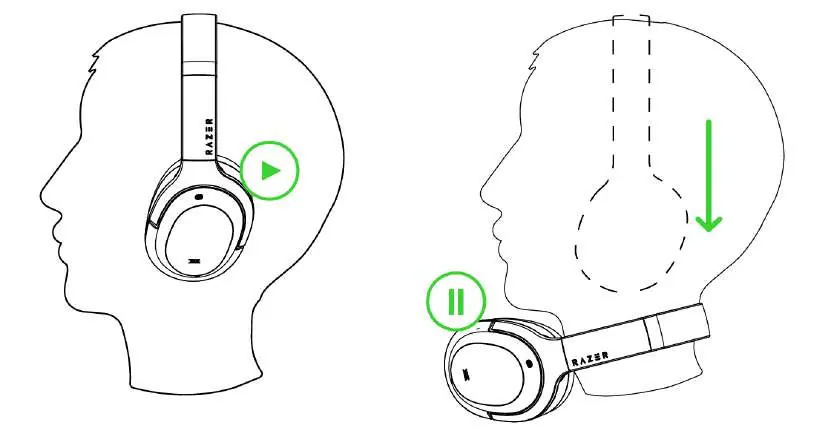
- Volume Up/Down: Press to adjust volume. Press and hold to continuously change volume.
- Center/Multi-function button:
- Single press: Play/pause, accept/end calls, swap calls.
- Double press: Skip track.
- Triple press: Previous track.
- Press and hold (2s): Launch voice command, reject incoming call, swap calls.
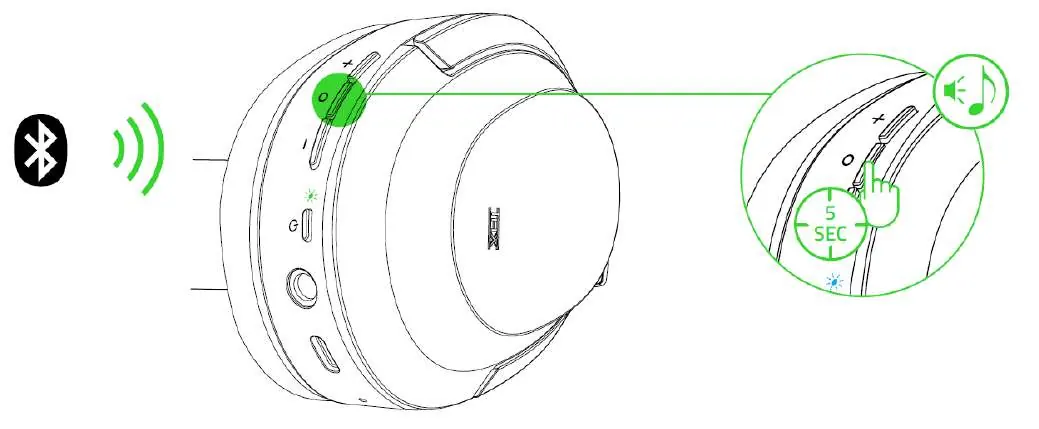
- Press and hold (5s): Enable/disable Gaming Mode.
ANC and Ambient Awareness
While powered on, use the power button to toggle noise control modes:
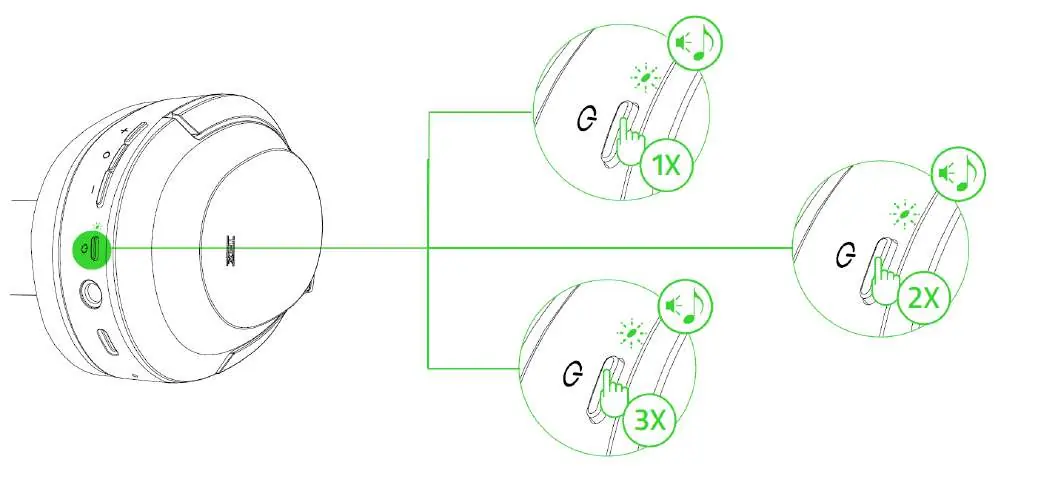
- Press once: Activate Active Noise Cancellation (ANC).
- Press twice: Activate Ambient Awareness.
- Press three times: Deactivate both functions.
An audio prompt will notify you when these modes are enabled or disabled.
Gaming mode
Gaming Mode provides lower latency for real-time audio feedback. While connected via Bluetooth, press and hold the Center/Multi-function button for 5 seconds to activate or deactivate this function. The status indicator will briefly blink in blue when enabled.
Maintenance and safety
To keep your Razer Opus in optimum condition, clean it once a month using a soft cloth or cotton swab. Do not use soap or harsh cleaning agents. Operate the device within the temperature range of 0°C to 40°C. Do not take the device apart, as this will void your warranty.
Practical help
Common problems
Headset not pairing
Ensure the headset is powered off, then press and hold the power button until the status indicator blinks blue.
Battery low
Charge the headset using the provided USB-C cable until the status indicator turns green.
Audio issues
Check the Bluetooth connection or ensure the 3.5mm cable is securely connected.
Before use
- Charge the headset fully before first use.
- Download the Razer Opus app for advanced customization.
- Ensure your device has Bluetooth or a 3.5mm headphone jack.
- Stretch the headset gently before placing it on your head to minimize stress.
Show more Show less
Specs in practice
- Ambient Awareness
- Allows you to hear your surroundings without removing the headset.
Images and diagrams
- Diagrams illustrate the location of buttons and ports on the ear cups.
- Visuals show the sequence for toggling ANC and Ambient Awareness modes.
- Diagrams demonstrate the correct way to connect the charging cable.
Model compatibility
- Compatible with iOS and Android devices.
- Works in wireless (Bluetooth) and wired (3.5mm) modes.

Manual page author
Emily Carter
User documentation editor