Computers / Cooling Systems
User Manual for Razer Kunai Chroma RGB 140MM Fan
Quick guide for the Razer Kunai Chroma RGB 140MM fan. Learn how to mount the fan, connect it to your PC, and configure it using Razer Synapse software.
Table of contents
Manual images
Click an image to enlargeQuick guide from the manual
This guide provides essential instructions for installing and connecting your Razer Kunai Chroma RGB fan. Always turn off your PC before performing any hardware installation to prevent electric shock or damage. It is recommended to wear an anti-static wrist strap during installation.
Mounting Method
You can mount the fan using either the included anti-vibration rubber screws or standard mounting screws. Ensure the fan is securely attached to the PC chassis.
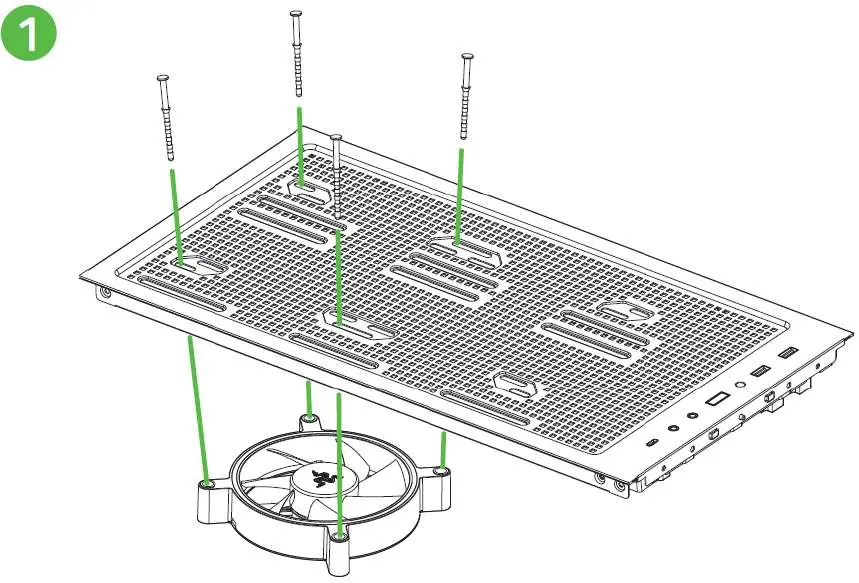
Connection
The fan supports daisy-chaining for aRGB connectors. Connect the fan to your motherboard or dedicated controllers as follows:
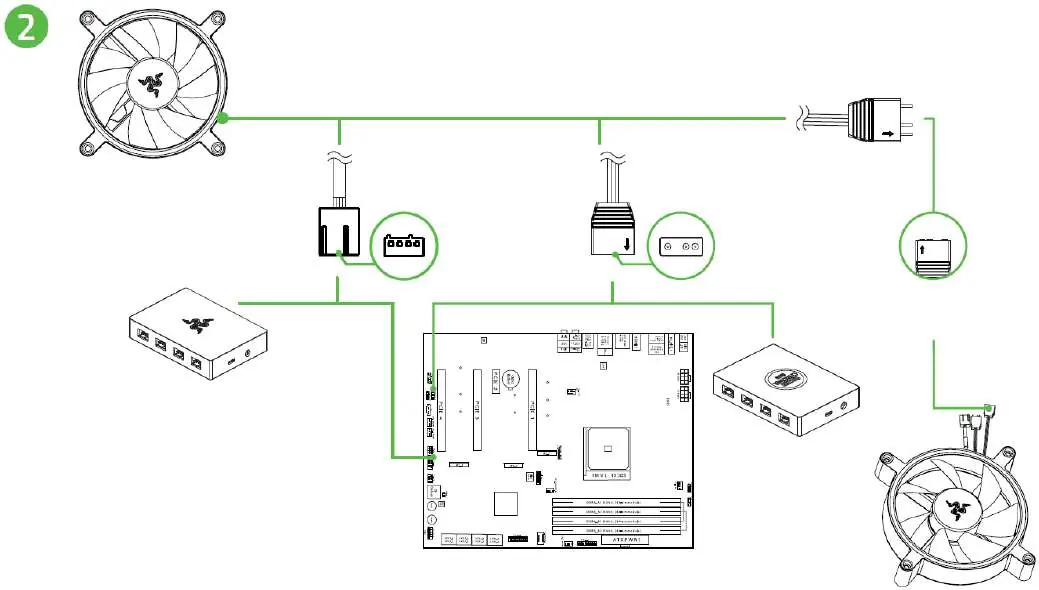
- 4-pin PWM Controller: Connect the fan's PWM cable here for speed control.
- 3-pin aRGB Controller: Connect the aRGB cable here for lighting control.
- Daisy Chain: You can connect multiple aRGB devices in a series using the male/female 3-pin connectors.
Software
To configure your fan's lighting and performance, download and install Razer Synapse from razer.com/synapse. Follow the on-screen prompts during installation.
Safety and Maintenance
- Do not take apart the device or attempt to service it yourself.
- Power off the device before making any modifications or disconnecting components.
- Keep the device away from water, moisture, solvents, and direct sunlight.
- Operating temperature range: 0°C to 45°C (32°F to 113°F).
- If the temperature exceeds this range, unplug and switch off the device to let it stabilize.
Official resources from the manual
Practical help
Common problems
Device not operating properly
Unplug the device and contact Razer support at support.razer.com.
Temperature exceeds 45°C (113°F)
Unplug and switch off the device to let the temperature stabilize.
Before use
- Turn off your PC before proceeding to avoid electric shocks.
- Wear an anti-static wrist strap to avoid damaging internal components.
- Ensure you have the necessary controllers (PWM/aRGB) for full functionality.
- Verify that all other PC peripherals are for illustration purposes only and not included.
Images and diagrams
- Mounting: Shows the fan being attached to the PC chassis using either rubber screws or standard mounting screws.
- Connection: Illustrates the daisy-chaining of aRGB connectors and connection to PWM/aRGB controllers.
Model compatibility
- Compatible with standard PC chassis.
- Requires Razer Synapse software for advanced configuration.

Manual page author
David Miller
Documentation analyst
Organizes user manual content into clear summaries, with attention to model details, product context, and everyday usability.