Electronics / Amplifiers Receivers
Owner's Manual for Blackstar Dept. 10 AMPED 3 Guitar Amplifier Pedal
Quick guide for the Blackstar Dept. 10 AMPED 3 guitar amplifier pedal. Learn about channel switching, CabRig speaker simulation, power settings, and MIDI control.
Table of contents
Manual images
Jump to the sectionQuick guide from the manual
The Blackstar Dept. 10 AMPED 3 is a 100W floorboard guitar amplifier pedal. It features three channels (Clean, Crunch, Overdrive), built-in boost, reverb, and CabRig DSP speaker simulation. The unit can be used in Patch mode (recalling stored settings) or Manual mode (reflecting physical knob positions). It also functions as a USB-C audio interface.
Front Panel Controls
The front panel allows for direct sound shaping:
- Channel Footswitches: Select between Clean, Crunch, and Overdrive channels. Hold to toggle between Patch and Manual modes.
- Voice Switches: Select between two distinct voices per channel (e.g., Clean Warm/Bright, Crunch/Super Crunch, OD1/OD2).
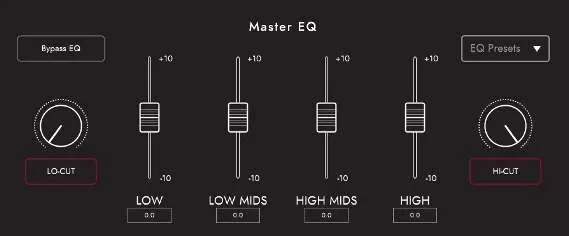
- Gain & EQ: Adjust Gain, Bass, Middle, Treble, and the patented ISF control to shift between American and British tonal characteristics.
- Response: Select between EL84, EL34, and 6L6 power valve responses.
- Power: Switch between 100W, 20W, and 1W output settings.
- Boost & Reverb: Dedicated footswitches for Boost (Pre/Post) and Reverb (Dark/Light).
Rear Panel Connections
- Mains Input: Universal power supply (100-240V).
- In: Guitar input.
- FX Loop: Send and Return jacks with a level switch (+4dBu/-10dBV).
- Speaker Outputs: 8 Ohm and 16 Ohm outputs. Warning: Do not use both simultaneously.
- Outputs: Two isolated 9V DC outputs (max 500mA combined).
- USB Audio: USB-C connection for recording and using Blackstar Architect software.
- MIDI: MIDI In and MIDI Thru ports.
- Balanced/Line Out: XLR and 1/4" TRS outputs for CabRig processed signals.
Software and Patch Management
Use the Blackstar Architect software to access advanced features:
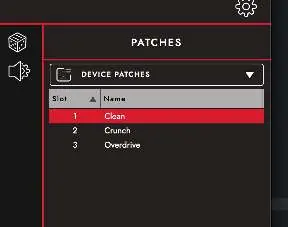
- Patch Management: Save and recall patches to the device or your computer.
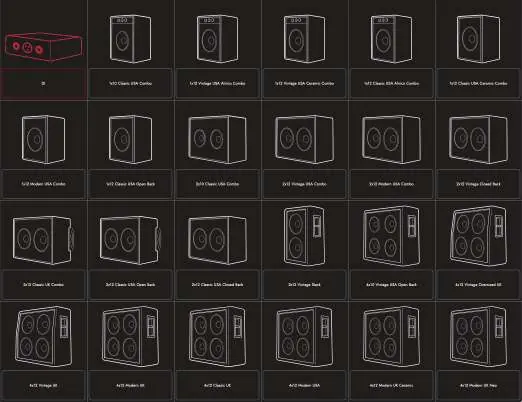
- CabRig: Customize speaker cabinet simulations, microphone selection, and room ambience.
- Audio Settings: Adjust MIDI channels, FX loop settings, and reverb parameters.
Technical Specifications
- Power (RMS): 100W
- Weight: 1.98 kg
- Dimensions: 285mm (W) x 80mm (H) x 150mm (D)
Manufacturer information
Blackstar Amplification
Practical help
Common problems
Knob position does not match the sound
The Recall Indicator shows a mismatch. Turn the knob until it passes the stored value; the indicator will flash, and the knob will then take control.
Speaker output damage
Never use both 8 Ohm and 16 Ohm speaker outputs at the same time.
FX Loop level issues
Use the FX Loop Level switch to match your equipment. If unsure, start with -10dBV.
Power supply warning
Do not exceed a combined total current of 500mA from the two 9V DC outputs.
Before use
- Ensure the mains voltage in your area is compatible (100-240V).
- Connect your guitar to the 'In' jack using a high-quality screened lead.
- If using a speaker cabinet, connect it to the appropriate 8 Ohm or 16 Ohm output.
- If recording via CabRig, ensure the unit is connected to your computer via USB-C.
- Set the desired power level (100W, 20W, or 1W) using the Power switch.
Specs in practice
- Response (EL84, EL34, 6L6)
- Simulates the dynamics, sag, and break-up characteristics of different power valve types.
Images and diagrams
- Front Panel: Contains all primary tone-shaping controls, channel selection, and power settings.
- Rear Panel: Contains all I/O connections including Mains, FX Loop, Speaker Outputs, MIDI, and USB.
Model compatibility
- Speaker outputs: 8 Ohm or 16 Ohm cabinets only.
- 9V DC outputs: Centre negative, 500mA total combined limit.
- USB-C: Compatible with PC, Mac, and other recording devices using standard audio drivers.

Manual page author
Michael Turner
Technical manual editor
Reviews PDF manuals for structure, safety notes, and practical product details so readers can find the right information quickly.