Toys / Games
Ruko Carle Robot 1088-Blue Quick Start Guide
Quick start guide for the Ruko Carle interactive robot, covering charging, battery installation, app setup, and basic operation.
Table of contents
Getting Started with Your Ruko Carle Robot
The Ruko Carle robot is an interactive toy designed for children aged 3 and older. This guide provides the essential steps to get your robot up and running quickly. Before you begin, ensure you have all the necessary components and have read the safety instructions provided in the full user manual.
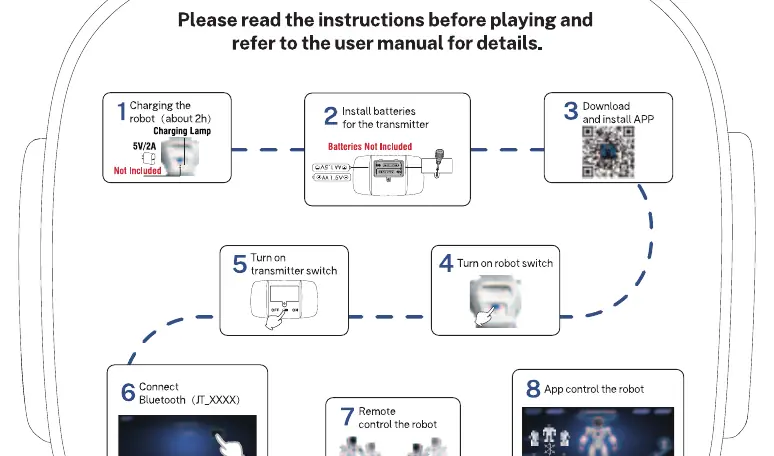
Charging and Powering the Robot
The first step in preparing your robot for play is ensuring it is fully charged. Connect the robot to a 5V/2A power source using the provided charging cable. A full charge typically takes about two hours. Please note that the charging adapter is not included in the package. Once charged, locate the power switch on the robot to turn it on.
Transmitter and App Setup
To control the robot, you will need to prepare the transmitter. The transmitter requires batteries, which are not included. Install the appropriate AA batteries into the battery compartment, ensuring the polarity is correct. Once the batteries are installed, you can turn on the transmitter switch.
For an enhanced experience, you can control the robot using a dedicated mobile application. Download and install the official Ruko app on your smartphone or tablet. Once installed, ensure your device's Bluetooth is enabled. Connect your device to the robot by selecting the corresponding Bluetooth signal, typically labeled as JT_XXXX, within the app settings.
Operating the Robot
After successfully connecting the robot to the transmitter or the app, you are ready to play. The robot can be controlled via the physical transmitter or through the app interface. You can command the robot to perform various actions, including walking and gliding. Experiment with the different control modes to explore the full range of the robot's capabilities. Always ensure the robot is used on a flat, stable surface to prevent falls or damage. If you encounter any issues during operation, refer to the troubleshooting section or contact Ruko support for further assistance.
Maintenance and Safety
To keep your Ruko Carle robot in good condition, store it in a cool, dry place when not in use. Avoid exposing the robot to extreme temperatures, moisture, or direct sunlight for extended periods. Regularly check the robot and transmitter for any signs of wear or damage. If the robot will not be used for an extended period, remove the batteries from the transmitter to prevent leakage. Keep small parts away from young children to avoid choking hazards.
Manufacturer information
Ruko
Practical help
Common problems
Robot does not turn on
Ensure the robot is fully charged and the power switch is in the ON position.
Cannot connect via Bluetooth
Check if Bluetooth is enabled on your mobile device and ensure the robot is within range.
Transmitter not responding
Verify that fresh AA batteries are correctly installed in the transmitter.
Before use
- Charge the robot for approximately 2 hours using a 5V/2A charger.
- Install fresh AA batteries into the transmitter.
- Download and install the Ruko app on your mobile device.
- Ensure the robot is turned on.
- Turn on the transmitter.
- Enable Bluetooth on your smartphone or tablet.
- Connect to the robot via the app using the JT_XXXX signal.
Specs in practice
- Charging Time
- Approximately 2 hours for a full charge.
- Battery Type
- Transmitter requires AA batteries (not included).
Images and diagrams
- Step 1: Connect charging cable to robot.
- Step 2: Insert batteries into the transmitter.
- Step 3: Scan QR code to download the app.
- Step 4-5: Power on the robot and the transmitter.
- Step 6-8: Connect via Bluetooth and begin control.
Model compatibility
- Suitable for children aged 3 and older.
- Requires a mobile device with Bluetooth for app control.

Manual page author
Michael Turner
Technical manual editor
Reviews PDF manuals for structure, safety notes, and practical product details so readers can find the right information quickly.