Toys / Games
Ruko Carle Robot 1088-Green Safety and Operation Guide
Comprehensive safety guidelines, battery maintenance, and operational instructions for the Ruko Carle interactive robot.
Table of contents
Manual images
Jump to the sectionSafety and Disclaimer
The Ruko Carle robot is designed for users aged 3 and above. By operating this product, you acknowledge your responsibility for its use and any potential consequences. Always use the robot on flat, stable surfaces and maintain a safe distance during operation. Avoid placing the robot near edges or in elevated positions to prevent falls and damage. Do not attempt to disassemble the robot's joints; if repairs are necessary, contact the Ruko after-sales service team. If the robot emits smoke, smells scorched, or if water enters the unit, immediately power it off and seek professional assistance.
Battery Guidelines
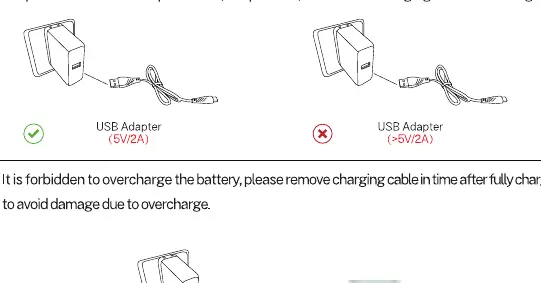
Proper charging is essential for the longevity of your robot. Use only the provided charging cable. It is strictly prohibited to use computer USB ports, simple USB hubs, or inferior charging cables, as these may damage the battery. Always disconnect the charger once the battery is fully charged to prevent overcharging. For maintenance, ensure the battery is fully charged at least once per month. If transporting the robot, discharge the battery to 50% or lower. Never disassemble or pierce the battery, as this poses a fire or explosion risk.
Daily Maintenance and Environment
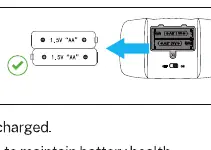
Keep the robot and its transmitter away from liquids, extreme heat, and direct sunlight. Avoid subjecting the device to severe squeezing or drops. When the transmitter is not in use, remove the batteries to prevent power drainage. Play on flat, smooth surfaces; avoid sand, grass, or uneven terrain. Violent strikes or trampling can damage the robot's exterior and paint. Always ensure the robot is clean and dry before storage.
Operation and Connectivity
Before playing, ensure the robot is powered on and paired with the remote controller. To use the mobile application, connect via Bluetooth using the name JT_xxxx. Note that there are two distinct Bluetooth connections: one for audio playback (JT_Speaker) and one for app control (JT_xxxx). If you experience connectivity issues, ensure the correct Bluetooth profile is selected and that the app is properly initialized. If voice commands are not recognized, ensure you are in a quiet environment, speaking clearly, and following the standard command instructions.
Manufacturer information
Ruko
Practical help
Common problems
Transmitter cannot control the robot
Check battery power, ensure no strong light interference, aim at the robot's head, and stay within 3-5 meters.
Voice commands not recognized
Speak clearly at a normal speed, ensure the environment is quiet, and verify you are using the correct commands.
Cannot connect to App
Ensure Bluetooth is on, connect to the correct 'JT_xxxx' device (not 'JT_Speaker'), and restart the app.
Before use
- Ensure the robot is fully charged before first use.
- Check that the robot is powered on.
- Verify the remote controller has fresh batteries.
- Ensure the play area is flat and smooth.
- Confirm Bluetooth is enabled on your smartphone for app control.
- Check that the robot is not near edges or elevated surfaces.
Images and diagrams
- Battery charging: Use only the provided cable with a 5V/2A adapter.
- Transmitter batteries: Insert 1.5V AA batteries with correct polarity.
- Bluetooth settings: Distinguish between JT_Speaker for audio and JT_xxxx for app control.
Model compatibility
- Suitable for users aged 3 and above.
- Requires a smartphone with Bluetooth for app-based features.

Manual page author
David Miller
Documentation analyst
Organizes user manual content into clear summaries, with attention to model details, product context, and everyday usability.