Toys / Games
User Manual for FMS 1280mm Easy Trainer V2 RC Plane
Quick guide for the FMS 1280mm Easy Trainer V2, covering assembly, battery installation, transmitter setup, ESC programming, and troubleshooting.
Table of contents
Quick guide from the manual
The FMS 1280mm Easy Trainer V2 is a dual-purpose glider and trainer. This document provides essential instructions for assembly, setup, and safe operation. Always prioritize safety, fly in open areas away from people, and ensure your transmitter and receiver are correctly bound before flight.
Model assembly
- Main wing: Invert the aircraft, slide the wing spar into the fuselage, attach the wing halves onto the spar, and secure them using the wing alignment pins.
- Horizontal stabilizer: Apply glue to the designated area on the fuselage and attach the stabilizer.
- Pushrod: With servos centered, connect the pushrod clevis to the elevator control horn.
Battery installation
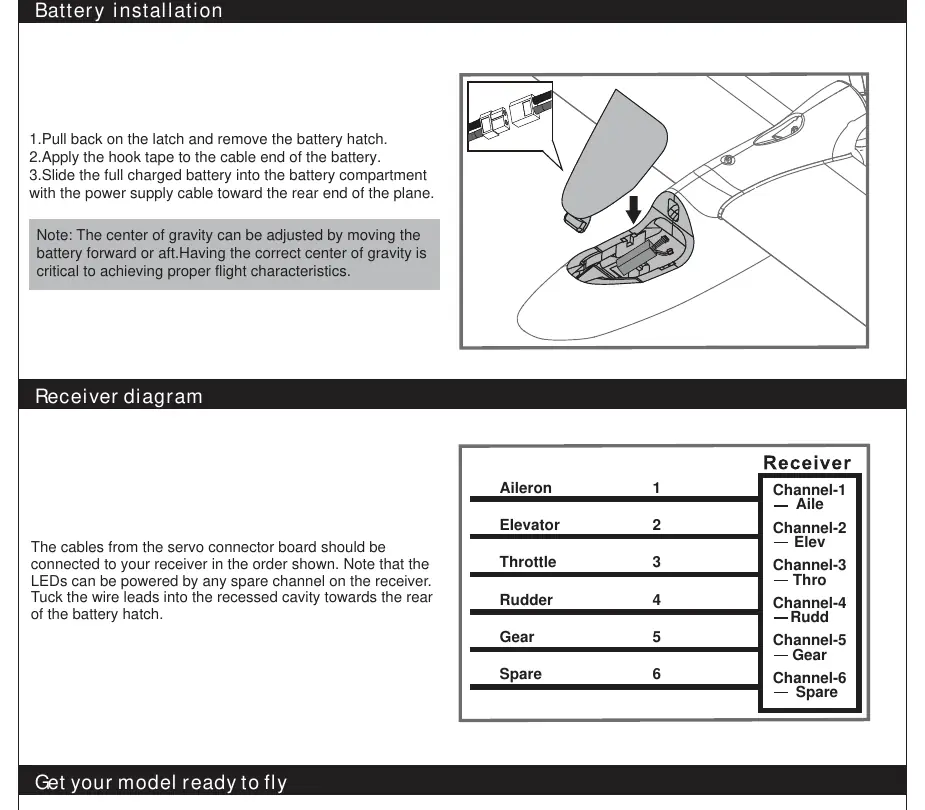
Remove the battery hatch, apply hook tape to the battery, and slide it into the compartment with the power cable facing the rear. Adjust the battery position to achieve the correct Center of Gravity (CG), which is 65-75mm from the leading edge of the main wing.
Transmitter and model setup
Ensure all control sticks are in neutral and the throttle is in the OFF position before binding. Verify that all control surfaces (ailerons, elevator, rudder) move in the correct direction. Use the recommended dual rate settings for your first flight.
ESC and flight preparation
The included ESC features a safe start; it will not arm unless the throttle is at the lowest position. If the motor rotates in the wrong direction, swap any two of the three motor wires. Always perform a ground range test before your first flight of the day. Limit your initial flight time to 4 minutes using a timer to avoid unexpected power loss.
Troubleshooting
- Motor not responding: Ensure the ESC is armed (throttle at lowest position) and the throttle channel is not reversed.
- Excessive vibration: Check for damaged propeller, spinner, or motor mount; ensure the propeller is installed correctly.
- Reduced flight time: Recharge the battery or replace it if damaged.
- Receiver LED flashing: Indicates power loss; check connections between the ESC and receiver.
Manufacturer information
FMS Model
Practical help
Common problems
Motor does not start or no sound emitted
Ensure the throttle stick is at the lowest position to arm the ESC. Check all power connections.
Motor runs in the opposite direction
Swap any two of the three motor wires connecting the ESC to the motor.
Control surfaces slow to respond or not moving
Check for damaged servos, control horns, or loose wiring/linkages.
Reduced flight time or underpowered
Ensure the flight battery is fully charged and not damaged. Check if the propeller is installed backward.
Before use
- Ensure all screws are tightened and the spinner is secure.
- Verify the battery is fully charged and the CG is correct (65-75mm from wing leading edge).
- Perform a ground range test with an assistant.
- Check that all control surfaces move correctly and in the right direction.
- Ensure the propeller is installed correctly and not damaged.
Specs in practice
- Flying Weight
- Around 630g - total weight of the model ready for flight.
- Recommended Battery
- 7.4V 1300mAh 20C Li-Po battery.
Images and diagrams
- Page 4: Kit contents identification (A-E).
- Page 5: Main wing assembly steps 1-3.
- Page 7: Battery installation and receiver channel mapping.
- Page 8: Transmitter control surface movement diagrams.
- Page 9: Clevis installation and CG balancing point.
Model compatibility
- The ESC is compatible with 2-3S Li-Po batteries.
- The model is designed for use with a standard radio control system.
- Use only Li-Po compatible chargers for the flight battery.

Manual page author
David Miller
Documentation analyst
Organizes user manual content into clear summaries, with attention to model details, product context, and everyday usability.