Power / Batteries & Chargers
User Manual for RURIS Dac Expert 2400e Battery and Dac Expert 24e Charger
Comprehensive user guide for the RURIS Dac Expert 2400e battery and Dac Expert 24e charger. Includes safety instructions, charging procedures, technical specifications, and maintenance guidelines.
Quick answers from the manual
Quick answer
- To charge the battery, plug the charger into a 220V outlet, align the battery ribs with the charger grooves, and slide the battery onto the charger. The green LED indicates charging is complete. p. 15
Key actions
- Charge the battery before first use. p. 15
- Remove the battery from the charger if no LEDs light up. p. 14
First start
- Charge the battery fully before the first operation. p. 15
Show 4 more answers Show less
Problems and fixes
Battery does not charge
Contact an authorized RURIS service.
p. 15Maintenance and reset
- Always remove the battery before cleaning or maintenance. p. 8, 14
Technical specifications
| Parameter | Value | Meaning | Pages |
|---|---|---|---|
| Battery Voltage | 20V | Nominal voltage | p. 11 |
| Battery Capacity | 4Ah | Amperage | p. 11 |
| Charger Input | 200-240V | Input voltage | p. 11 |
| Charger Output | 1.8A | Output current | p. 11 |
Where to find it in the PDF
- Safety Instructions p. 4, 5, 6, 7
- Technical Data p. 11
- Charging Procedure p. 15
Table of contents
Manual images
Click an image to enlargeQuick guide from the manual
This manual provides essential instructions for the safe operation and maintenance of the RURIS Dac Expert 2400e battery and Dac Expert 24e charger. Always read the manual before first use. Ensure the battery is charged before the first operation, as they are shipped in a low state of charge. If the battery does not charge, contact an authorized RURIS service.

Safety instructions
For your safety and the safety of others, adhere to the following precautions:
- General: Do not expose the battery or charger to rain, moisture, or water. Do not use the charger outdoors.
- Handling: Do not disassemble the battery or charger. Do not short-circuit terminals. Do not use if the battery case is cracked or damaged.
- Storage: Store in a cool, dry place. Do not store near fire sources, heaters, or in direct sunlight. Keep away from metallic objects that could cause a short circuit.
- Charging: Only charge lithium-ion batteries. Do not leave the battery charging unsupervised. Ensure the charging area is well-ventilated and free of combustible materials.
General presentation
The system consists of the battery and the charger. Key components include:
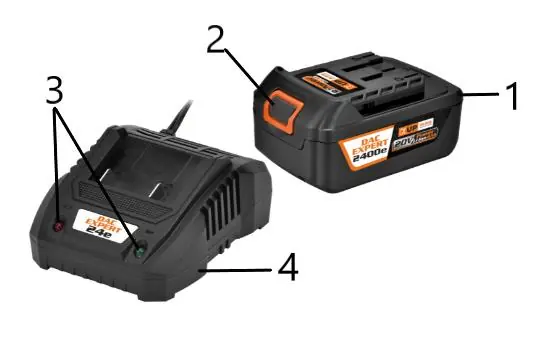
- Battery
- Battery release button
- Charging LEDs
- Battery charger
Technical data
Battery (Dac Expert 2400e): Voltage: 20V, Capacity: 4Ah, Total Power: 80Wh, Weight: 0.64kg, Operating Temperature: 0-45°C.
Charger (Dac Expert 24e): Input Voltage: 200-240V, Frequency: 50-60Hz, Input Power: 40W, Output Voltage: 20V, Output Current: 1.8A, Weight: 0.3kg, Operating Temperature: 0-45°C.
Battery usage and recycling
Lithium-ion batteries must be recycled properly. Do not dispose of them in household waste. If the battery is damaged, isolate it and contact the seller. When preparing for recycling, cover the terminals with adhesive tape to prevent short circuits.
Charger operation
Follow these steps to charge the battery:
- Plug the charger into a 220V, 50Hz household outlet.
- Align the raised ribs on the battery with the grooves in the charger.
- Slide the battery onto the charger.
- Ensure the connection is secure.
- The green LED will remain on when charging is complete.
- Slide the battery back to remove it from the charger.
If no LEDs are lit during charging, remove the battery immediately and contact an authorized RURIS service.
Practical help
Common problems
Battery does not charge when connected
Contact an authorized RURIS service.
No LEDs are lit during charging
Remove the battery from the charger immediately to avoid damage and contact an authorized RURIS service.
Battery or charger feels warm
This is normal during charging. If they overheat, let them cool down.
Before use
- Inspect the battery case for cracks or damage.
- Ensure the charging area is well-ventilated.
- Verify the power source is 220V, 50Hz.
- Ensure the charger ventilation slots are not blocked.
- Check that the battery is fully discharged before long-term storage.
Show more Show less
Specs in practice
- Battery Voltage
- 20V nominal voltage for the Dac Expert 2400e.
- Battery Capacity
- 4Ah (Ampere-hours) indicates the energy storage capacity.
- Charger Output
- 1.8A output current for charging the battery.
Images and diagrams
- 2: Battery release button
- 3: Charging LEDs
- 4: Battery charger
Model compatibility
- Only charge lithium-ion rechargeable batteries.
- Use only the specified RURIS charger for the Dac Expert 2400e battery.

Manual page author
Emily Carter
User documentation editor