Power / Batteries & Chargers
User Manual for DJI Matrice 4D Series 240W Charging Hub
Comprehensive user guide for the DJI Matrice 4D Series 240W Charging Hub (CHX230-240). Learn how to use charging modes, interpret LED status indicators, and maintain your device safely.
PDF source: Deutsch · summary: English
Quick answers from the manual
Quick answer
- The DJI 240W Charging Hub charges Intelligent Flight Batteries using either Standard Mode (100%) or Ready-to-Fly Mode (90%). It requires the DJI 240W Power Adapter to function. p. 2
Key actions
- Select charging mode p. 2
- Connect to power p. 2
First start
- Connect the DJI 240W Power Adapter to the hub, insert batteries, and toggle the mode switch to your desired setting. p. 2
Show 4 more answers Show less
Problems and fixes
Solid red LED
Unrecoverable abnormality. Remove and reinsert the battery or unplug and replug the power adapter.
p. 2
Blinking yellow LED
Temperature out of range. Wait for automatic recovery.
p. 2Maintenance and reset
- Clean metal terminals with a clean, dry cloth if there is any noticeable buildup. p. 2
Technical specifications
| Parameter | Value | Meaning | Pages |
|---|---|---|---|
| Model | CHX230-240 | Product model number | p. 2 |
| Operating Temperature | 5°C to 40°C | Safe operating range | p. 2 |
| Input | 16.8-25.5 V, Max. 12.1 A | Power input requirements | p. 2 |
Where to find it in the PDF
- Product Overview p. 1
- Usage and Safety p. 2
Table of contents
Quick guide from the manual
The DJI 240W Charging Hub is designed to charge Intelligent Flight Batteries efficiently. To operate the device, you must use the DJI 240W Power Adapter. The hub features two charging modes: Standard Mode (charges batteries to 100%) and Ready-to-Fly Mode (charges batteries to 90% and maintains them at that level for quick use). The hub automatically prioritizes the battery with the shortest charging time based on temperature and current charge level.
Product Overview
The charging hub consists of the following key components:
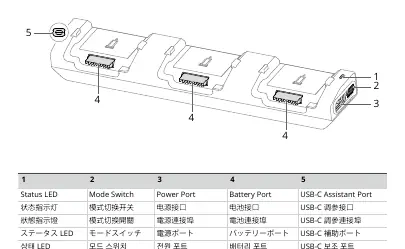
- Status LED: Indicates the charging status of the batteries.
- Mode Switch: Used to toggle between Standard and Ready-to-Fly modes.
- Power Port: Connection point for the DJI 240W Power Adapter.
- Battery Ports: Four ports for inserting Intelligent Flight Batteries.
- USB-C Assistant Port: Used exclusively for firmware updates.
Usage Instructions
Follow these steps to charge your batteries:
- Place the charging hub on a flat, stable surface.
- Connect the DJI 240W Power Adapter to the Power Port.
- Toggle the Mode Switch to select your desired charging mode (Standard or Ready-to-Fly).
- Insert the Intelligent Flight Batteries into the battery ports. The hub will automatically begin charging the battery with the shortest charging time first.
- Disconnect the batteries once charging is complete.
Note: The charging hub can also be connected to DJI Power series power stations using an SDC cable.
Status LED Descriptions
Monitor the charging process using the LED indicators:
- Solid yellow: No battery is inserted.
- Pulses green: Battery is charging.
- Solid green: Charging completed.
- Blinks yellow: Charging temperature range exceeded. No action required; charging will resume automatically once the temperature stabilizes.
- Solid red: Unrecoverable abnormality. Remove and reinsert the battery or unplug and replug the power adapter.
Safety and Maintenance
- Insulation: Ensure the device is properly insulated to prevent fire hazards.
- Terminals: Do not touch the metal terminals on the battery ports. If you notice buildup, clean the terminals with a clean, dry cloth.
- Compatibility: Only use the hub with specific compatible Intelligent Flight Battery models. Do not use with other battery types.
Manufacturer information
DJI
Practical help
Common problems
Solid red LED
Unrecoverable abnormality. Remove and reinsert the battery or unplug and replug the power adapter.
Blinking yellow LED
Charging temperature range exceeded. Wait for the battery or hub to recover automatically.
Solid yellow LED
No battery is inserted into the port.
Before use
- Ensure you are using the official DJI 240W Power Adapter.
- Place the hub on a flat and stable surface.
- Verify that your battery model is compatible with this charging hub.
- Check that metal terminals are clean and free of debris.
- Ensure the device is properly insulated.
Show more Show less
Specs in practice
- Operating Temperature
- 5°C to 40°C (41°F to 104°F). Do not operate outside this range.
Images and diagrams
- 1: Status LED
- 2: Mode Switch
- 3: Power Port
- 4: Battery Port
- 5: USB-C Assistant Port
Model compatibility
- Compatible only with specific Intelligent Flight Battery models.
- Can be connected to DJI Power series power stations using an SDC cable.

Manual page author
David Miller
Documentation analyst