Documents / Terms Conditions
User Manual for Rusta Bruksbo LX System 20V Fast Charger CDA1182
Quick guide for the Rusta Bruksbo LX System 20V Fast Charger (CDA1182). Includes charging instructions, LED status indicators, technical specifications, and safety warnings.
Quick answers from the manual
Quick answer
- The Rusta Bruksbo LX System 20V Fast Charger (CDA1182) is designed to charge 20V Lithium-Ion batteries (CDA1180 and CDA1181). Charging takes approximately 60 minutes. p. 5, 6
Key actions
- Insert battery into charger p. 6
First start
- Charge the battery before first use. p. 6
Maintenance and reset
- Clean battery casings regularly with a soft cloth. Keep ventilation openings free of dust. p. 6
Technical specifications
| Parameter | Value | Meaning | Pages |
|---|---|---|---|
| Input | 100-240V, 50-60Hz, Max 2A | Power requirements | p. 5 |
Where to find it in the PDF
- Safety Instructions p. 3, 4, 5
- Operation p. 6
Table of contents
Manual images
Click an image to enlargeQuick guide from the manual
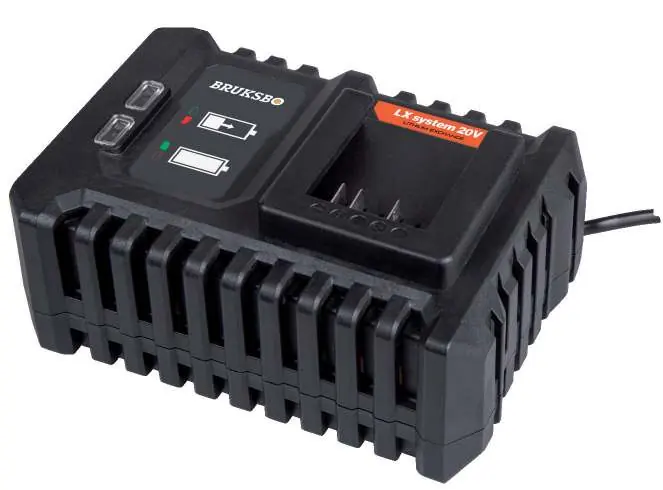
The Rusta Bruksbo LX System 20V Fast Charger (CDA1182) is designed to charge 20V Lithium-Ion batteries from the LX System platform. The charger features LED indicators to show the charging status and takes approximately 60 minutes to fully charge compatible batteries.
Product Description
The charger is a compact unit designed for use with specific Rusta battery packs. Key components include the battery slot, LED status indicators, and the power cable.
Operation
Inserting the battery: Ensure the battery exterior is clean and dry. Insert the battery into the base of the machine and push forward until it clicks into place.
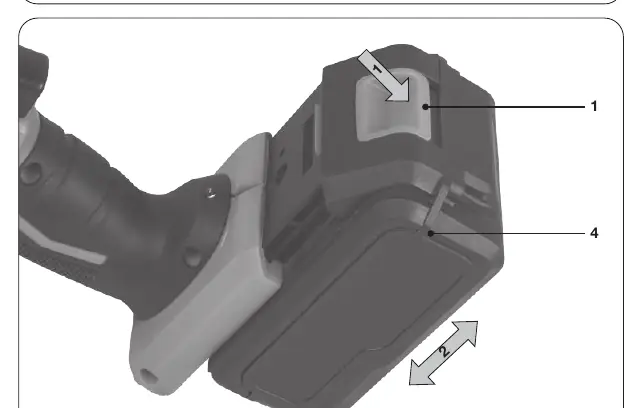
Removing the battery: Press the battery unlock button and pull the battery out of the machine.
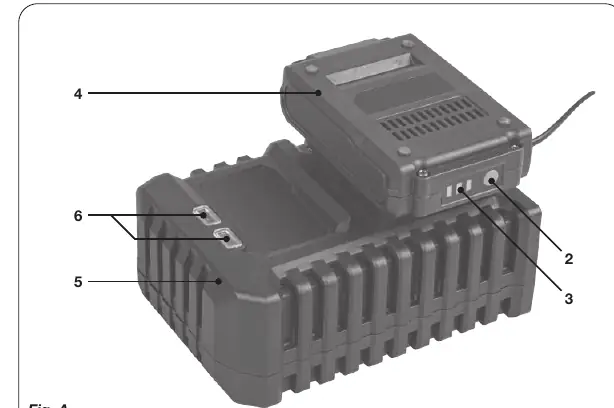
Charging: Remove the battery from the tool. Turn the battery upside down and slide it onto the charger until it is fully seated. Plug the charger into an electrical outlet. The LED indicators will show the charging status.
LED Indicators
- Red Off, Green Off: No power.
- Red Off, Green On: Standby mode (no battery inserted or charging finished).
- Red On, Green Off: Battery charging in progress.
Maintenance
Always switch off the machine and remove the battery before cleaning. Clean the battery casings regularly with a soft cloth, preferably after each use. Ensure ventilation openings are free of dust and dirt. Do not use solvents like gasoline, alcohol, or ammonia.
Safety
Read all safety warnings before use. Do not expose the charger to rain or wet conditions. Use only in well-ventilated areas. Do not charge non-rechargeable batteries. If the supply cord is damaged, the product must be scrapped.
Technical Specifications
- Model: CDA1182
- Input: 100-240V, 50-60Hz, Max 2A
- Output: 21V, 2.4A / 4A
- Charging time: 60 minutes (for 2Ah and 4Ah batteries)
- Compatible batteries: CDA1180 (2Ah), CDA1181 (4Ah)
Manufacturer information
Rusta
Practical help
Common problems
Charger not working / No LED lights
Check that the charger is properly plugged into a working electrical outlet and that the power supply matches the rating plate.
Battery not charging
Ensure the battery is fully inserted into the charger slot and that the battery contacts are clean.
Before use
- Ensure the battery exterior is clean and dry.
- Check that the mains voltage matches the rating plate.
- Ensure the charger is placed in a well-ventilated area.
- Charge the battery before first use.
- Do not charge if the mains cable or plug is damaged.
Specs in practice
- Charging time
- 60 minutes for both 2Ah and 4Ah batteries
Images and diagrams
- Fig. A: Charging the battery by sliding it onto the charger.
- Fig. B: Inserting and removing the battery from the tool.
Model compatibility
- Compatible with LX System 20V battery platform.
- Use only with CDA1180 (2Ah) and CDA1181 (4Ah) batteries.

Manual page author
David Miller
Documentation analyst
Organizes user manual content into clear summaries, with attention to model details, product context, and everyday usability.