Tools / Power Tools
User Manual for Ryobi PCL206 18V 2-Speed Drill-Driver
Comprehensive user guide for the Ryobi PCL206 18V 2-Speed Drill-Driver. Includes instructions on assembly, battery installation, operation, torque settings, drilling techniques, and maintenance.
Table of contents
Manual images
Click an image to enlargeQuick guide from the manual
This drill-driver is designed for drilling into wood, metal, plastics, and driving screws. Before use, ensure you have read all safety warnings. Always remove the battery pack when assembling parts, making adjustments, or when the tool is not in use. The drill features a variable speed trigger, a two-speed gear train, and an adjustable torque ring for precise control.
Product Overview
The PCL206 is an 18V cordless drill-driver. Key components include the keyless chuck, torque adjustment ring, two-speed gear selector, variable speed trigger, and rotation direction selector.
Assembly
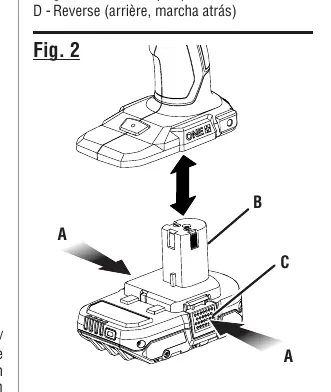
Installing/Removing Battery Pack: Ensure the switch trigger is locked. Insert the battery pack into the tool until the latches snap into place. To remove, depress the latches and pull the battery out.
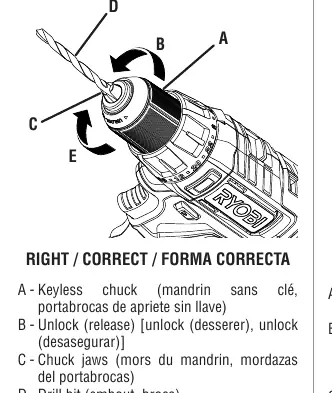
Installing/Removing Bits: Lock the switch trigger. Open the keyless chuck jaws by rotating the sleeve. Insert the drill bit straight into the jaws. Rotate the sleeve to tighten the jaws securely around the bit. Do not use a wrench to tighten the chuck.
Operation
Variable Speed Trigger: The drill speed increases with trigger pressure. Release the trigger to stop the drill. Note that a whistling or ringing noise from the switch during use is normal.
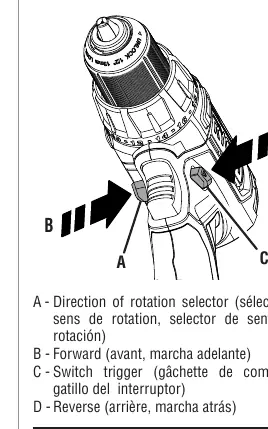
Rotation Selector: Set the selector to the center (OFF) position to lock the trigger. Push to the left for forward rotation and to the right for reverse.
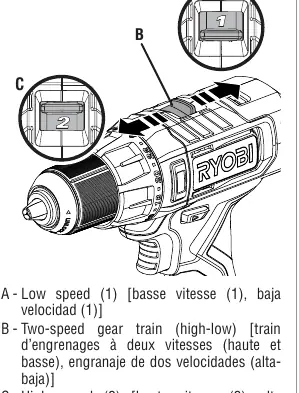
Two-Speed Gear Train: Use low speed (1) for high torque applications like driving screws or drilling metal. Use high speed (2) for fast drilling in wood or masonry. Never change speeds while the tool is running.
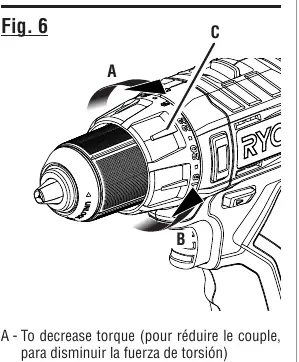
Adjusting Torque: Rotate the adjustment ring to select the appropriate torque setting. Lower numbers (1-4) are for small screws, while higher numbers (17-23) and the drill icon are for large screws and heavy drilling.
Drilling and Driving
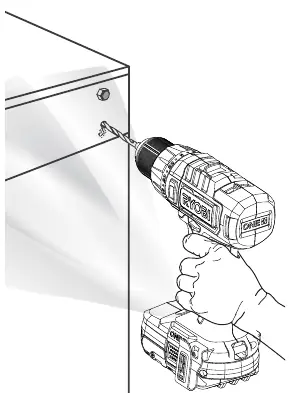
Wood and Metal Drilling: For best results, use high-speed steel bits. Start drilling at a low speed to prevent the bit from slipping. When drilling through holes in wood, place a block of wood behind the workpiece to prevent splintering. When drilling metal, use a light oil on the bit to prevent overheating.
Maintenance
General Maintenance: Keep the tool clean. Avoid using solvents on plastic parts as they can cause damage. Use a clean cloth to remove dirt, dust, oil, and grease. If the drill stalls or the bit jams, stop the tool immediately to prevent damage.
Manufacturer information
Ryobi
Practical help
Common problems
Drill will not run
Ensure the rotation selector is pushed fully to the left or right. It will not run in the center (locked) position.
Difficulty changing speeds
Turn the chuck by hand until the gears engage.
Drill overheating
Running at low speeds under constant usage may cause overheating. Cool the drill by running it without a load at full speed.
Before use
- Ensure the battery pack is fully charged.
- Check that the rotation selector is set to the desired direction.
- Verify the bit is securely tightened in the chuck.
- Wear appropriate eye protection.
- Ensure the work area is clear and well-lit.
Images and diagrams
- Fig 1: Shows the location of the rotation selector, trigger, and forward/reverse settings.
- Fig 2: Illustrates how to install and remove the battery pack.
- Fig 3 & 4: Demonstrates correct bit installation in the keyless chuck.
- Fig 5: Shows the two-speed gear selector switch.
- Fig 6: Explains the torque adjustment ring settings.
Model compatibility
- Use only with batteries and chargers listed in the tool/appliance/battery pack/charger correlation supplement 987000-432.
- Not intended for mixing concrete, drywall, grout, or other viscous mixtures.

Manual page author
David Miller
Documentation analyst
Organizes user manual content into clear summaries, with attention to model details, product context, and everyday usability.