Home Appliances / Vacuum Cleaners
Operator's Manual for Ryobi 18V Dry Hand Vac P7131/P7131ID
Quick guide for the Ryobi 18V Dry Hand Vac (P7131/P7131ID). Learn how to assemble, operate, clean the filter, and maintain your vacuum safely.
Quick answers from the manual
Quick answer
- The Ryobi 18V Dry Hand Vac (P7131/P7131ID) is a cordless vacuum for light-duty dry surfaces. It is operated by an 18V battery and features a removable dust bowl and washable filter. p. 1, 5
Key actions
- Start/Stop the vacuum p. 5, 17
- Empty the dust bowl p. 5, 18
First start
- Insert the battery pack into the port until the latches snap into place. p. 5, 17
Problems and fixes
Vacuum not working properly
Check for blockages, ensure the dust bowl and filter are clean, and verify the battery is charged.
p. 2, 6Maintenance and reset
- Clean or replace the filter p. 6, 18
Technical specifications
| Parameter | Value | Meaning | Pages |
|---|---|---|---|
| Voltage | 18V | Operating voltage | p. 1 |
Where to find it in the PDF
- Safety Instructions p. 2, 3
- Assembly and Operation p. 5
- Maintenance p. 6
- Illustrations p. 17, 18
Table of contents
Manual images
Click an image to enlargeQuick Guide
The Ryobi 18V Dry Hand Vac is designed for light-duty dry vacuuming. This manual provides essential instructions for safe operation, assembly, and maintenance. Always ensure the dust bowl and filter are properly installed before use. This unit is for dry vacuuming only; do not use it to clean up liquids.
Assembly
Installing/Removing Battery Pack: Insert the battery pack into the battery port until the latches on each side snap into place. To remove, depress both latches on the side of the battery pack and pull it out.
Crevice Tool: The combination crevice tool is stored on the underside of the dust bowl. To use, pull it forward to detach. The cover slides back to reveal a brush attachment.
Operation
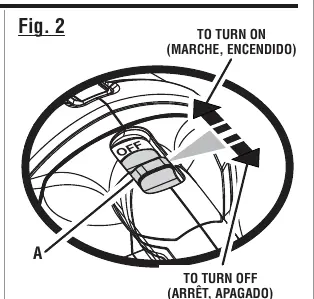
Starting/Stopping: Slide the ON/OFF switch toward the front of the vacuum to start. Slide it toward the back to stop.
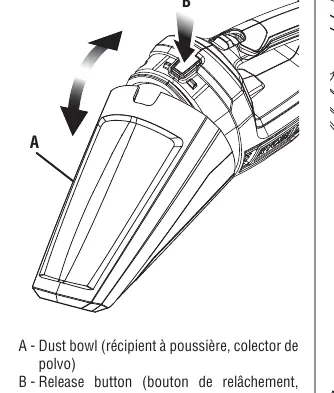
Emptying the Dust Bowl: The dust bowl should be checked and emptied periodically. To remove, press the release button on top of the hand vac and pull the bowl down and out. To reattach, align the slot on the bottom of the dust bowl with the tab on the motor housing and snap the sections together.
Maintenance
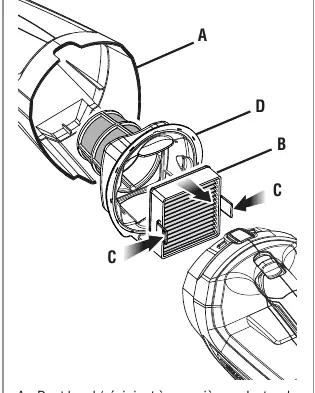
Cleaning/Replacing the Filter: Remove the battery pack and dust bowl. Press the tabs inward to lift the filter out of the screen assembly. Shake or brush off dust and dirt. The screen assembly can also be removed and cleaned. Ensure all parts are completely dry before reattaching. Replacement filter part number: 533907001 (model A32VC04).
Safety
Always remove the battery pack when assembling parts, making adjustments, cleaning, or when the tool is not in use. Do not use the vacuum to pick up burning materials, flammable liquids, or in areas where they may be present. Do not expose the unit to rain or damp locations.
Manufacturer information
Ryobi
Practical help
Common problems
Vacuum has low suction or is not picking up debris.
Check if the dust bowl is full, the filter is clogged, or if there is a blockage in the ventilation openings.
Battery pack does not fit or stay in place.
Ensure the latches on both sides of the battery pack snap into place when inserted.
Before use
- Ensure the battery pack is fully charged.
- Verify the dust bowl and filter are clean and properly installed.
- Check that the ventilation openings are free of dust, lint, or hair.
- Ensure the ON/OFF switch is in the OFF position before inserting the battery.
Images and diagrams
- Figure 1: Battery pack installation and removal.
- Figure 2: ON/OFF switch operation.
- Figure 3-5: Using and storing the crevice tool.
- Figure 6-8: Removing the dust bowl and cleaning the filter.
Model compatibility
- For dry vacuuming only; do not use on liquids.
- Use only with Ryobi 18V battery packs and chargers.
- Use only recommended accessories.

Manual page author
Emily Carter
User documentation editor
Prepares concise manual descriptions and highlights the most useful setup, operation, and maintenance information for readers.