Home Appliances / Vacuum Cleaners
Ryobi ONE+ 18V Hand Vacuum Operator's Manual
Comprehensive operator's manual for the Ryobi ONE+ 18V Hand Vacuum (PCL704). Includes safety instructions, battery installation, operation, maintenance, and filter cleaning procedures.
Quick answers from the manual
Quick answer
- The Ryobi ONE+ 18V Hand Vacuum is designed for light-duty dry vacuuming. It is powered by an 18V battery system. p. 4
Key actions
- Install battery p. 4
- Clean filter p. 5
First start
- Insert the battery pack into the battery port until the latches snap into place. p. 4
Problems and fixes
Reduced suction
Empty the dust bowl and clean or replace the filter.
p. 5Maintenance and reset
- Allow 24 hours for parts to dry completely after washing. p. 5
Technical specifications
| Parameter | Value | Meaning | Pages |
|---|---|---|---|
| Replacement filter | 019183001012 | Part number for replacement filter | p. 5 |
Where to find it in the PDF
- Safety Instructions p. 2, 3
- Assembly and Operation p. 4, 5
- Illustrations p. 6, 14
Table of contents
Manual images
Click an image to enlargeQuick Guide from the Manual
The Ryobi ONE+ 18V Hand Vacuum is designed for light-duty dry vacuuming. It is a cordless appliance powered by an 18V battery system. Always ensure the dust bowl and filter are properly installed before use. This unit is for dry vacuuming only and should not be used to clean up liquids.
Safety Instructions
- Dry Use Only: Do not use to clean up liquids.
- Battery Safety: Remove the battery pack when the vacuum is not in use, during assembly, adjustments, or cleaning.
- Storage: Store indoors. Do not expose to rain or damp locations.
- Prohibited Materials: Never vacuum burning or smoking materials like hot coals, cigarette butts, or matches.
- Chemical Damage: Do not let gasoline, oils, or petroleum-based products come into contact with plastic parts.
Assembly and Operation
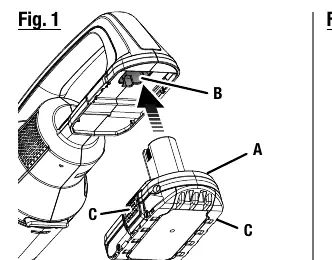
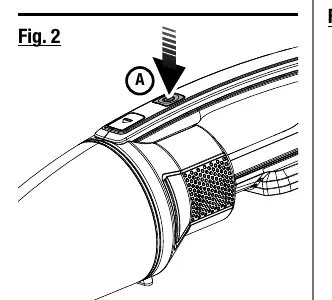
Installing/Removing Battery Pack
Insert the battery pack into the battery port until the latches on each side snap into place. To remove, depress both latches on the side of the battery pack and pull it out.
Starting and Stopping
To start the vacuum, depress the ON/OFF switch. To stop, depress the switch again.
Installing Accessories
Insert the desired accessory into the opening in the dust bowl. For 1-7/16 in. accessories, insert the adaptor into the opening first, then slide the accessory onto the adaptor.
Maintenance
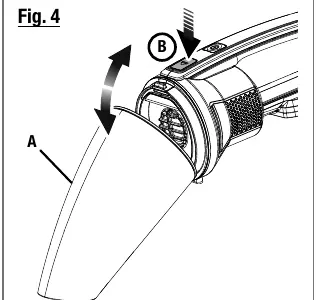
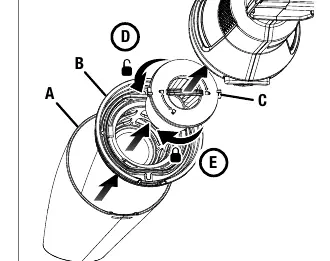
Removing and Cleaning the Dust Bowl
The dust bowl should be checked, emptied, and cleaned periodically. To remove, depress the release button on top of the hand vac and pull the dust bowl down and out.
Cleaning/Replacing the Filter
- Remove the battery pack and the dust bowl.
- Remove the filter housing and filter from the dust bowl.
- Turn the filter counterclockwise to remove it from the housing.
- Shake or lightly brush dust off the filter and housing. Wash if necessary.
- Important: Allow all parts to dry completely for 24 hours before reassembling.
- When replacing the filter, use recommended part number 019183001012.
Manufacturer information
Ryobi
Practical help
Common problems
Vacuum not picking up debris
Check if the dust bowl is full or if the filter is clogged with dust.
Vacuum does not start
Ensure the battery pack is fully charged and properly seated in the battery port.
Before use
- Ensure the battery pack is fully charged.
- Verify the dust bowl and filter are correctly installed.
- Check that the air inlet is free of obstructions.
- Ensure the switch is in the OFF position before inserting the battery.
Specs in practice
- Dry vacuuming only
- The unit is not designed to pick up liquids.
Images and diagrams
- Figure 1: Battery pack installation and removal.
- Figure 2: ON/OFF switch location.
- Figure 3: Accessory installation.
- Figure 4: Dust bowl removal procedure.
- Figure 5: Filter housing and filter removal.
Model compatibility
- Use only with batteries and chargers listed in supplement 987000-432.

Manual page author
David Miller
Documentation analyst
Organizes user manual content into clear summaries, with attention to model details, product context, and everyday usability.