Power / Batteries & Chargers
User Manual for Ryobi 18V Lithium-Ion Battery Pack
Quick guide for the Ryobi 18V Lithium-Ion Battery Pack. Learn about charging, safety, maintenance, and understanding charge status indicators.
Quick answers from the manual
Quick answer
- The Ryobi 18V Lithium-Ion Battery Pack requires charging before first use. If the battery stops working during use, release the trigger to reset. If it enters sleep mode, place it in the charger for 90 seconds to reactivate. p. 5
Key actions
- Charge the battery before first use. p. 5
- Store batteries at temperatures below 27°C. p. 6
First start
- Charge the battery pack prior to first use. p. 5
Problems and fixes
Battery in sleep mode (does not charge)
Place the battery in the charger for 90 seconds to reactivate. If it fails after 3 attempts, have it serviced.
p. 5Maintenance and reset
- Release the trigger to reset the battery after an overload or overheat shutdown. p. 5
Technical specifications
| Parameter | Value | Meaning | Pages |
|---|---|---|---|
| Charging Temperature | 10°C - 37°C | Optimal temperature range for charging. | p. 5 |
| Cold Weather Usage | -10°C | Minimum temperature for battery operation. | p. 5 |
Where to find it in the PDF
- Description and Parts p. 3
- Operation and Charging p. 5, 6
Table of contents
Quick guide from the manual
This manual provides essential instructions for the Ryobi 18V Lithium-Ion Battery Pack (models RB18L15, RB18L40, RB18LL40). Always charge the battery before first use and ensure you are using a compatible Ryobi 18V charger. The battery features advanced protection modes to maximize lifespan, including active, standby, and sleep modes.
Description
The battery pack consists of the following main components:
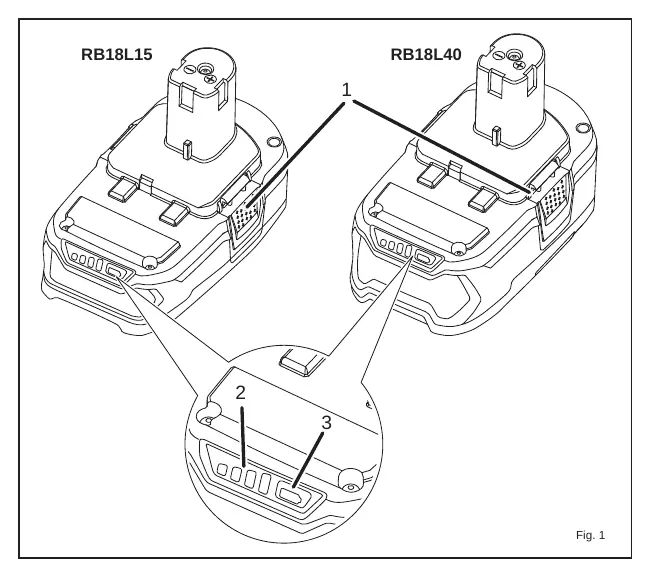
- Latches: Used to secure the battery into the tool or charger.
- Charge level indicator: Displays the remaining battery capacity.
- Charge level indicator button: Press to activate the LED charge level display.
Safety Instructions
- Keep the battery away from metal objects (paper clips, coins, keys, etc.) to prevent short-circuiting the terminals.
- Do not expose the battery to fire or heat.
- Do not use or charge a battery that has been dropped or damaged.
- Charge only in compatible 18V chargers.
- Do not charge in damp or wet locations.
- If battery leakage occurs, wash skin with soap and water and neutralize with lemon juice or vinegar. If it gets into eyes, flush with water for 10 minutes and seek medical attention.
Operation and Battery Protection
Ryobi 18V lithium-ion batteries include protection features:
- Active Mode: If the tool stops during use due to overheating or overloading, release the trigger to reset.
- Sleep Mode: If the battery is completely discharged, it enters sleep mode. To reactivate, place the battery in the charger for 90 seconds. If it does not begin charging, remove it for 30 seconds and try again.
- Shut-off Mode: Minimizes self-discharge when not in use. It reactivates automatically when used with a tool or by pressing the LED gauge.
Cold Weather Operation: The battery can be used in temperatures down to -10°C. Use the tool in light-duty applications initially to allow the battery to warm up.
Charging the Battery Pack
Battery packs are shipped in a low charge condition and must be charged before first use.
- Ensure the charger is connected to the correct power supply.
- Align the raised rib on the battery with the groove in the charger.
- Ensure the latches snap into place.
- The battery may become slightly warm during charging; this is normal.
- If the battery is too hot, the charger may wait until it cools before starting.
- If the battery is below the normal temperature range (below 0°C), the charger will wait until it warms up.
Charge Status Indicators
Press the charge level indicator button to see the remaining capacity:
- 0-10%: One LED flashing.
- 10-25%: One LED solid.
- 25-50%: Two LEDs solid.
- 50-75%: Three LEDs solid.
- 75-100%: Four LEDs solid.
Maintenance and Storage
- Maintenance: Do not disassemble the battery pack.
- Storage (longer than 30 days): Store in a location where the temperature is below 27°C. Store in a charged condition (30%-50%).
- Long-term storage: After six months, discharge the battery to 10%-20% by running it in a tool, then recharge it to maximize lifetime.
Environmental Protection
Recycle raw materials instead of disposing of them as waste. Cover terminals with heavy-duty adhesive tape before disposal to prevent short circuits.
Manufacturer information
Ryobi
Practical help
Common problems
Battery does not charge
Ensure the charger is connected to power. If the battery is in sleep mode, place it in the charger for 90 seconds to reactivate. If the battery is too hot or too cold, wait for it to reach the appropriate temperature range.
Tool stops during use
The battery may have triggered an overload or overheat protection. Release the trigger to reset. If it does not restart, the battery is likely discharged and needs to be charged.
Before use
- Charge the battery pack before first use.
- Verify the charger is a compatible Ryobi 18V model.
- Inspect the battery for any signs of damage or drops.
- Ensure the charging environment is between 10°C and 37°C.
Specs in practice
- Shut-off Mode
- A feature that minimizes self-discharge when the battery is not in use.
Images and diagrams
- Fig 1 identifies the latches, charge level indicator, and the indicator button on the battery pack.
Model compatibility
- Compatible with Ryobi One+ 18V cordless products.
- Compatible chargers include: BCL-1418, BCL14181H, BCL14183H, BCL1418IV, BCS-618, BCL1800, BCS618G.

Manual page author
David Miller
Documentation analyst
Organizes user manual content into clear summaries, with attention to model details, product context, and everyday usability.